
Tagada
Tagada parses Gmail into clickable sentences for local highlighting and categorization, keeping your data private and boosting email efficiency.
Visit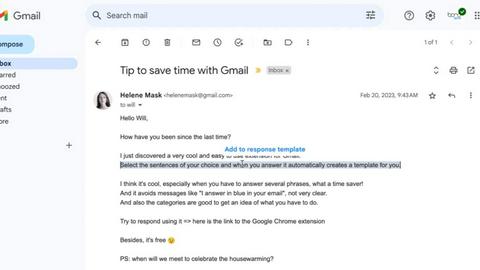
About Tagada
Tagada is a specialized browser extension designed to transform how professionals read and reply to emails directly within Gmail, with a core commitment to complete data privacy. Unlike traditional email workflows that often involve manually typing replies in colored text within the original message, Tagada introduces a structured, efficient, and highly organized approach to email management. The extension automatically parses incoming emails into individual, clickable sentences, allowing users to highlight, tag, and organize these sentences by predefined categories with a single click. This process eliminates the need to mentally separate key points from lengthy threads. Once the user has selected and tagged the relevant information, Tagada generates a clean, professional reply template built exclusively around the chosen points. This functionality ensures that responses are focused, clear, and address only the most critical aspects of the conversation. The product is ideal for a wide range of professionals, including support teams, freelancers, consultants, and anyone who regularly manages complex or lengthy email threads. Its most significant value proposition is its 100% local processing model. Tagada operates entirely on the user's device, meaning no data is ever sent to the cloud, no third-party servers are involved, and no artificial intelligence is used to analyze or process email content. This architecture guarantees that sensitive business communications remain private and under the user's complete control. By integrating seamlessly into the familiar Gmail interface, Tagada requires no new tools to learn, making adoption effortless. It effectively cuts response time, structures replies for better clarity, and provides a powerful organizational framework for managing inbox overload, all while upholding the highest standards of data security.
Features of Tagada
Instant Email Parsing
Tagada revolutionizes email reading by automatically breaking down complex or lengthy messages into individual, clickable sentences. Instead of manually scanning through large blocks of text to find key action items or important details, the extension instantly parses the email content, presenting it as a list of discrete, selectable segments. This feature dramatically reduces cognitive load and allows users to quickly identify and focus on the most critical information within any email, whether it is a support ticket, a client proposal, or an internal update. The parsing happens in real-time as the email is opened, providing immediate access to a structured view of the message without any delay or manual setup.
One-Click Highlighting and Tagging
Once an email is parsed into sentences, Tagada enables users to highlight and tag each segment by category with a single click. This functionality allows for rapid organization of information directly within the Gmail interface. Users can create custom categories relevant to their workflow, such as "Action Required," "Important Information," "Question," or "Deadline," and then apply these tags to specific sentences. This process transforms a static email into a dynamic, organized document. By visually categorizing the content, users can quickly see what needs a response, what provides context, and what can be archived, ensuring that no critical detail is overlooked during the reply process.
Auto-Generated Reply Templates
After highlighting and tagging the relevant sentences within an email, Tagada automatically generates a clean, structured reply template. This template is built exclusively from the user's selections, ensuring that the response directly addresses the points that matter most. The generated template eliminates the need to manually retype or reformat key information, significantly reducing the time spent composing replies. It also promotes clarity and organization in responses, as the template naturally structures the reply around the tagged categories. This feature is particularly valuable for professionals who need to provide thorough, point-by-point responses to complex inquiries or multi-faceted requests.
100% Local Processing and Privacy
Tagada operates with a strict commitment to data privacy and security by processing all email content locally on the user's device. The extension does not send any data to the cloud, use any third-party servers, or employ any artificial intelligence algorithms. This means that no email content, user selections, tags, or generated replies ever leave the user's computer or the Gmail environment. For professionals and organizations handling sensitive or confidential information, this architecture provides absolute peace of mind. Tagada ensures that the user retains full control over their data, with no risk of external access, data mining, or unauthorized processing, making it a trusted tool for secure email management.
Use Cases of Tagada
Streamlining Client Communication for Consultants
Consultants often manage long email threads with clients that contain numerous action items, questions, and pieces of feedback. Tagada allows a consultant to parse a client's email into sentences, then tag each point under categories like "Client Feedback," "Action Required," or "Approval Needed." The extension then generates a reply template that systematically addresses each tagged point. This ensures that the consultant's response is comprehensive, organized, and directly aligned with the client's needs, improving professional communication and reducing the risk of missing a critical request.
Managing Support Tickets for Customer Service Teams
Customer support teams handle a high volume of emails containing multiple issues, questions, and follow-ups. With Tagada, a support agent can instantly parse a customer's email, highlight the specific problems or questions, and tag them by urgency or topic, such as "Billing Issue" or "Technical Problem." The auto-generated reply template then allows the agent to craft a structured response that addresses each point clearly. This workflow reduces response time, ensures consistency in replies, and helps agents manage their queue more efficiently without losing context.
Organizing Project Updates for Freelancers
Freelancers frequently receive project updates from clients that include new requirements, deadlines, and feedback. Tagada helps by breaking these updates into clickable sentences. The freelancer can tag items like "New Deliverable," "Revised Deadline," or "Client Approval." This organization provides a clear overview of what has changed and what is expected. The generated reply template then helps the freelancer confirm each point, ask clarifying questions, or acknowledge changes, ensuring that all project details are accurately captured and addressed in a single, well-structured response.
Improving Internal Team Coordination
Professionals in any organization often need to reply to internal emails that contain multiple tasks, meeting notes, or decision points. Tagada allows a user to parse a colleague's email, highlight and tag sentences such as "Task Assigned," "Decision Made," or "Next Steps." The extension then creates a reply template that confirms understanding, updates on progress, or asks for clarification on each specific point. This use case enhances team coordination by ensuring that internal communications are clear, actionable, and free from the confusion that can arise from long, unstructured email threads.
Frequently Asked Questions
Is Tagada free to use?
Tagada offers a free version that allows users to experience the core functionality of the extension. However, the free version comes with certain limitations in terms of features or usage. For users who require the full suite of capabilities, such as unlimited parsing, tagging, and template generation, a paid license is recommended. Purchasing a license unlocks the complete experience and ensures optimal performance for professional use.
What data does Tagada collect from users?
Tagada is designed with a strong focus on user privacy. The extension only collects minimal, essential data to enhance the user experience. This data is limited to your first name, email address, and language preference. Tagada does not collect, store, or process any of your email content, your tagged categories, or your generated replies. The company respects user privacy and does not gather any unnecessary information.
Does Tagada send my emails to its servers?
No, Tagada does not send your emails or any email content to its servers. The extension processes all data entirely and locally on your device. This means that your emails, the sentences you highlight, the tags you create, and the reply templates you generate never leave your computer or the Gmail environment. Tagada ensures that your data remains private and under your complete control at all times.
What should I do if an email appears broken or disorganized?
Some emails may have a specific or unusual structure that the Tagada extension is unable to parse correctly, which can cause the content to appear broken or disorganized. If you encounter this issue, the best solution is to temporarily disable the Tagada extension. You can then reply to the email using the standard Gmail interface. After you have sent your reply, you can re-enable the extension. This workaround allows you to handle problematic emails without disruption.
Explore more in this category:
Top Alternatives to Tagada

PolicyCentral.ai
PolicyCentral.ai is an AI-driven platform for enterprises to manage, publish, and track policy compliance across all departments.

ul0
ul0 is a free URL shortener that instantly creates permanent links, tracks clicks, and generates UPI QR codes without any signup required.

Scheduler.social
Scheduler.social is an AI-driven platform that automates your entire social media marketing workflow, from content creation to publishing across all.

Helpyly
Helpyly simplifies customer support by streamlining ticket management and enhancing team collaboration for improved service delivery.

VersQ
VersQ delivers professional AI document translation across 20 plus languages with 50 plus models, flat monthly pricing, and preserved formatting.

Innermost
Innermost is your AI-powered mental wellness companion, offering personalized support to help you understand and navigate your emotions.

AssetCenter
AssetCenter provides comprehensive asset tracking in a unified timeline, ensuring clarity and control throughout the entire asset lifecycle.

Clearlist.me
Clearlist.me automates your selling process, writing listings, pricing items, and managing buyers with just one link, saving you time and hassle.