
Video to Text
Video to Text uses advanced AI to deliver fast, accurate transcriptions from any video or audio file in over 99 languages.
Visit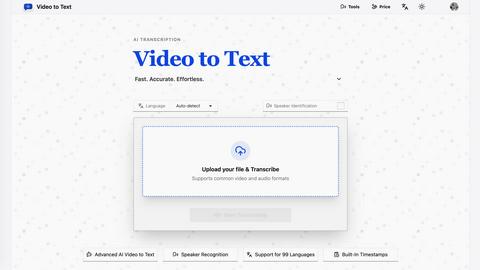
About Video to Text
Video to Text is a professional-grade, AI-powered transcription service engineered to convert video and audio files into clean, accurate, and exportable text. Designed for creators, teams, and individuals, it eliminates the complexity of building and maintaining a custom transcription pipeline. The platform delivers a seamless workflow from upload to export, leveraging advanced speech recognition to handle diverse content with high precision. Its core value proposition lies in offering fast, reliable, and speaker-aware transcription without requiring technical expertise. By supporting an extensive range of 99 languages and multiple export formats, Video to Text serves as a versatile tool for anyone needing to transform spoken content into actionable, searchable, and shareable text, from content creators and journalists to educators and business professionals.
Features of Video to Text
High-Accuracy AI Transcription
Video to Text utilizes cutting-edge artificial intelligence to deliver exceptionally accurate transcriptions of both video and audio content. The system is trained on vast datasets to understand diverse accents, dialects, and speaking styles, ensuring that the final text output is reliable and minimizes the need for extensive manual corrections. This core feature provides the foundation for all other capabilities, making it a trustworthy solution for professional and personal use.
Support for 99 Languages with Auto-Detection
The platform boasts an unparalleled global reach with support for transcription in 99 languages, from widely spoken ones like English, Spanish, and Mandarin to regional dialects. Its intelligent auto-detection feature automatically identifies the primary language in your media file, streamlining the process. Furthermore, it offers multi-language recognition for recordings where speakers switch between languages, making it an indispensable tool for international teams and multicultural content.
Speaker Identification (Diarization)
This advanced feature automatically distinguishes between different speakers in a conversation, labeling each segment of the transcript with identifiers like "Speaker 1," "Speaker 2," etc. Speaker diarization transforms chaotic multi-person dialogues, such as meeting recordings, interviews, or panel discussions, into clearly organized, readable transcripts. This saves significant time in post-processing and enhances the clarity and usability of the transcribed content.
Built-In Timestamps & Flexible Export Options
Every transcription includes precise, built-in timestamps that align the text with specific moments in the original media. These timestamps are crucial for creating subtitles, editing video, or quickly navigating to key sections. Users can then export their finished transcript in multiple formats: TXT for plain text, SRT/VTT for subtitles, and CSV for data analysis, ensuring compatibility with any downstream workflow or software tool.
Use Cases of Video to Text
Content Creation and Subtitling
Video creators, YouTubers, and online educators use Video to Text to generate accurate subtitles (SRT/VTT files) for their videos, improving accessibility, viewer engagement, and SEO. The service quickly turns long-form content like tutorials, vlogs, and course materials into searchable text and compliant captions, streamlining the post-production process significantly.
Business and Meeting Documentation
Teams and remote workers leverage the tool to transcribe meetings, conference calls, and webinars. The speaker identification feature is particularly valuable here, creating organized, searchable minutes that can be shared with stakeholders, archived for reference, or mined for action items, ensuring no critical detail is lost.
Academic Research and Journalism
Researchers, journalists, and students utilize Video to Text to transcribe interviews, focus groups, and lectures. Converting spoken information into text enables efficient analysis, accurate quoting, and the creation of written summaries or articles. The high accuracy and language support make it reliable for sensitive or complex subject matter.
Language Learning and Accessibility
Language learners practice by transcribing audio lessons to check comprehension, while organizations use the service to make audio and video content accessible to deaf and hard-of-hearing individuals through accurate captions. It also aids in creating transcripts for podcasts, enhancing content reach and usability.
Frequently Asked Questions
What is Video to Text?
Video to Text is a dedicated AI transcription tool that converts video and audio files into accurate text transcripts, subtitles, and other text-based formats. It is designed to be a fast, effortless, and professional solution for individuals and teams who need reliable speech-to-text conversion without managing complex software or services.
What file formats does Video to Text support?
The service supports a wide array of common video and audio formats to ensure broad compatibility. For video, it accepts MP4, MOV, MKV, WEBM, and M4V files. For audio, it supports MP3, WAV, M4A, FLAC, OGG, AAC, and OPUS files. This covers most file types generated by recording devices, editing software, and publishing platforms.
How does the speaker identification feature work?
The speaker identification feature, or diarization, uses AI to analyze vocal characteristics and speech patterns within an audio file. It automatically detects changes in speaker and labels each segment of the transcript accordingly (e.g., Speaker 1, Speaker 2). This happens automatically during the transcription process, organizing dialogues and multi-speaker recordings into a clear, readable format.
Is there a free trial available?
Yes, Video to Text offers new users 30 free minutes of transcription to test the service's accuracy, features, and workflow. This allows you to upload sample files and evaluate the output quality before committing to a paid plan, ensuring the tool meets your specific requirements.
Pricing of Video to Text
Video to Text operates on a simple, pay-as-you-go pricing model with no required subscriptions. You only pay for the transcription minutes you use. The plans are structured as follows:
- Starter: $9.9 for 200 minutes (cost: $1 for 20 mins).
- Recommended (Most Popular): $19.9 for 600 minutes (cost: $1 for 30 mins).
- Best Value: $99 for 6000 minutes (cost: $1 for 60 mins).
All new users receive 30 free transcription minutes to start. Minutes can be added to your account as needed, providing flexibility and control over spending.
Top Alternatives to Video to Text
Overchat AI
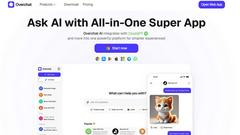
Overchat AI is a powerful all-in-one platform that allows you to chat, create images, and generate videos effortlessly.

Atomic Chat
Atomic Chat is a private, offline, open-source desktop app offering uncensored local AI chat with over 1,000 models and zero data leaving your device.

Agentzee
Automate sales, support, and follow-ups with AI agents across voice calls, website chatbot, WhatsApp chatbot, Instagram chatbot, and Facebook, fully i

OGTV
OGTV is a live video chat platform that instantly connects you with real people worldwide for safer, more meaningful conversations.

AI Pro Resume
AI Pro Resume simplifies resume and cover letter creation with tailored AI-generated content for your industry, ensuring professionalism and ATS.
Receipt Taxer
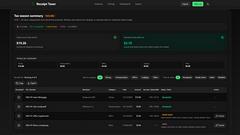
Receipt Taxer simplifies bookkeeping by transforming receipts into organized digital data with instant extraction and seamless TurboTax integration.
Yevideo - AI Video AI Image
Yevideo is an AI-powered studio that turns images, text, and ideas into high-quality marketing videos and images with fast, professional editing.