StreamVox - AI Live Translator
StreamVox is a real-time AI translator for Windows, providing live subtitles for calls, gaming, and videos in 49 languages without barriers.
Visit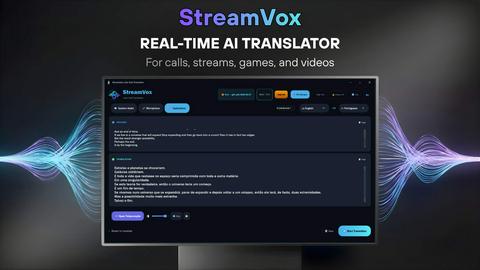
About StreamVox - AI Live Translator
StreamVox is an innovative real-time AI translator designed for Windows users, transforming how individuals interact with audio content across various platforms. Whether you are engaged in video calls, gaming, streaming, or simply watching videos, StreamVox seamlessly adds live subtitles and instant translations to any audio playing on your PC. This powerful tool is particularly valuable for multilingual environments, enabling clearer communication and understanding during conversations, meetings, and entertainment. With support for over 49 input and target languages, StreamVox breaks down language barriers, making it an essential resource for professionals, gamers, and content consumers alike. The application prioritizes user experience, featuring customizable overlays that ensure subtitles are visible without obstructing the primary content, thereby enhancing the overall viewing or gaming experience.
Features of StreamVox - AI Live Translator
Extensive Language Support
StreamVox supports over 49 input languages and 49 AI-powered target languages, making it an incredibly versatile tool for users around the globe. This extensive language library allows users to communicate and comprehend content in their preferred languages effortlessly.
Smart Audio Capture
The application incorporates three distinct audio modes: System Audio, Microphone, and Per-App Capture. This feature enables users to isolate specific audio sources, ensuring only the desired content is captured while filtering out background noise, thus enhancing clarity during translation.
Customizable Overlay
StreamVox features a transparent overlay that floats above any application. Users can adjust the font size, color, and opacity of the subtitles, allowing for personalized visibility settings to match their preferences, ensuring that the translation remains unobtrusive while still being easy to read.
Phone Link Integration
With Phone Link integration, StreamVox can translate mobile calls live on your PC screen. This feature is particularly useful for users who frequently engage in international calls, providing real-time subtitles that enhance communication without needing additional devices.
Use Cases of StreamVox - AI Live Translator
Enhancing Remote Work
StreamVox is ideal for professionals conducting international meetings via platforms like Zoom, Microsoft Teams, or Google Meet. It allows participants to follow conversations in real-time, regardless of the language spoken, thereby facilitating smoother collaboration and understanding.
Gaming Without Borders
Gamers can benefit from StreamVox by receiving real-time translations during multiplayer games. This feature enhances the gaming experience by allowing players from different language backgrounds to communicate effectively, making teamwork more efficient and enjoyable.
Enjoying Foreign Media
StreamVox enables users to watch foreign films, series, and online content without waiting for official subtitles. This capability enhances the viewing experience by providing instant translations, allowing for greater accessibility to global media.
Bridging Language Gaps in Education
Educators and students can use StreamVox to facilitate learning in multilingual classrooms or during online courses. The real-time translation of lectures and discussions helps students grasp complex topics in their preferred language, fostering a more inclusive educational environment.
Frequently Asked Questions
How does StreamVox ensure privacy?
StreamVox prioritizes user privacy by processing audio in real-time without storing any of the captured data. This commitment ensures that conversations and content remain confidential.
Can I use StreamVox with any application?
Yes, StreamVox is compatible with various applications, including Zoom, Teams, Discord, and most video players, making it versatile for different use cases.
Is there a mobile version of StreamVox?
Currently, StreamVox is designed for Windows PCs; however, it integrates with mobile devices via Microsoft Phone Link, allowing users to see live translations for phone calls on their PC screens.
What are the system requirements for StreamVox?
StreamVox requires Windows 10 or 11 (64-bit) to function. Ensure your PC meets these specifications for optimal performance with the application.
Pricing of StreamVox - AI Live Translator
Free Starter: $0 - 20 min/day forever
Pro: $8.99/mo - 40 hours/month
Pro+: $14.99/mo - 70 hours/month
Unlimited: $24.99/mo - no limits
14-day money-back guarantee.
Explore more in this category:
Top Alternatives to StreamVox - AI Live Translator
Salnly
Beauty salon management app for appointments, clients, billing, marketing, inventory, and gift cards.


Caterngly
Manage your catering service effortlessly with one app to streamline operations, bookings, vendor contracts, and feedback.

Bookstorely
A bookstore management SaaS that helps streamline inventory, sales, reviews, and customer experiences.