
Add Loved One to Photo
Add Loved One to Photo uses advanced AI to seamlessly insert a missing or deceased loved one into any existing photo in under 40 seconds.
Visit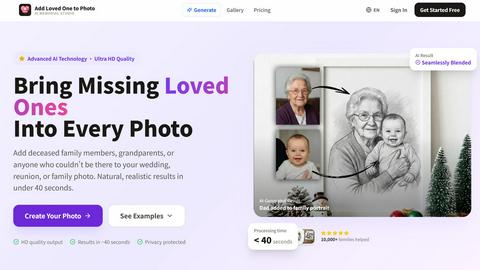
About Add Loved One to Photo
Add Loved One to Photo is a specialized AI memorial photo studio designed to help families and individuals heal and preserve memories by creating complete, realistic photographs. Its core function is to seamlessly integrate a missing or deceased loved one into an existing group photo, allowing for the creation of portraits that honor their memory and presence. The platform utilizes advanced artificial intelligence to analyze a user-uploaded group photo and a clear reference image of the loved one, blending them into a single, natural-looking composite. This process, which takes under 40 seconds, results in ultra-high-definition (2K HD) output suitable for printing and framing. The product serves a deeply emotional need, catering to those wishing to commemorate weddings, family reunions, graduations, holidays, and other milestone events with all important figures included. Beyond realistic photo restoration, it also offers a style-based generation mode, enabling users to transform their completed memory into artistic renditions such as watercolor paintings, sketches, or oil paintings. With a focus on privacy, ease of use, and professional-grade results, Add Loved One to Photo provides a dignified and accessible solution for sentimental photo restoration and memorial creation.
Features of Add Loved One to Photo
Advanced AI Blending Technology
The platform employs sophisticated artificial intelligence algorithms specifically trained for photorealistic image composition. It intelligently analyzes lighting, shadows, perspective, and skin tones from both the group photo and the reference image to insert the loved one into the scene naturally. This ensures the final composite looks authentic and emotionally resonant, not like a clumsy digital edit, achieving seamless integration that respects the original photo's integrity.
Ultra-Fast 40-Second Processing
Leveraging powerful cloud-based AI processing, the tool delivers high-quality results in approximately 40 seconds. This remarkable speed allows users to quickly see their completed memory without the long wait times associated with manual photo editing or other complex software. The efficiency of the process makes it accessible for creating multiple versions or trying different artistic styles without significant delay.
High-Resolution 2K HD Output
Every generated photo is produced in stunning 2K HD quality. This high resolution is crucial for users who wish to print and frame their completed memories, ensuring details remain sharp and clear even at larger sizes. The output is provided in a user-selected aspect ratio, making it ready for digital sharing, professional printing, or inclusion in photo albums without any loss of fidelity.
Artistic Style Transformation Mode
Beyond realistic photo composites, the tool includes a creative mode that allows users to apply various artistic filters to their generated image. With a single click, the realistic photo can be transformed into styles such as watercolor, sketch, oil painting, or anime. This feature provides families with unique ways to memorialize their loved one through art, offering beautiful alternatives for display and remembrance.
Use Cases of Add Loved One to Photo
Memorial Portraits for Weddings
Create a respectful and heartfelt wedding memorial photo by adding a deceased parent, grandparent, or other loved one to the wedding party or family portraits. This allows couples to symbolically include important figures who could not be physically present on their special day, providing a cherished keepsake that honors their memory within the celebration's joy.
Completing Multi-Generational Family Reunions
Use the AI editor to add missing grandparents or other relatives back into reunion photographs. This is ideal for creating a complete multi-generational family portrait that includes every member, bridging geographical or temporal gaps. The result is a fuller, more accurate representation of the family unit for albums and framed displays.
Holiday and Seasonal Family Photos
Generate a complete holiday family photo for Christmas cards, New Year's albums, or seasonal gifts by adding a loved one to the scene. This use case helps families maintain tradition and include all members in annual portraits, creating emotionally significant keepsakes that celebrate togetherness during special times of the year.
Milestone Event Commemoration
Commemorate important life milestones such as graduations, birthdays, or anniversaries by adding a missed loved one to the official portrait. This application helps acknowledge their role and memory during these significant achievements and celebrations, providing a tangible connection and a meaningful gift for other family members.
Frequently Asked Questions
How realistic are the final photos created by the AI?
The AI is specifically engineered to produce highly realistic and natural-looking composites. It meticulously matches lighting, shadows, skin tones, and perspective between the uploaded photos. While results depend on the quality and clarity of the input images, the technology is designed to achieve seamless blends that appear authentic, not artificially pasted, making them suitable for professional printing and framing.
What kind of photos should I upload for the best results?
For optimal results, upload a clear, well-lit reference photo of the loved one's face. The group photo should also be of good quality, with consistent lighting and a clear area where the person can be naturally added. High-resolution images (JPG, PNG, WEBP up to 20MB) yield the best output. The AI works most effectively with front-facing portraits where facial features are visible.
Is my privacy protected when using this service?
Yes, user privacy is a top priority. Uploaded photos and generated images are handled with strict security protocols. The service is designed to protect your personal memories, and images are not shared or used for any purpose other than generating your requested composite. You maintain full ownership of all uploaded and created content.
Can I create artistic versions of the photo?
Absolutely. In addition to the realistic photo generation, the platform includes a "Create Style" mode. After generating your composite, you can apply various artistic filters to transform it into styles like watercolor, sketch, oil painting, or anime. This provides a creative way to memorialize your loved one with a unique piece of art.
Explore more in this category:
Top Alternatives to Add Loved One to Photo

Receiptum
Receiptum is a free, fast tool for creating realistic, customizable professional receipts for business, creative, or educational use.
AI 3D
AI 3D generates production-ready, fully textured GLB models from text or images using Tencent Hunyuan3D and ByteDance Seed3D.

dMaya.ai
dMaya.ai is an AI-driven design platform that transforms product descriptions into editable UI screens, streamlining your design workflow instantly.

Mockupanda
Mockupanda generates unlimited professional mockups instantly for Etsy and POD sellers to boost conversions.
GPT Image 2 API
GPT Image 2 API enables seamless generation and editing of high-quality images from text prompts for diverse design and marketing needs.
QuoteImageMaker
QuoteImageMaker analyzes your text to generate perfectly matched backgrounds and preset sizes for social media posts in seconds.
ChatGPT Image Generator
Transform text prompts into professional AI images and edit existing photos using OpenAI's latest GPT Image technology for commercial use.