
Opal vs TemplateFox
Side-by-side comparison to help you choose the right product.

Opal empowers solopreneurs and neurodivergent thinkers to effortlessly manage their projects and notes in one intuitive platform.
Last updated: April 13, 2026

TemplateFox
Effortlessly design and automate PDF generation for invoices, reports, and more with TemplateFox's intuitive platform.
Last updated: February 26, 2026
Visual Comparison
Opal
TemplateFox
Feature Comparison
Opal
Visual Infinite Canvas
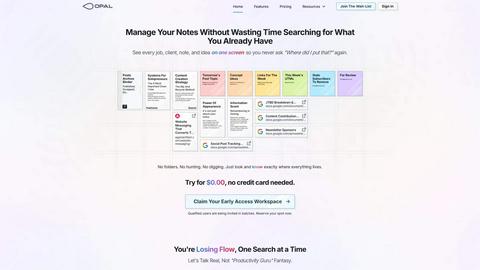
Opal provides a spacious digital workspace that allows users to visually organize their notes, tasks, and files. By presenting information in a spatial format, users can quickly grasp their entire workflow without unnecessary clicks or searches.
Markdown-Based Block Editor
The platform includes a rich markdown-based block editor, enabling users to create content with various media types. This feature is ideal for writing scripts, manuals, or articles, allowing for seamless integration of text, images, and links.
Real-Time Collaboration
Opal facilitates real-time collaboration, enabling multiple users to work on the same project simultaneously. This feature is essential for teams that require instant feedback and communication while managing tasks and documents.
AI Integration
With the Opal Recall skill, users can connect their own AI agents to the platform through an API. This integration enhances productivity by allowing users to retrieve information and insights quickly, making it easier to stay on top of tasks and projects.
TemplateFox
Dynamic Template Design
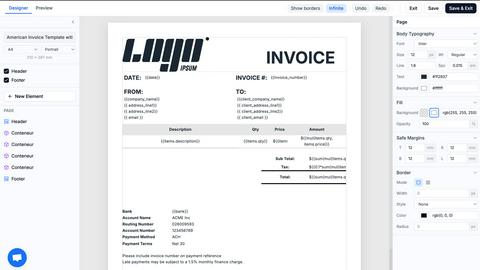
TemplateFox provides a highly intuitive drag-and-drop editor that allows users to design templates visually. This feature eliminates the need for any coding skills, making it accessible for everyone from professionals to beginners.
Automated Document Generation
Users can generate a vast array of documents—from invoices to reports—through a straightforward API call or Zapier automation. This automation simplifies workflows and saves significant time in document preparation.
Dynamic Data Binding
With TemplateFox, users can inject dynamic data into their templates seamlessly. This means that names, addresses, prices, and other data points can be updated automatically, ensuring that each document is personalized and accurate.
Scalable PDF Generation
TemplateFox is built to handle varying data loads efficiently. Tables within documents can automatically grow to accommodate any amount of data, spanning multiple pages if necessary, which is particularly useful for detailed reports or invoices.
Use Cases
Opal
Project Management
Opal is perfect for project managers who need to track multiple tasks, clients, and deadlines. The visual organization helps keep everything in sight, ensuring that no detail is overlooked during project execution.
Content Creation
Writers and content creators can utilize Opal's markdown editor to draft articles, scripts, or manuals. The ability to organize thoughts and ideas visually aids in the creative process while streamlining content development.
Knowledge Management
For businesses that rely on standard operating procedures and documentation, Opal serves as a centralized knowledge management system. All essential information can be stored, linked, and accessed easily, reducing time spent searching for documents.
Client Management
Individuals managing client relationships can benefit from Opal's structure, allowing them to keep track of client notes, contracts, and communication history in one accessible space. This ensures that every detail is accounted for and easily retrievable.
TemplateFox
Invoicing
Businesses can automate their invoicing process by generating professional invoices quickly and efficiently. This not only saves time but also enhances the accuracy of financial documents.
Reporting
TemplateFox allows organizations to create comprehensive reports that can be updated with real-time data. This feature is ideal for businesses needing to present data-driven insights regularly.
Certifications
Educational institutions and training organizations can use TemplateFox to issue certificates in bulk. The ability to personalize each certificate with dynamic data ensures that every recipient receives a unique document.
Shipping Documents
E-commerce businesses can generate packing slips, shipping labels, and delivery notes seamlessly. The automation of these documents ensures that logistics run smoothly and efficiently.
Overview
About Opal
Opal is an innovative productivity tool designed to transform the way individuals and teams manage their notes, documents, and important files. Unlike traditional productivity applications that often bury information in complex folder structures, Opal offers a visual, infinite canvas where users can arrange their content spatially on a digital desk. This approach allows users to see everything at a glance, ensuring that important information remains top of mind. Whether you are a freelancer, a project manager, or a business owner, Opal caters to anyone who relies on effective knowledge management. Its primary value proposition lies in eliminating the frustration of searching for lost information, thereby enhancing focus, improving productivity, and ultimately enabling users to do their best work without the chaos of disorganized tools.
About TemplateFox
TemplateFox is a powerful Software as a Service (SaaS) solution designed to streamline the generation of professional PDFs from visually crafted templates. With its user-friendly drag-and-drop editor, users can create and customize templates without any prior knowledge of HTML or CSS. This makes TemplateFox an ideal choice for indie hackers, developers, and businesses looking to automate their document workflows efficiently. The platform allows users to generate thousands of documents—including invoices, certificates, reports, and more—through a simple API call or integration with Zapier. Users can expect rapid results, with PDF generation occurring in just 1-3 seconds. Starting with a free tier that offers 100 PDFs per month, TemplateFox scales effortlessly with affordable paid plans, ensuring that users have access to a robust solution tailored to their needs.
Frequently Asked Questions
Opal FAQ
What makes Opal different from traditional productivity tools?
Opal stands out by offering a visual workspace that allows users to spatially organize their information, unlike traditional tools that often rely on hierarchical folder structures.
Can I collaborate with my team on Opal?
Yes, Opal features real-time collaboration capabilities, allowing multiple users to work together seamlessly on projects and documents.
Is there an AI integration available in Opal?
Absolutely. Opal offers the Opal Recall skill, enabling users to connect their AI agents through an API for enhanced productivity and quick information retrieval.
How does Opal help with knowledge management?
Opal serves as a centralized hub for all your essential documents and notes, making it easy to access and link information, streamlining your knowledge management processes.
TemplateFox FAQ
How does TemplateFox handle document security?
TemplateFox provides signed URLs for document access, ensuring that sensitive information is securely transmitted and only accessible to authorized individuals.
Can I integrate TemplateFox with other tools?
Yes, TemplateFox offers no-code integrations with popular platforms such as Zapier, Airtable, and others, allowing users to automate their workflows easily.
What types of documents can I create with TemplateFox?
You can create a wide variety of documents, including invoices, reports, certificates, packing slips, and any other professional PDFs tailored to your needs.
Is there a free trial available for TemplateFox?
Yes, TemplateFox offers a free plan that allows users to generate up to 100 PDFs per month, enabling potential customers to test the platform's capabilities before committing to a paid plan.
Alternatives
Opal Alternatives
Opal is a spatial knowledge management tool designed specifically for solopreneurs, freelancers, and neurodivergent thinkers. By providing a visual, infinite canvas, Opal allows users to organize their notes, documents, and important files in a way that prioritizes visibility and accessibility. Its unique approach helps users retain a sense of control over their projects and enhances productivity. Many users seek alternatives to Opal for various reasons, including budget constraints, specific feature requirements, or compatibility with their preferred platforms. When looking for an alternative, consider factors such as ease of use, the ability to integrate with existing tools, and the flexibility of the software to accommodate your unique workflow. Ensuring that the alternative aligns with your organizational style and project management needs is crucial for maximizing productivity and efficiency.
TemplateFox Alternatives
TemplateFox is a powerful Software as a Service (SaaS) platform that specializes in the streamlined generation of professional PDFs using visually crafted templates. It falls within the productivity and management category, catering to a diverse range of users including indie hackers, developers, and businesses seeking to automate their document workflows. Users often explore alternatives to TemplateFox due to various reasons such as pricing structures, feature sets, or specific platform needs that may not align perfectly with their requirements. When searching for an alternative, it is essential to consider factors such as the ease of use, scalability, and the ability to customize templates without requiring technical expertise. Additionally, examining the automation capabilities and integration options with existing tools is crucial, as these elements significantly impact the efficiency of document generation workflows. Ultimately, identifying a solution that meets your unique needs while offering robust support can lead to enhanced productivity.