
Veo 4 AI Video Generator
Veo 4 AI Video Generator transforms text and images into stunning cinematic videos in minutes, effortlessly bringing ...
Visit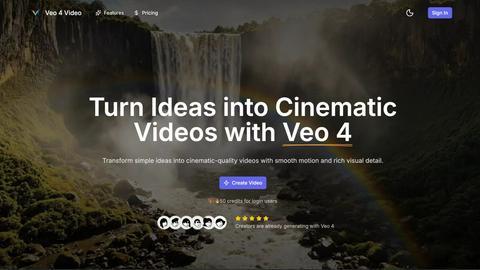
About Veo 4 AI Video Generator
Veo 4 AI Video Generator is an advanced AI-powered platform designed to transform text and images into cinematic-quality video content. Utilizing cutting-edge technology, Veo 4 allows users to create stunning videos from simple prompts, making it an invaluable tool for creators, marketers, and anyone involved in visual storytelling. The platform excels at producing high-fidelity clips quickly, enabling users to generate dynamic 8-second videos that capture attention and convey messages effectively. With intuitive controls for motion, lighting, and camera simulation, Veo 4 democratizes video production, allowing individuals without technical editing skills to craft professional-grade videos. Whether for social media, product ads, or creative projects, Veo 4 makes video generation accessible, efficient, and expressive, empowering users to bring their ideas to life in just minutes.
Features of Veo 4 AI Video Generator
Text-to-Video Engine
Veo 4 features a powerful text-to-video engine that converts clear prompts into coherent cinematic clips. Users can enhance their videos by adding details such as time of day, camera movement, and mood, ensuring that the final product closely aligns with their creative vision.
Image-to-Video Motion
This feature enables users to animate still images into videos seamlessly. By uploading one or two images, Veo 4 generates smooth transitions between frames, allowing for dynamic motion that enhances the storytelling aspect of the visual content.
Fast & Quality Modes
Veo 4 offers two operational modes: Fast for quick drafts and Quality for polished outputs. This flexibility allows users to choose the pace of their video production based on their specific needs, whether it's for rapid prototyping or detailed final edits.
Aspect Ratios + Clean Exports
With the ability to choose between multiple aspect ratios—Auto, 16:9, or 9:16—users can export clean 1080p videos without watermarks. This feature simplifies the sharing process across various platforms, ensuring that content is ready for immediate posting.
Use Cases of Veo 4 AI Video Generator
Product Ads
Veo 4 is ideal for creating short and engaging promotional clips. Businesses can transform concise pitches into visually appealing videos that effectively capture the essence of their products, making it perfect for landing pages and paid advertising campaigns.
Social Shorts
The platform is designed to generate loopable B-roll and short clips that are perfect for social media. Marketers and content creators can utilize Veo 4 to create captivating visuals from hooks or captions that enhance viewer engagement and retention.
Concept Visuals
For designers and artists, Veo 4 serves as a tool to visualize concepts quickly. Users can turn their ideas into motion graphics, making it easier to communicate their vision and iterate on design concepts with rich visual details.
Story-Driven Motion Pieces
Storytellers can leverage Veo 4 to create narrative-driven videos that combine text prompts with compelling visuals. This feature is especially useful for filmmakers and content creators looking to explore storytelling through innovative visual formats.
Frequently Asked Questions
How long does it take to generate a video with Veo 4?
Generating a video typically takes only a few minutes, allowing users to quickly turn their ideas into cinematic clips without extensive waiting times.
Can I use Veo 4 for free?
New users are rewarded with 50 free credits upon signing up, providing an opportunity to explore the platform's capabilities before committing to a paid plan.
What types of media can I use with Veo 4?
Veo 4 supports both text inputs for the text-to-video feature and image uploads for the image-to-video functionality, enabling diverse creative expressions.
Is there a limit on video exports?
Users can export multiple videos in various aspect ratios without watermarks, making it easy to share content across different platforms without restrictions.
Pricing of Veo 4 AI Video Generator
Veo 4 offers a competitive pricing structure with options suitable for different user needs. New users benefit from 50 free credits upon registration, allowing them to explore the platform's features without upfront costs. For more extensive usage, various pricing tiers may be available, catering to individual creators and teams alike.
Explore more in this category:
Top Alternatives to Veo 4 AI Video Generator

OmniGemini
OmniGemini is a multimodal AI tool that enables effortless video and image creation, remixing, and editing using diverse media inputs.

MStudio
MStudio is the AI-powered production studio that turns your script into a pitch-ready storyboard with visuals, motion, and audio in one session.

OmniVideo
OmniVideo is the unified workspace where professionals turn prompts, product photos, and reference frames into polished video drafts for faster.

Gemini Omni
Gemini Omni unifies multimodal prompting, chat editing, and visual remixing into one continuous workflow for faster creative iteration.

Alma by Olivares AI
Alma by Olivares AI is your intelligent assistant that remembers conversations, conducts research, and integrates creative media studios seamlessly.

KPI Studio
KPI Studio transforms raw data into engaging video animations in under 60 seconds, streamlining your content creation process effortlessly.

ChatGPT Image 2
ChatGPT Image 2 is your all-in-one AI hub for seamless image editing, generation, and video creation, now with a limited-time 50% off offer.
Spark Robin
Spark Robin transforms text and images into engaging short videos for social media, ads, and creative projects with ease and precision.