
Seedance 2 vs Veo 4 AI Video Generator
Side-by-side comparison to help you choose the right product.

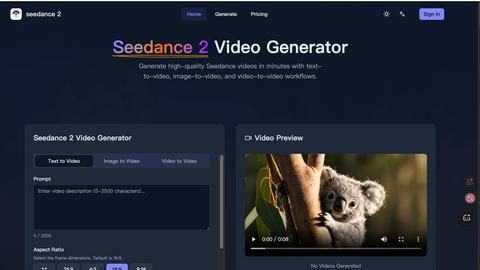
Seedance 2 generates cinematic videos from text, images, and clips with easy control and high-quality results.
Last updated: February 25, 2026

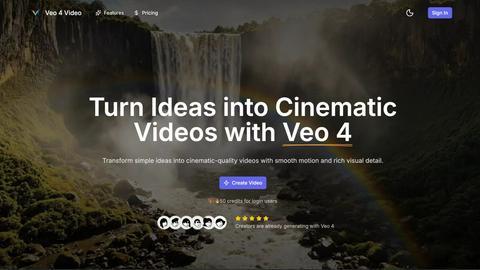
Veo 4 AI Video Generator transforms text and images into stunning cinematic videos in minutes, effortlessly bringing ...
Last updated: February 26, 2026
Visual Comparison
Seedance 2
Veo 4 AI Video Generator
Feature Comparison
Seedance 2
Multi-Modal Input Support
Seedance 2 offers versatile input modes, allowing users to generate videos from text, images, or existing footage. This flexibility means users can choose the best mode for their creative needs, whether they are starting from scratch or building on existing content.
Reference-First Control
This unique feature enables users to anchor character details, visual styles, and camera feels using reference materials rather than relying solely on text prompts. This approach minimizes guesswork and enhances the quality of the generated content.
Joint Audio-Video Generation
Seedance 2 excels in generating audio and video in a single pass, synchronizing sound effects, music, and voiceovers seamlessly. This capability not only streamlines the production process but also ensures that the audio matches the visuals perfectly, enhancing viewer engagement.
High-Definition Output
The platform supports high-definition video output up to 1080p at a cinematic frame rate of 24fps. This feature ensures that the final products are suitable for professional use and can be displayed across various media platforms without compromising quality.
Veo 4 AI Video Generator
Text-to-Video Engine
Veo 4 features a powerful text-to-video engine that converts clear prompts into coherent cinematic clips. Users can enhance their videos by adding details such as time of day, camera movement, and mood, ensuring that the final product closely aligns with their creative vision.
Image-to-Video Motion
This feature enables users to animate still images into videos seamlessly. By uploading one or two images, Veo 4 generates smooth transitions between frames, allowing for dynamic motion that enhances the storytelling aspect of the visual content.
Fast & Quality Modes
Veo 4 offers two operational modes: Fast for quick drafts and Quality for polished outputs. This flexibility allows users to choose the pace of their video production based on their specific needs, whether it's for rapid prototyping or detailed final edits.
Aspect Ratios + Clean Exports
With the ability to choose between multiple aspect ratios—Auto, 16:9, or 9:16—users can export clean 1080p videos without watermarks. This feature simplifies the sharing process across various platforms, ensuring that content is ready for immediate posting.
Use Cases
Seedance 2
Marketing Campaigns
Marketers can leverage Seedance 2 to create engaging video ads quickly, allowing for rapid iteration and optimization. The platform's ability to generate multiple versions of a video ensures that brands can test different concepts and find the most effective approach.
E-Commerce Product Demos
E-commerce brands can utilize Seedance 2 to produce visually appealing product demonstration videos. By converting images and text descriptions into engaging footage, businesses can showcase their products more effectively, ultimately boosting sales.
Educational Content Creation
Educators can benefit from Seedance 2 by creating instructional videos that combine visuals and audio. This feature makes it easier to convey complex concepts in a more digestible format, enhancing the learning experience for students.
Social Media Content Production
Content creators looking to maintain a strong presence on social media can use Seedance 2 to generate quick and consistent video content. The platform's speed and efficiency enable creators to keep their audience engaged without spending excessive time on editing.
Veo 4 AI Video Generator
Product Ads
Veo 4 is ideal for creating short and engaging promotional clips. Businesses can transform concise pitches into visually appealing videos that effectively capture the essence of their products, making it perfect for landing pages and paid advertising campaigns.
Social Shorts
The platform is designed to generate loopable B-roll and short clips that are perfect for social media. Marketers and content creators can utilize Veo 4 to create captivating visuals from hooks or captions that enhance viewer engagement and retention.
Concept Visuals
For designers and artists, Veo 4 serves as a tool to visualize concepts quickly. Users can turn their ideas into motion graphics, making it easier to communicate their vision and iterate on design concepts with rich visual details.
Story-Driven Motion Pieces
Storytellers can leverage Veo 4 to create narrative-driven videos that combine text prompts with compelling visuals. This feature is especially useful for filmmakers and content creators looking to explore storytelling through innovative visual formats.
Overview
About Seedance 2
Seedance 2 is an advanced multi-modal AI video generation platform designed to transform text, images, and existing video clips into high-quality cinematic videos rapidly. With its innovative features, Seedance 2 caters to a diverse audience, including creators, marketers, filmmakers, e-commerce brands, and educators. The platform facilitates quick and controlled video production, enabling users to produce publishable content at scale without the need for extensive editing. Its reference-first control system allows users to anchor character design, visual style, and camera dynamics effectively. Furthermore, Seedance 2 supports high-definition output up to 1080p at 24 frames per second, making it an ideal tool for anyone looking to create visually stunning videos that maintain character consistency and temporal stability.
About Veo 4 AI Video Generator
Veo 4 AI Video Generator is an advanced AI-powered platform designed to transform text and images into cinematic-quality video content. Utilizing cutting-edge technology, Veo 4 allows users to create stunning videos from simple prompts, making it an invaluable tool for creators, marketers, and anyone involved in visual storytelling. The platform excels at producing high-fidelity clips quickly, enabling users to generate dynamic 8-second videos that capture attention and convey messages effectively. With intuitive controls for motion, lighting, and camera simulation, Veo 4 democratizes video production, allowing individuals without technical editing skills to craft professional-grade videos. Whether for social media, product ads, or creative projects, Veo 4 makes video generation accessible, efficient, and expressive, empowering users to bring their ideas to life in just minutes.
Frequently Asked Questions
Seedance 2 FAQ
How does Seedance 2 handle audio generation?
Seedance 2 generates audio in conjunction with video, allowing for synchronized sound effects, music, and voiceovers to be created in one seamless process, enhancing production efficiency.
What types of input does Seedance 2 support?
Users can input text, images, or existing video clips to generate new videos, providing flexibility for various creative projects and workflows.
Can I create videos in different aspect ratios?
Yes, Seedance 2 supports multiple aspect ratios, including 16:9, 9:16, and 1:1, making it suitable for different platforms and screen types.
What frame rate does Seedance 2 use for video output?
Seedance 2 produces videos at a frame rate of up to 24 frames per second, which is the standard for high-quality cinematic playback, ensuring smooth and professional results.
Veo 4 AI Video Generator FAQ
How long does it take to generate a video with Veo 4?
Generating a video typically takes only a few minutes, allowing users to quickly turn their ideas into cinematic clips without extensive waiting times.
Can I use Veo 4 for free?
New users are rewarded with 50 free credits upon signing up, providing an opportunity to explore the platform's capabilities before committing to a paid plan.
What types of media can I use with Veo 4?
Veo 4 supports both text inputs for the text-to-video feature and image uploads for the image-to-video functionality, enabling diverse creative expressions.
Is there a limit on video exports?
Users can export multiple videos in various aspect ratios without watermarks, making it easy to share content across different platforms without restrictions.
Alternatives
Seedance 2 Alternatives
Seedance 2 is an advanced multi-modal AI video generation platform that transforms text, images, and existing footage into high-quality cinematic videos. As a versatile tool designed for creators, marketers, filmmakers, e-commerce brands, and educators, it streamlines the video production process, allowing users to generate engaging content rapidly. Users commonly seek alternatives to Seedance 2 for various reasons, including pricing, feature sets, or specific platform needs that may not be fully addressed by the software. When choosing an alternative, it is essential to consider factors such as input versatility, quality of output, ease of use, and the ability to integrate audio seamlessly with visuals. Assessing these criteria can help users find a solution that best fits their unique creative requirements.
Veo 4 AI Video Generator Alternatives
Veo 4 AI Video Generator is an advanced platform that transforms text and images into cinematic-quality video content, catering to the needs of creators, marketers, and visual storytellers. As users explore video production tools, they often seek alternatives due to considerations like pricing structures, specific feature sets, platform compatibility, or varying levels of user support. The quest for alternatives typically stems from the desire for more flexibility, enhanced capabilities, or simply a better fit for individual project requirements. When selecting an alternative to Veo 4, users should evaluate key factors such as ease of use, the range of features offered, the quality of output, and how well the platform aligns with their specific video production goals. Additionally, assessing customer support, pricing options, and community feedback can significantly influence the decision-making process, ensuring that the chosen tool effectively meets their creative needs.