
vaethat
Vaethat is an AI tool that effortlessly enhances architectural renders, boosting detail and clarity while preserving.
Visit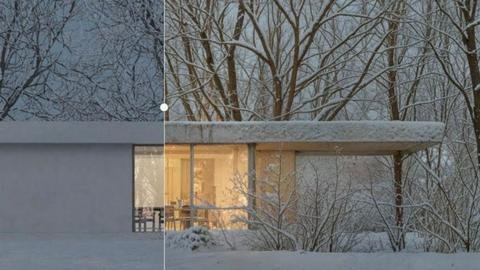
About vaethat
Vaethat is an advanced AI-powered tool designed specifically for architectural visualization professionals, enabling them to upscale and enhance 3D renders with remarkable ease and efficiency. This innovative software addresses the unique challenges faced by architects and visualizers when creating high-quality images, allowing users to improve the clarity, sharpness, and overall realism of their architectural images. By leveraging cutting-edge AI technology, Vaethat streamlines the enhancement process, eliminating the need for complex adjustments or extensive manual editing. The tool is built to preserve the original design intent while delivering results that elevate the presentation quality of architectural projects. Whether for client presentations, portfolios, or marketing materials, Vaethat provides a seamless and intuitive experience that enhances the artistry of architectural renders.
Features of vaethat
AI Render Upscaling
Vaethat's AI render upscaling feature allows users to significantly increase the resolution and sharpness of their 3D architectural renders. This enhancement is achieved without compromising the geometry, ensuring that the final output maintains a clean and consistent appearance.
Detail Refinement
With the detail refinement feature, Vaethat enhances fine textures, edges, and small architectural elements. This results in crisper, more polished images that highlight the intricate details of architectural designs, making them more visually appealing and professional.
Material and Lighting Enhancement
Vaethat improves the perceived realism of architectural images through its material and lighting enhancement capabilities. By boosting material definition, contrast, and balancing lighting, users can achieve a more lifelike representation of their designs, capturing the attention of viewers and clients alike.
Noise and Artifact Cleanup
This feature focuses on reducing noise and common rendering artifacts that can detract from the quality of architectural images. By producing cleaner, presentation-ready visuals, Vaethat ensures that renders are suitable for any professional setting, from client meetings to marketing campaigns.
Use Cases of vaethat
Client Presentations
Architects and visualizers can utilize Vaethat to prepare high-quality renders for client presentations. The enhanced clarity and realism of the images help convey design intent effectively, making it easier for clients to visualize the final outcome of their projects.
Portfolio Enhancement
Professionals in the architectural visualization field can enhance their portfolios using Vaethat. The tool allows for the creation of stunning images that showcase their skills and expertise, ultimately helping them attract new clients and opportunities.
Marketing Materials
Vaethat is ideal for producing eye-catching marketing materials. With its ability to refine images and improve realism, users can create promotional content that stands out, effectively communicating the quality and uniqueness of their architectural designs.
Project Approvals
For architects seeking project approvals, Vaethat provides a means to produce high-quality visuals that highlight the key elements of their designs. The enhanced details and clarity help stakeholders understand the project better, facilitating smoother approval processes.
Frequently Asked Questions
How does the AI render enhancer calculate credits?
The AI render enhancer calculates credits based on the number of images processed and the complexity of enhancements applied. Users can monitor their credit usage through the platform and adjust their plans as needed.
Can I use the archviz AI upscaler with V-Ray, Lumion, Enscape, 3ds Max, and SketchUp?
Yes, Vaethat is compatible with various architectural software such as V-Ray, Lumion, Enscape, 3ds Max, and SketchUp. This versatility allows users to seamlessly integrate the tool into their existing workflows.
What makes this AI post-production tool different from manual editing?
Unlike manual editing, which can be time-consuming and requires extensive skills, Vaethat automates the enhancement process. Users can achieve professional-quality results quickly and easily, without the need for complex adjustments or technical expertise.
Can I upgrade or downgrade my AI enhancement plan anytime?
Yes, Vaethat offers flexibility in subscription plans, allowing users to upgrade or downgrade as their needs change. This adaptability ensures that professionals can choose a plan that best suits their project demands and budget.
Explore more in this category:
Top Alternatives to vaethat

Receiptum
Receiptum is a free, fast tool for creating realistic, customizable professional receipts for business, creative, or educational use.
OmniGemini
OmniGemini is a multimodal AI tool that enables effortless video and image creation, remixing, and editing using diverse media inputs.
AI 3D
AI 3D generates production-ready, fully textured GLB models from text or images using Tencent Hunyuan3D and ByteDance Seed3D.
Floor Plan AI
Generate professional floor plans instantly with our AI floor plan generator.
Lovart
Lovart AI uses next-gen generative intelligence to turn simple prompts into professional logos, videos, and complete brand kits in seconds.

dMaya.ai
dMaya.ai is an AI-driven design platform that transforms product descriptions into editable UI screens, streamlining your design workflow instantly.

Mockupanda
Mockupanda generates unlimited professional mockups instantly for Etsy and POD sellers to boost conversions.
Spark Robin
Spark Robin transforms text and images into engaging short videos for social media, ads, and creative projects with ease and precision.