
Shrinkpad
Effortlessly batch compress images and videos on Mac, optimizing file sizes while saving you time and bandwidth.
Visit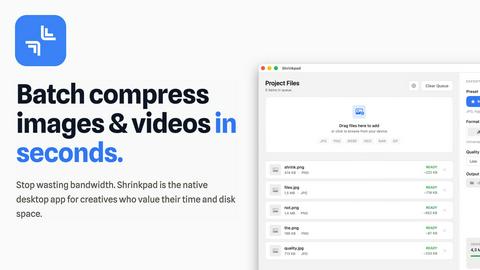
About Shrinkpad
Shrinkpad is a powerful desktop application designed exclusively for macOS users to batch compress images and videos efficiently. It caters to photographers, designers, content creators, and anyone looking to optimize their digital assets without sacrificing quality. By leveraging native macOS frameworks, Shrinkpad processes media files locally, ensuring privacy and eliminating the need for internet connectivity. Users can drag and drop hundreds of files or entire folders, customize compression settings, and achieve significant reductions in file size—up to 90%—while maintaining visual integrity. This not only saves valuable disk space but also enhances performance for web applications and mobile devices by reducing load times. With support for over 50 file formats and an intuitive interface, Shrinkpad streamlines the media optimization process, making it an essential tool for anyone tired of managing bloated file sizes.
Features of Shrinkpad
Efficient Batch Processing
Shrinkpad enables users to batch compress a multitude of images and videos simultaneously. No more tedious individual file handling; simply drag and drop entire folders to compress hundreds of files in mere seconds, significantly speeding up your workflow.
Advanced Compression Technology
Utilizing sophisticated algorithms, Shrinkpad automatically analyzes the visual complexity of media files to apply the optimal compression ratio. This ensures that the final output maintains high visual quality without noticeable artifacts, making it perfect for professional use.
Extensive Format Support
Supporting over 50 media formats right out of the box, Shrinkpad eliminates compatibility concerns. It seamlessly handles popular formats such as JPG, PNG, HEIC, WebP for images, and MP4, MOV for videos, allowing for comprehensive media optimization without the need for prior conversion.
Customizable Settings
Shrinkpad offers a high degree of customization, enabling users to choose quality presets or manually adjust compression settings. Users can select their preferred output formats, create custom file naming patterns, and even choose to preserve or strip metadata with ease, tailoring the process to fit individual workflows.
Use Cases of Shrinkpad
Photographers
For photographers who deal with high-resolution images, Shrinkpad allows for quick batch compression of RAW files, significantly reducing storage needs while preserving image quality for portfolios and client deliveries.
Content Creators
Content creators can effortlessly compress videos and images for their projects, ensuring faster upload times and improved performance on websites and social media platforms without sacrificing quality.
Web Developers
Web developers benefit from Shrinkpad’s ability to reduce image and video sizes, which can lead to faster loading times and better performance metrics for websites, enhancing user experience and SEO rankings.
Graphic Designers
Graphic designers can streamline their asset preparation by batch compressing files exported from design tools like Figma or Photoshop, saving time and ensuring that their media files are optimized for use in various applications and platforms.
Frequently Asked Questions
Can I use Shrinkpad for free?
Yes, Shrinkpad offers a Free Starter plan that includes essential tools for casual users, allowing you to batch process up to 10 files at a time in common formats.
What file formats does Shrinkpad support?
Shrinkpad supports over 50 formats, including JPG, PNG, WEBP, AVIF for images, and MP4, MOV for videos, ensuring versatility in media handling.
Does Shrinkpad support video compression?
Absolutely! Shrinkpad is capable of compressing video files, allowing users to optimize their media assets without any reduction in visual quality.
How many files can I process at once?
With the Free Starter plan, you can process up to 10 files per batch. However, with the Personal and Team plans, there are no limits on batch processing, allowing you to handle thousands of files seamlessly.
Pricing of Shrinkpad
Shrinkpad offers straightforward pricing with no subscriptions. The Free Starter plan is available for casual users, while the Personal plan is priced at $14 for individual creators, providing unlimited batch processing and support for all formats. For teams and small studios, the Team plan is available for $35, offering multiple device licenses and priority support.
Explore more in this category:
Top Alternatives to Shrinkpad
OmniGemini
OmniGemini is a multimodal AI tool that enables effortless video and image creation, remixing, and editing using diverse media inputs.

Gemini Omni
Gemini Omni unifies multimodal prompting, chat editing, and visual remixing into one continuous workflow for faster creative iteration.

Lovart
Lovart AI uses next-gen generative intelligence to turn simple prompts into professional logos, videos, and complete brand kits in seconds.
dMaya.ai
dMaya.ai is an AI-driven design platform that transforms product descriptions into editable UI screens, streamlining your design workflow instantly.

Spark Robin
Spark Robin transforms text and images into engaging short videos for social media, ads, and creative projects with ease and precision.

QuoteImageMaker
QuoteImageMaker analyzes your text to generate perfectly matched backgrounds and preset sizes for social media posts in seconds.

MuseSpark AI
MuseSpark AI transforms your creative inspirations into reality with powerful models for text, audio, image, and video content creation.

ul0
ul0 is a free URL shortener that instantly creates permanent links, tracks clicks, and generates UPI QR codes without any signup required.