
ProcessSpy
ProcessSpy is an advanced process monitor for Mac that provides real-time insights and detailed analytics for optimal performance management.
Visit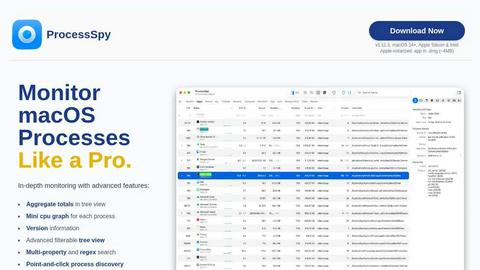
About ProcessSpy
ProcessSpy is an advanced process monitoring tool specifically designed for macOS, offering users a powerful alternative to the traditional Activity Monitor. It provides a comprehensive view of all running processes, enabling users to visualize process trees, inspect open files, and analyze environment variables with ease. This utility is especially valuable for developers and power users who need a deeper insight into their applications and system performance. With features such as point-and-click process discovery and advanced filtering options, ProcessSpy empowers users to efficiently manage and troubleshoot their macOS environment. Its native integration ensures a seamless experience, making it a reliable choice for those who demand precision and control over their system processes.
Features of ProcessSpy
Advanced Tree View
The Advanced Tree View feature allows users to visualize processes in a hierarchical structure, providing aggregate totals for CPU, memory, and thread usage. This offers a clear overview of resource consumption and makes it easier to identify which processes are resource-heavy.
Javascript Filters
With Javascript Filters, users can define complex conditions for filtering processes. This powerful feature allows for multi-criteria searches, enabling users to quickly find specific processes based on detailed attributes, enhancing the usability of the tool.
Process History Recording
ProcessSpy includes a Process History Recording feature that tracks historical values for CPU, memory, and threads. Users can see how resource consumption changes over time, and the ability to export this data to CSV makes it easy to analyze trends or share findings.
Environment Variables (Paid)
For users who require deeper insights, the Environment Variables feature allows access to a process's environment variables with just a click. This is particularly useful for developers needing to troubleshoot or optimize their applications based on the execution context.
Use Cases of ProcessSpy
Software Development
Developers can benefit greatly from ProcessSpy by using its detailed process information to manage multiple applications running different JDK versions. This tool allows them to quickly identify processes based on command line arguments and version details.
System Troubleshooting
System administrators can use ProcessSpy to troubleshoot performance issues by monitoring CPU and memory usage in real-time. The ability to visualize process trees helps in pinpointing the root cause of performance bottlenecks.
Performance Monitoring
IT professionals can leverage ProcessSpy's historical data recording feature to monitor application performance over time. By analyzing trends in resource usage, they can make informed decisions about scaling and optimization.
Security Analysis
Security analysts can utilize ProcessSpy to inspect running processes for unauthorized applications or processes that may indicate a security breach. The ability to view detailed process information aids in maintaining system integrity.
Frequently Asked Questions
Is ProcessSpy safe to install on my Mac?
Yes, ProcessSpy is Apple-notarized and distributed as a signed application within a DMG file. This ensures that it is verified and safe to use on both Intel and Apple Silicon Macs.
Does ProcessSpy support older versions of macOS?
No, ProcessSpy is specifically designed for macOS 14 and newer versions, ensuring compatibility with the latest system features and optimizations.
What is the license model?
The license for ProcessSpy allows one user to use the tool on unlimited devices. It includes lifetime updates and access to new features as they are released.
How can I access the advanced features of ProcessSpy?
Advanced features, such as viewing environment variables, advanced process information, and process history recording, can be unlocked by purchasing a license for $24.99. This fee also includes lifetime updates for the software.
Top Alternatives to ProcessSpy




Game Server Backend
Game Server Backend offers a unified platform for multiplayer games, simplifying player auth, data storage, and server management with one API.

Headless Domains
Headless Domains empowers AI agents with secure, verifiable identities to establish trust across applications and digital marketplaces.

GPT Image 2 API
GPT Image 2 API enables seamless generation and editing of high-quality images from text prompts for diverse design and marketing needs.
Json Translator
The easiest json translator to instantly translate JSON files online while keeping structure, keys, and formatting intact.
LoadTester
LoadTester is a modern HTTP and API load testing tool that lets engineering teams run distributed performance checks from browser or CI/CD without.