Kling AI Motion Control
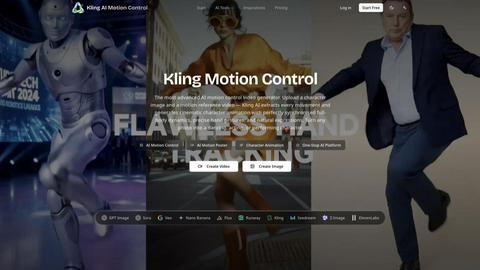
Kling AI Motion Control transfers full-body movement from a reference video onto any uploaded character image to create perfectly synchronized.
Visit
About Kling AI Motion Control
Kling AI Motion Control is a sophisticated AI-powered video generation tool developed by Kuaishou, designed to create cinematic character animations by transferring motion from a reference video to a static character image. This advanced system represents a significant leap in AI-driven animation, allowing users to upload a single photograph of a character and a short motion reference video, after which the AI extracts every movement and generates a fully synchronized animation. The tool is built for content creators, filmmakers, social media influencers, game developers, and marketing professionals who need high-quality, realistic character animation without the complexity of traditional motion capture or manual keyframing. Its core value proposition lies in its ability to deliver full-body dynamics, precise hand gestures, and natural facial expressions that rival professional animation studios, all within minutes and at a fraction of the cost. Kling AI Motion Control supports two orientation modes: Video mode for continuous action sequences up to 30 seconds and Image mode for character-focused shots with camera control. It operates on two powerful models, Kling 2.6 and 3.0, ensuring industry-leading fidelity in motion transfer. Whether turning a portrait into a dancing performer, creating a character for a short film, or generating engaging social media content, Kling AI Motion Control democratizes animation by making it accessible to anyone with a reference image and a vision.
Features of Kling AI Motion Control
Full-Body Motion Sync
The core capability of Kling AI Motion Control is its ability to perfectly synchronize full-body motions from the reference video to the character image. The AI captures joint positions, body dynamics, and natural weight transfer to create realistic animation that looks human rather than puppet-like. This feature ensures that every movement, from subtle shifts in posture to dynamic jumps and spins, is replicated with high precision, maintaining the character's identity and proportions throughout the sequence.
Complex Motion Performance
Kling AI Motion Control excels at handling demanding motion sequences including dance choreography, martial arts, multi-gesture performances, and rapid movement transitions. The model is trained to extract valid continuous action segments even from complex or fast-paced reference videos, ensuring that no motion is lost or distorted. This makes it suitable for professional applications where accuracy in movement is critical, such as in music videos, fitness demonstrations, or action scene storyboarding.
Hand Precision
One of the standout features of Kling AI Motion Control is its finger-level motion control, which preserves subtle hand gestures, pointing, grasping, and fine motor movements. The system achieves industry-leading hand fidelity compared to competitors like Viggle AI and Animate Anyone, making it possible to animate characters performing tasks that require dexterity, such as playing musical instruments, sign language, or intricate hand choreography. This level of detail significantly enhances the realism and emotional impact of the generated animation.
30s One-Shot Action
In Video orientation mode, Kling AI Motion Control can generate up to 30-second continuous videos in a single generation, which is the longest among AI motion control tools currently available. This eliminates the need for splicing multiple clips or using extensions to create full performance sequences. Users can produce complete dance routines, monologues, or action scenes in one go, saving time and ensuring seamless continuity in the final output.
Use Cases of Kling AI Motion Control
Social Media Content Creation
Content creators on platforms like TikTok, Instagram, and YouTube can use Kling AI Motion Control to transform static photos into engaging, animated characters that dance, act, or perform. This allows for the rapid production of viral-worthy content without the need for expensive equipment or professional actors. For example, a creator can upload a selfie and a dance video to generate a personalized dancing avatar that matches their style and branding, increasing viewer engagement and shareability.
Film and Video Previsualization
Filmmakers and storyboard artists can leverage Kling AI Motion Control to quickly previsualize character movements and scenes before committing to full production. By using reference images of actors or concept art and motion videos of desired actions, directors can test choreography, camera angles, and timing in a matter of minutes. This accelerates the creative process, reduces costs associated with test shoots, and allows for rapid iteration on scene composition and character blocking.
Game Development and Character Prototyping
Game developers can use Kling AI Motion Control to animate character concepts for prototyping and pitch presentations. By uploading concept art and reference motion videos, they can demonstrate how a character would move, fight, or interact within a game environment. This is particularly useful for indie developers and small studios that lack the resources for full motion capture sessions, enabling them to create compelling character demos for investors or internal review.
Marketing and Advertising Campaigns
Marketing professionals can create animated characters for brand mascots, product demonstrations, or social media ads using Kling AI Motion Control. For instance, a brand can turn its logo character into a dancing figure for a holiday campaign or animate a product image to show its features in action. This adds a dynamic, eye-catching element to advertising materials without the high costs of traditional animation or live-action shoots, making it ideal for small to medium-sized businesses.
Frequently Asked Questions
What are the input requirements for Kling AI Motion Control?
For the reference image, Kling AI Motion Control accepts JPG, JPEG, or PNG formats with a maximum file size of 10MB. The image must be at least 340 pixels on the short edge and no more than 3850 pixels on the long edge, with an aspect ratio between 2:5 and 5:2. For the reference video, supported formats are MP4 and MOV with a maximum file size of 50MB. The video must be a single continuous shot lasting between 3 and 30 seconds, and the character actions in the generated video will follow the movements shown in this reference.
How long does it take to generate a video and how much does it cost?
Generation time for Kling AI Motion Control ranges from 2 to 15 minutes, depending on the complexity of the motion and the output resolution selected. The cost is calculated per second of generated video, ranging from 6 to 9 credits per second. Users can choose between Standard 720p output for faster iteration and social media use, or Professional 1080p output for broadcast-ready, production-quality results. Both output options maintain full character identity consistency.
Can I control the background and other elements in the generated video?
Yes, Kling AI Motion Control offers advanced scene detail control through optional text prompts. Users can write prompts of up to 2,500 characters to specify background elements, clothing, lighting, and environment details. The motion for the character comes entirely from the reference video, while the prompt controls the visual context. In Image orientation mode, users can also control camera movement by including commands like Zoom In, Zoom Out, Camera Up, Camera Down, or Fixed Position in their prompts.
What makes Kling AI Motion Control different from other AI animation tools?
Kling AI Motion Control distinguishes itself through several key advantages. It offers the longest single-generation output at up to 30 seconds in Video mode, eliminating the need for splicing multiple clips. It provides industry-leading hand fidelity with finger-level motion control, outperforming competitors like Viggle AI and Animate Anyone. The tool also supports dual resolution output (720p and 1080p) and handles complex motion sequences including dance and martial arts. Additionally, it offers both Video and Image orientation modes with optional camera control, providing greater creative flexibility.
Explore more in this category:
Top Alternatives to Kling AI Motion Control
GPT Image 2 API
GPT Image 2 API lets you generate high-quality AI images online using GPT Image 2. Simple API, fast results, and developer-friendly integration.
QuoteImageMaker
QuoteImageMaker analyzes your text to generate perfectly matched backgrounds and preset sizes for social media posts in seconds.
ChatGPT Image Generator
Transform text prompts into professional AI images and edit existing photos using OpenAI's latest GPT Image technology for commercial use.
Kling AI Video Generator
Kling AI Video Generator produces cinematic clips with native audio and motion control from text or image prompts in one browser workspace.
China AI
China AI is the premier platform for generating professional images and videos by seamlessly integrating top Chinese and US AI models.
Gemini Pro - AI Image & Video Generator
Gemini Pro is the leading platform for generating photorealistic 4K images and cinematic videos from text using top AI models like Veo and Sora.