Image Color Picker Online
Effortlessly extract precise color codes from any image online, instantly generating HEX, RGB, HSL, and CMYK values for your design needs.
Visit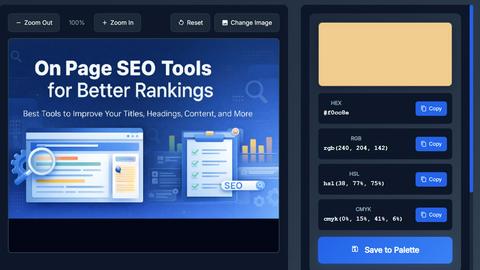
About Image Color Picker Online
Image Color Picker Online by SanishTech is a versatile, free, browser-based tool designed to effortlessly extract precise colors from images. This innovative tool allows users to upload any image file and click on a specific area to instantly obtain the corresponding color codes in various formats, including HEX, RGB, HSL, and CMYK. It is particularly useful for a diverse audience, including designers, developers, bloggers, marketers, and anyone who needs to ensure color accuracy in their work. Whether you are matching colors from logos, screenshots, graphics, or website mockups, this tool simplifies the process. Users can access the tool directly in their browser without the need for signup or software installation, making it an efficient and user-friendly solution for color extraction tasks.
Features of Image Color Picker Online
Multi-Format Color Output
One of the standout features of Image Color Picker Online is its ability to provide color codes in multiple formats simultaneously. Users can obtain HEX codes for web design, RGB values for digital projects, HSL for styling and gradients, and CMYK for print applications. This versatility caters to various design needs and ensures that users have the right format for any project.
Zoom and Precision Controls
The zoom feature enhances the tool's usability, allowing users to achieve pixel-perfect accuracy when selecting colors. This is particularly beneficial for picking colors from small or intricate areas, avoiding the risk of selecting the wrong shade, and working effectively with gradients and textures. Precision controls are essential for designers who require exact color matching.
One-Click Copy Buttons
Image Color Picker Online streamlines the color extraction process with convenient one-click copy buttons. Users can easily copy the desired color code without the hassle of manual typing, significantly speeding up their workflow. This feature is especially useful for professionals who frequently need to transfer color codes to other applications.
Save to Palette and Export Options
The tool allows users to build and save custom color palettes by collecting multiple colors from a single image. Additionally, users have the option to export their color selections in various formats, including CSS, JSON, or as an image. This feature is invaluable for designers and developers who want to maintain consistency across their projects and easily share color palettes with team members.
Use Cases of Image Color Picker Online
Web Design
Web designers can leverage the Image Color Picker Online tool to ensure consistency in their projects. By extracting exact color codes from UI designs, logos, or website mockups, they can create cohesive and visually appealing websites that align with branding guidelines.
Graphic Design
Graphic designers can utilize the tool to build color palettes for various projects. By accurately extracting colors from reference images or inspiration boards, they can create designs that resonate with their intended audience and maintain brand integrity.
Social Media Content Creation
Social media creators can benefit from the Image Color Picker Online by matching colors across their posts to maintain a consistent aesthetic. By easily picking colors from images, they can enhance their visual storytelling and create a recognizable brand presence.
Educational Purposes
Students and beginners in design can use this tool to learn about color formats and their applications. By visually exploring different color codes and seeing their impacts in real-time, they can gain a better understanding of color theory and its practical uses in design.
Frequently Asked Questions
How do I use the Image Color Picker Online tool?
To use the tool, simply upload an image by dragging it into the designated area or clicking to browse. Once uploaded, you can zoom in for precision, click on any part of the image, and instantly capture the color code in your desired format.
What image formats does the tool support?
The Image Color Picker Online supports various image formats, including JPG, PNG, GIF, and WEBP, with a maximum file size of up to 10MB. This compatibility ensures that users can work with a wide range of images.
Is there a need to sign up or install software?
No, the Image Color Picker Online is a free browser-based tool that does not require any sign-up or software installation. Users can access and use the tool directly in their web browser, making it convenient and hassle-free.
Can I save my color palettes?
Yes, the tool allows users to build and save custom color palettes by collecting multiple colors from a single image. Users can also export these palettes in various formats for use in other applications or projects.
Explore more in this category: