
Blueberry
Blueberry is an all-in-one Mac app that unifies editing, terminal, and browsing for seamless web app development.
Visit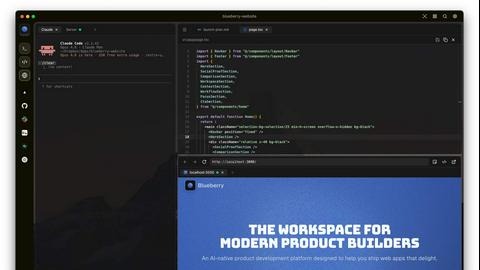
About Blueberry
Blueberry is an innovative macOS application designed to integrate your editor, terminal, and browser into a single, focused workspace, streamlining the product development process. It serves as an AI-native platform that enables modern product builders to create web applications seamlessly and efficiently. By connecting with advanced AI models like Claude, Gemini, and Codex through its built-in MCP server, Blueberry provides your AI with full visibility of your files, terminal outputs, and live previews. This eliminates the need for tedious copy-pasting of context, allowing developers to focus on coding and creativity rather than managing multiple tools. Whether you are a solo developer or part of a larger team, Blueberry is crafted to enhance productivity, foster collaboration, and simplify workflows, making it an essential tool for anyone involved in web app development.
Features of Blueberry
Integrated Workspace
Blueberry combines a terminal, code editor, and preview browser into one cohesive environment, minimizing the disruption caused by switching between different applications. This integration allows developers to maintain focus and efficiency, making the coding process smoother and more enjoyable.
Advanced AI Integration
With Blueberry's MCP server, you can connect various AI models directly within your workspace. This means your AI can see your entire project in real-time, providing contextual assistance that enhances coding and debugging, ultimately resulting in faster development cycles.
Multi-Device Preview
The built-in preview feature supports multiple device views, including desktop, tablet, and mobile. This provides developers with the ability to see exactly how their applications will appear to users across different platforms without leaving the Blueberry workspace.
Pinned Apps and Command Bar
Blueberry allows you to pin essential applications like GitHub, Figma, and Linear directly in your workspace. Additionally, the command bar enables quick access to files, project navigation, and command execution, ensuring that developers can work efficiently without losing their flow.
Use Cases of Blueberry
Streamlined Development Workflows
Developers can use Blueberry to create a personalized workspace that includes all necessary tools and apps. By saving specific setups for each project, they can quickly switch contexts and maintain productivity without the hassle of reopening and rearranging windows.
Enhanced Collaborative Projects
In team environments, Blueberry allows multiple users to work on the same project with shared access to the workspace. This fosters collaboration and real-time feedback, making it easier to manage group projects and track changes effectively.
Efficient Debugging and Testing
With the integrated AI models, debugging becomes a more manageable task. Developers can query their AI about code functionality or issues while observing real-time terminal output, significantly reducing the time spent on troubleshooting.
Rapid Prototyping
For product builders looking to test new ideas quickly, Blueberry's live preview and integrated tools facilitate rapid prototyping. The ability to see changes in real time helps teams iterate faster and validate concepts before full-scale development.
Frequently Asked Questions
What operating system is Blueberry compatible with?
Blueberry is currently designed exclusively for macOS, ensuring optimal performance and integration within Apple's ecosystem.
Is Blueberry really free during the beta phase?
Yes, Blueberry is completely free during its beta phase, allowing users to experience its features without any financial commitment.
How does Blueberry handle AI model integration?
Blueberry features a built-in MCP server that allows users to connect to various AI models like Claude, Codex, and Gemini, providing them with contextual insight into the entire project.
Can I use Blueberry for collaborative projects?
Absolutely! Blueberry supports collaborative workflows by allowing multiple users to share the same workspace, making it easier to work together on projects in real time.
Explore more in this category:
Top Alternatives to Blueberry



dMaya.ai
dMaya.ai is an AI-driven design platform that transforms product descriptions into editable UI screens, streamlining your design workflow instantly.

Game Server Backend
Game Server Backend offers a unified platform for multiplayer games, simplifying player auth, data storage, and server management with one API.
Headless Domains
Headless Domains empowers AI agents with secure, verifiable identities to establish trust across applications and digital marketplaces.

GPT Image 2 API
GPT Image 2 API enables seamless generation and editing of high-quality images from text prompts for diverse design and marketing needs.
Json Translator
The easiest json translator to instantly translate JSON files online while keeping structure, keys, and formatting intact.