
Opal vs Zovo
Side-by-side comparison to help you choose the right product.

Opal empowers solopreneurs and neurodivergent thinkers to effortlessly manage their projects and notes in one intuitive platform.
Last updated: April 13, 2026

Zovo offers 20 privacy-first Chrome extensions for developers and writers, all accessible with one affordable.
Last updated: February 25, 2026
Visual Comparison
Opal
Zovo
Feature Comparison
Opal
Visual Infinite Canvas
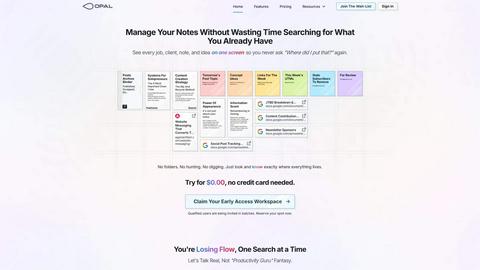
Opal provides a spacious digital workspace that allows users to visually organize their notes, tasks, and files. By presenting information in a spatial format, users can quickly grasp their entire workflow without unnecessary clicks or searches.
Markdown-Based Block Editor
The platform includes a rich markdown-based block editor, enabling users to create content with various media types. This feature is ideal for writing scripts, manuals, or articles, allowing for seamless integration of text, images, and links.
Real-Time Collaboration
Opal facilitates real-time collaboration, enabling multiple users to work on the same project simultaneously. This feature is essential for teams that require instant feedback and communication while managing tasks and documents.
AI Integration
With the Opal Recall skill, users can connect their own AI agents to the platform through an API. This integration enhances productivity by allowing users to retrieve information and insights quickly, making it easier to stay on top of tasks and projects.
Zovo
BeLikeNative
BeLikeNative offers a groundbreaking feature that allows users to write like native speakers in just one keystroke. Supporting 80 languages, this tool is perfect for anyone looking to enhance their writing skills quickly and efficiently, ensuring that communication is clear and professional.
Tab Suspender Pro
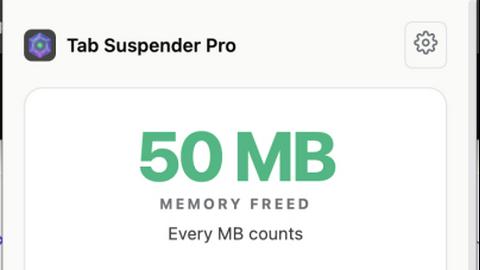
This extension intelligently manages your browser's memory usage by auto-suspending inactive tabs. With smart detection and memory tracking, Tab Suspender Pro helps users maintain optimal browser performance, reducing lag and preventing crashes, especially during extensive browsing sessions.
JSON Formatter Pro
JSON Formatter Pro simplifies the process of working with JSON data. It allows users to format, validate, and explore JSON objects easily, with features like beautification, minification, and a tree explorer for better visualization of data structures, making it a vital tool for developers and data analysts.
Clipboard History Pro
This powerful tool ensures that users never lose copied text again. Clipboard History Pro saves up to 10,000 clips and provides instant search capabilities, making it easy to retrieve previously copied items. The smart paste feature further enhances productivity by allowing quick access to frequently used text snippets.
Use Cases
Opal
Project Management
Opal is perfect for project managers who need to track multiple tasks, clients, and deadlines. The visual organization helps keep everything in sight, ensuring that no detail is overlooked during project execution.
Content Creation
Writers and content creators can utilize Opal's markdown editor to draft articles, scripts, or manuals. The ability to organize thoughts and ideas visually aids in the creative process while streamlining content development.
Knowledge Management
For businesses that rely on standard operating procedures and documentation, Opal serves as a centralized knowledge management system. All essential information can be stored, linked, and accessed easily, reducing time spent searching for documents.
Client Management
Individuals managing client relationships can benefit from Opal's structure, allowing them to keep track of client notes, contracts, and communication history in one accessible space. This ensures that every detail is accounted for and easily retrievable.
Zovo
Writing Assistance
Users looking to improve their writing quality can leverage BeLikeNative to instantly rewrite sentences in a way that sounds natural and fluent. This feature is particularly beneficial for non-native speakers seeking to enhance their communication skills in professional or academic settings.
Memory Management
For individuals who frequently have multiple tabs open, Tab Suspender Pro is essential. It automatically suspends tabs that are not in use, freeing up memory and ensuring that the browser runs smoothly, which is especially useful for users working on resource-intensive tasks.
Data Handling
Developers and data professionals can utilize JSON Formatter Pro to effectively manage and manipulate JSON data. This tool streamlines the process of formatting and validating data, making it easier to work with APIs and integrate data from various sources.
Text Management
Clipboard History Pro is invaluable for anyone who regularly copies and pastes text. Whether you are a writer, programmer, or student, this tool allows you to store and retrieve previously copied items quickly, enhancing overall productivity and efficiency in daily tasks.
Overview
About Opal
Opal is an innovative productivity tool designed to transform the way individuals and teams manage their notes, documents, and important files. Unlike traditional productivity applications that often bury information in complex folder structures, Opal offers a visual, infinite canvas where users can arrange their content spatially on a digital desk. This approach allows users to see everything at a glance, ensuring that important information remains top of mind. Whether you are a freelancer, a project manager, or a business owner, Opal caters to anyone who relies on effective knowledge management. Its primary value proposition lies in eliminating the frustration of searching for lost information, thereby enhancing focus, improving productivity, and ultimately enabling users to do their best work without the chaos of disorganized tools.
About Zovo
Zovo is an innovative suite of 20 Chrome extensions meticulously crafted by a solo developer with over a decade of experience and a proven track record of earning more than $400,000 on Upwork, boasting a 100% success rate. Designed for users who demand efficiency and privacy, Zovo's flagship extension, BeLikeNative, empowers over 3,300 users to write like native speakers with one-keystroke rewrites across 80 languages. The complete suite includes a variety of productivity tools such as Tab Suspender Pro, JSON Formatter Pro, Clipboard History Pro, and many more, catering to diverse needs. Each extension prioritizes user privacy, ensuring that no data leaves the user's device, eliminating data harvesting practices. Users actively participate in shaping the roadmap by voting on features, ensuring that their needs drive development. New extensions are regularly introduced, often providing early access to members before public release. With a commitment to open-source principles and community engagement, Zovo stands out as a user-centric solution for enhancing browser functionality.
Frequently Asked Questions
Opal FAQ
What makes Opal different from traditional productivity tools?
Opal stands out by offering a visual workspace that allows users to spatially organize their information, unlike traditional tools that often rely on hierarchical folder structures.
Can I collaborate with my team on Opal?
Yes, Opal features real-time collaboration capabilities, allowing multiple users to work together seamlessly on projects and documents.
Is there an AI integration available in Opal?
Absolutely. Opal offers the Opal Recall skill, enabling users to connect their AI agents through an API for enhanced productivity and quick information retrieval.
How does Opal help with knowledge management?
Opal serves as a centralized hub for all your essential documents and notes, making it easy to access and link information, streamlining your knowledge management processes.
Zovo FAQ
How does Zovo ensure user privacy?
Zovo prioritizes user privacy by ensuring that all data processed by its extensions remains on the user's device. There is no data harvesting or sharing with third parties, allowing users to browse and work without concerns about their privacy.
Can I request new features for Zovo extensions?
Absolutely! Zovo encourages users to submit feature requests directly. The developer reviews every suggestion, and the most requested features are prioritized for development, ensuring that the tools evolve based on user needs.
Are Zovo extensions free to use?
While some tools are available for free online, the complete suite of extensions requires a membership. This membership grants access to premium features, early releases, and the ability to vote on new features, enhancing the overall user experience.
How can I contact support if I have an issue?
Zovo offers direct communication with the developer, Michael Lip. Users can reach out via email or Discord for any questions or issues, ensuring that they receive prompt assistance without the frustrations of automated ticket systems.
Alternatives
Opal Alternatives
Opal is a spatial knowledge management tool designed specifically for solopreneurs, freelancers, and neurodivergent thinkers. By providing a visual, infinite canvas, Opal allows users to organize their notes, documents, and important files in a way that prioritizes visibility and accessibility. Its unique approach helps users retain a sense of control over their projects and enhances productivity. Many users seek alternatives to Opal for various reasons, including budget constraints, specific feature requirements, or compatibility with their preferred platforms. When looking for an alternative, consider factors such as ease of use, the ability to integrate with existing tools, and the flexibility of the software to accommodate your unique workflow. Ensuring that the alternative aligns with your organizational style and project management needs is crucial for maximizing productivity and efficiency.
Zovo Alternatives
Zovo is a comprehensive suite of 20 privacy-first Chrome extensions designed for developers and writers, all available through a single affordable subscription. This innovative platform caters to users seeking enhanced productivity and privacy, offering tools that streamline tasks while safeguarding personal data. As users become more aware of their online privacy and seek more tailored functionalities, they often look for alternatives that may better suit their specific needs, whether it be pricing, additional features, or compatibility with different platforms. When searching for an alternative, it's essential to consider various factors such as the range of features offered, user privacy policies, ease of use, and community engagement in the development process. Additionally, evaluating the reputation of the developer and the quality of customer support can significantly impact the overall experience. An ideal alternative should not only match or exceed the capabilities of Zovo but also align with your unique requirements and preferences.