
TemplateFox vs TrafficClaw
Side-by-side comparison to help you choose the right product.

TemplateFox
Effortlessly design and automate PDF generation for invoices, reports, and more with TemplateFox's intuitive platform.
Last updated: February 26, 2026

TrafficClaw
TrafficClaw is an AI analyst that converses with your SEO and analytics data to deliver actionable growth insights.
Last updated: April 13, 2026
Visual Comparison
TemplateFox
TrafficClaw

Feature Comparison
TemplateFox
Dynamic Template Design
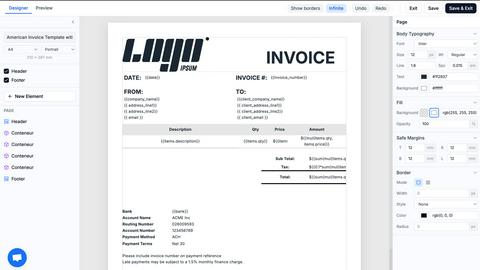
TemplateFox provides a highly intuitive drag-and-drop editor that allows users to design templates visually. This feature eliminates the need for any coding skills, making it accessible for everyone from professionals to beginners.
Automated Document Generation
Users can generate a vast array of documents—from invoices to reports—through a straightforward API call or Zapier automation. This automation simplifies workflows and saves significant time in document preparation.
Dynamic Data Binding
With TemplateFox, users can inject dynamic data into their templates seamlessly. This means that names, addresses, prices, and other data points can be updated automatically, ensuring that each document is personalized and accurate.
Scalable PDF Generation
TemplateFox is built to handle varying data loads efficiently. Tables within documents can automatically grow to accommodate any amount of data, spanning multiple pages if necessary, which is particularly useful for detailed reports or invoices.
TrafficClaw
AI Chat Analyst
This is the core interactive feature of TrafficClaw. It is a natural language interface where you can ask any question about your website's analytics and SEO performance. The AI does not provide generic blog-style advice; instead, it analyzes your connected GA4 and Search Console data in real-time to deliver specific verdicts. It can generate charts, pinpoint issues like traffic drops, identify cannibalization, and suggest actionable fixes, all within a conversational chat window.
SEO Intelligence Suite
This feature provides a comprehensive set of automated SEO tools that proactively monitor and improve your site's search presence. It includes functionality for detecting keyword gaps where competitors rank but you don't, alerting you to content decay as older pages lose rankings, identifying keyword cannibalization issues between your own pages, and offering optimization strategies for AI-powered search engines (AEO). It transforms raw search data into strategic insights.
Integrated Analytics Dashboard
TrafficClaw unifies key metrics into a single, clear dashboard, ending the need to switch between multiple tabs. You get a real-time overview of active visitors, traffic trends over time, bounce rates, and conversion funnel performance. This consolidated view provides an immediate, high-level understanding of your site's health and user engagement, all powered by your live Google Analytics 4 data.
Automated Site Audit & Content Tools
This feature conducts deep, page-level technical audits of your website, evaluating performance scores, Core Web Vitals, and other health metrics, accompanied by automatic fix suggestions. Furthermore, it includes a content creation toolkit powered by AI, featuring a schema generator, blog writing assistant, keyword researcher, and internal linking optimizer to help you create and enhance content that ranks.
Use Cases
TemplateFox
Invoicing
Businesses can automate their invoicing process by generating professional invoices quickly and efficiently. This not only saves time but also enhances the accuracy of financial documents.
Reporting
TemplateFox allows organizations to create comprehensive reports that can be updated with real-time data. This feature is ideal for businesses needing to present data-driven insights regularly.
Certifications
Educational institutions and training organizations can use TemplateFox to issue certificates in bulk. The ability to personalize each certificate with dynamic data ensures that every recipient receives a unique document.
Shipping Documents
E-commerce businesses can generate packing slips, shipping labels, and delivery notes seamlessly. The automation of these documents ensures that logistics run smoothly and efficiently.
TrafficClaw
Diagnosing Sudden Traffic Drops
When you notice an unexplained decline in website visitors, instead of manually cross-referencing dates in Analytics and Search Console, you can ask the AI Analyst "Why did my traffic drop on March 15th?". It will analyze your data, check for Google algorithm updates affecting your site, identify specific pages that lost impressions, and provide a clear verdict with evidence, such as a core update impact or a technical indexing issue.
Uncovering New Keyword Opportunities
For content creators and SEOs looking to expand their organic reach, you can ask "What are my main keyword gaps compared to my competitors?" or "What related keywords am I not targeting?". The SEO Intelligence suite analyzes your current rankings and search query data to surface high-potential, relevant keywords that you can target with new or existing content to capture more traffic.
Resolving Internal Competition (Cannibalization)
A common hidden SEO issue is when multiple pages on your own site compete for the same keywords, splitting their ranking potential. You can instruct the AI to "Check for keyword cannibalization on my site." It will quickly identify clusters of pages targeting identical terms, show you which page is winning, and recommend consolidation or differentiation strategies to strengthen your overall ranking authority.
Real-Time Performance Monitoring and Alerts
For agencies or businesses managing multiple sites, the integrated dashboard and AI provide at-a-glance monitoring. You can quickly see real-time visitor counts, site health scores, and get proactive alerts—like the system notifying you of a detected Google update while confirming your ranks remain stable. This allows for immediate, informed oversight without daily manual logins to each platform.
Overview
About TemplateFox
TemplateFox is a powerful Software as a Service (SaaS) solution designed to streamline the generation of professional PDFs from visually crafted templates. With its user-friendly drag-and-drop editor, users can create and customize templates without any prior knowledge of HTML or CSS. This makes TemplateFox an ideal choice for indie hackers, developers, and businesses looking to automate their document workflows efficiently. The platform allows users to generate thousands of documents—including invoices, certificates, reports, and more—through a simple API call or integration with Zapier. Users can expect rapid results, with PDF generation occurring in just 1-3 seconds. Starting with a free tier that offers 100 PDFs per month, TemplateFox scales effortlessly with affordable paid plans, ensuring that users have access to a robust solution tailored to their needs.
About TrafficClaw
TrafficClaw is an AI-powered analytics and SEO command center designed to eliminate the guesswork from website growth. It directly addresses the core frustration of modern webmasters, marketers, and developers: having access to data from tools like Google Analytics 4 and Search Console but lacking clear, actionable explanations for traffic changes and performance issues. Instead of presenting users with raw graphs and forcing them to become data detectives, TrafficClaw introduces a conversational AI analyst. You simply connect your data sources and ask questions in natural language, such as "Why did my traffic drop last week?" or "What are my top keyword opportunities?". The AI then analyzes your live, connected data to deliver specific verdicts, evidence-backed insights, and direct fixes. This product is for anyone responsible for a website's performance who values time and seeks efficient, data-driven growth. Its main value proposition is consolidating disparate analytics and SEO tools into one intelligent interface where you can converse with your data, receive automated audits, and get tailored recommendations to ask, fix, and grow your traffic systematically.
Frequently Asked Questions
TemplateFox FAQ
How does TemplateFox handle document security?
TemplateFox provides signed URLs for document access, ensuring that sensitive information is securely transmitted and only accessible to authorized individuals.
Can I integrate TemplateFox with other tools?
Yes, TemplateFox offers no-code integrations with popular platforms such as Zapier, Airtable, and others, allowing users to automate their workflows easily.
What types of documents can I create with TemplateFox?
You can create a wide variety of documents, including invoices, reports, certificates, packing slips, and any other professional PDFs tailored to your needs.
Is there a free trial available for TemplateFox?
Yes, TemplateFox offers a free plan that allows users to generate up to 100 PDFs per month, enabling potential customers to test the platform's capabilities before committing to a paid plan.
TrafficClaw FAQ
How does TrafficClaw access my data?
TrafficClaw uses secure, read-only Google OAuth to connect to your Google Analytics 4 and Search Console accounts. This means we request permission to view your data but cannot edit, delete, or modify anything within your Google accounts. Your data remains yours, is processed securely, and is never sold to third parties.
What makes the AI advice better than generic SEO tips?
The AI Analyst is fundamentally different because it grounds every response in your specific, live website data. Instead of giving one-size-fits-all advice from a blog post, it analyzes your actual traffic patterns, keyword rankings, and page performance to deliver personalized verdicts and actionable fixes that are directly relevant to your site's unique situation.
Is there a setup or coding required?
Setup is designed to be instantaneous and code-free. You simply sign in with Google, and TrafficClaw automatically detects your connected GA4 properties and Search Console sites. The entire process takes less than 30 seconds, and no technical configuration or coding is required to start asking questions and viewing your dashboard.
Can I use the live visitor globe on my own website?
Yes, TrafficClaw offers a free embeddable 3D globe widget that shows real-time visitor locations and activity, powered by your GA4 data. You can add it to any website or CMS by copying and pasting a single iframe code snippet. This requires no additional tracking scripts and provides a public-facing visualization of your site's live traffic.
Alternatives
TemplateFox Alternatives
TemplateFox is a powerful Software as a Service (SaaS) platform that specializes in the streamlined generation of professional PDFs using visually crafted templates. It falls within the productivity and management category, catering to a diverse range of users including indie hackers, developers, and businesses seeking to automate their document workflows. Users often explore alternatives to TemplateFox due to various reasons such as pricing structures, feature sets, or specific platform needs that may not align perfectly with their requirements. When searching for an alternative, it is essential to consider factors such as the ease of use, scalability, and the ability to customize templates without requiring technical expertise. Additionally, examining the automation capabilities and integration options with existing tools is crucial, as these elements significantly impact the efficiency of document generation workflows. Ultimately, identifying a solution that meets your unique needs while offering robust support can lead to enhanced productivity.
TrafficClaw Alternatives
TrafficClaw is an AI-powered analytics assistant that simplifies SEO and website data analysis. It belongs to the growing category of conversational AI tools for marketing and analytics, allowing users to ask direct questions about their traffic and performance data from connected sources like GA4 and Search Console. Users often explore alternatives for various practical reasons. These can include budget constraints, the need for specific integrations beyond the core offering, or a preference for a different user interface or reporting structure. Some may seek platforms with broader feature sets that include competitor analysis or content optimization alongside data interrogation. When evaluating other options, key considerations should be the depth and reliability of data connections, the intelligence and actionability of the insights provided, and the overall ease of use. The ideal tool should not only diagnose issues but also clearly guide you toward effective solutions, turning complex data into straightforward, executable steps.