
Seedance 2.0 AI vs Shrinkpad
Side-by-side comparison to help you choose the right product.

Seedance 2.0 AI
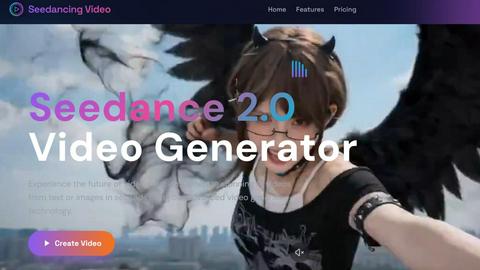
Seedance 2.0 AI effortlessly transforms text and images into captivating videos, enhancing your content creation.
Last updated: February 25, 2026

Shrinkpad
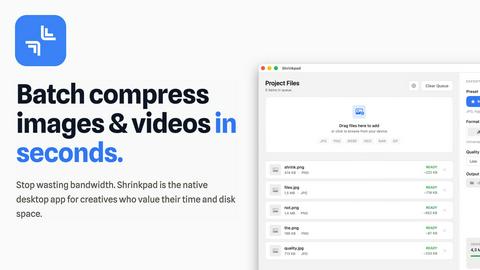
Effortlessly batch compress images and videos on Mac, optimizing file sizes while saving you time and bandwidth.
Last updated: February 26, 2026
Visual Comparison
Seedance 2.0 AI
Shrinkpad
Feature Comparison
Seedance 2.0 AI
Text to Video
Seedance 2.0 AI's Text to Video feature allows users to input descriptions and transform them into visually compelling videos. Utilizing advanced AI technology, the platform comprehends the essence of the text and generates a corresponding video that captures the intended message beautifully.
Image to Video
The Image to Video feature breathes life into static images, enabling users to create dynamic videos from photographs or illustrations. This powerful animation tool ensures that image quality is maintained while adding motion, making it ideal for showcasing products or artwork in an engaging way.
Multiple AI Models
Seedance 2.0 AI integrates various leading AI models, including Sora, Veo3, and Kling, within a single platform. This flexibility allows users to select the most suitable model for their specific video creation needs, ensuring high-quality outputs tailored to various styles and requirements.
User-Friendly Interface
The platform boasts an intuitive user interface that simplifies the video creation process. Users can easily enter prompts or upload images, select their desired AI model, and generate videos in just a few clicks, making it accessible for both novice and experienced creators alike.
Shrinkpad
Efficient Batch Processing
Shrinkpad enables users to batch compress a multitude of images and videos simultaneously. No more tedious individual file handling; simply drag and drop entire folders to compress hundreds of files in mere seconds, significantly speeding up your workflow.
Advanced Compression Technology
Utilizing sophisticated algorithms, Shrinkpad automatically analyzes the visual complexity of media files to apply the optimal compression ratio. This ensures that the final output maintains high visual quality without noticeable artifacts, making it perfect for professional use.
Extensive Format Support
Supporting over 50 media formats right out of the box, Shrinkpad eliminates compatibility concerns. It seamlessly handles popular formats such as JPG, PNG, HEIC, WebP for images, and MP4, MOV for videos, allowing for comprehensive media optimization without the need for prior conversion.
Customizable Settings
Shrinkpad offers a high degree of customization, enabling users to choose quality presets or manually adjust compression settings. Users can select their preferred output formats, create custom file naming patterns, and even choose to preserve or strip metadata with ease, tailoring the process to fit individual workflows.
Use Cases
Seedance 2.0 AI
Social Media Content Creation
Seedance 2.0 AI is perfect for generating engaging short videos tailored for social media platforms like TikTok and Instagram Reels. Marketers and content creators can utilize the platform to produce viral-worthy content that captures audience attention effectively.
Marketing and Advertising
With its advanced capabilities, Seedance 2.0 AI allows businesses to create professional marketing videos. Users can transform product images into promotional videos, enhancing brand visibility and driving customer engagement through visually appealing content.
Educational Content Development
Educators can leverage Seedance 2.0 AI to create informative training videos that enhance learning experiences. By converting textual materials into engaging visual narratives, teachers can present complex information in a more digestible format.
Creative Projects and Animated Art
Artists and creatives can utilize the platform to bring their artwork to life through animation. Seedance 2.0 AI enables users to create stunning animated videos that showcase their artistic talents, making it an invaluable tool for creative expression.
Shrinkpad
Photographers
For photographers who deal with high-resolution images, Shrinkpad allows for quick batch compression of RAW files, significantly reducing storage needs while preserving image quality for portfolios and client deliveries.
Content Creators
Content creators can effortlessly compress videos and images for their projects, ensuring faster upload times and improved performance on websites and social media platforms without sacrificing quality.
Web Developers
Web developers benefit from Shrinkpad’s ability to reduce image and video sizes, which can lead to faster loading times and better performance metrics for websites, enhancing user experience and SEO rankings.
Graphic Designers
Graphic designers can streamline their asset preparation by batch compressing files exported from design tools like Figma or Photoshop, saving time and ensuring that their media files are optimized for use in various applications and platforms.
Overview
About Seedance 2.0 AI
Seedance 2.0 AI is an innovative video creation platform that leverages advanced artificial intelligence to transform the video production landscape. Designed for creators, marketers, and educators, this platform enables users to generate high-resolution videos from text or images in just seconds, making the video creation process efficient and accessible. With a minimum resolution of 720 pixels and the capability to produce videos ranging from 3 to 30 seconds, Seedance 2.0 AI ensures that image quality is preserved while adding dynamic motion elements. This powerful tool is trusted by over 5,000 creators and is perfect for a variety of applications, including social media content, marketing videos, animated art, and visual storytelling. Its intuitive interface and advanced features empower users to create professional-quality videos without the need for complex editing skills, thus revolutionizing the way video content is produced and shared.
About Shrinkpad
Shrinkpad is a powerful desktop application designed exclusively for macOS users to batch compress images and videos efficiently. It caters to photographers, designers, content creators, and anyone looking to optimize their digital assets without sacrificing quality. By leveraging native macOS frameworks, Shrinkpad processes media files locally, ensuring privacy and eliminating the need for internet connectivity. Users can drag and drop hundreds of files or entire folders, customize compression settings, and achieve significant reductions in file size—up to 90%—while maintaining visual integrity. This not only saves valuable disk space but also enhances performance for web applications and mobile devices by reducing load times. With support for over 50 file formats and an intuitive interface, Shrinkpad streamlines the media optimization process, making it an essential tool for anyone tired of managing bloated file sizes.
Frequently Asked Questions
Seedance 2.0 AI FAQ
How quickly can I generate a video using Seedance 2.0 AI?
Videos can be generated in a matter of seconds after entering your prompt or uploading an image. The platform's advanced AI technology processes requests rapidly, allowing for efficient video production.
What types of content can I create with Seedance 2.0 AI?
You can create a wide range of content, including social media videos, marketing ads, educational materials, and animated art. The platform is versatile and caters to various creative and professional needs.
Do I need any technical skills to use Seedance 2.0 AI?
No, Seedance 2.0 AI features an intuitive interface designed for users of all skill levels. You can easily navigate the platform, making it accessible even for those without prior video editing experience.
Can I choose different AI models for my videos?
Yes, Seedance 2.0 AI offers multiple AI models, such as Sora, Veo3, and Kling, allowing you to choose the one that best suits your video creation needs and style preferences.
Shrinkpad FAQ
Can I use Shrinkpad for free?
Yes, Shrinkpad offers a Free Starter plan that includes essential tools for casual users, allowing you to batch process up to 10 files at a time in common formats.
What file formats does Shrinkpad support?
Shrinkpad supports over 50 formats, including JPG, PNG, WEBP, AVIF for images, and MP4, MOV for videos, ensuring versatility in media handling.
Does Shrinkpad support video compression?
Absolutely! Shrinkpad is capable of compressing video files, allowing users to optimize their media assets without any reduction in visual quality.
How many files can I process at once?
With the Free Starter plan, you can process up to 10 files per batch. However, with the Personal and Team plans, there are no limits on batch processing, allowing you to handle thousands of files seamlessly.
Alternatives
Seedance 2.0 AI Alternatives
Seedance 2.0 AI is a cutting-edge video creation platform that utilizes advanced artificial intelligence to transform text and images into high-quality videos. This tool is particularly beneficial for creators, marketers, and educators, enabling efficient content production with minimal effort. Users often seek alternatives to Seedance 2.0 AI for various reasons, such as the desire for different pricing structures, specific features that cater to unique needs, or compatibility with existing workflows. When choosing an alternative, it is essential to consider factors such as the platform's ease of use, the quality of output, range of features, and the ability to customize videos. Additionally, understanding the support available and the flexibility of the pricing plans can help users find a solution that aligns with their content creation goals.
Shrinkpad Alternatives
Shrinkpad is a robust desktop application tailored for macOS users, specializing in the batch compression of images and videos. This tool is particularly valuable for photographers, designers, and content creators who seek to optimize their digital assets efficiently. Given its focus on local processing, Shrinkpad ensures user privacy while significantly reducing file sizes, which can enhance overall performance for various applications. Users often seek alternatives to Shrinkpad for various reasons, including pricing models, feature sets, or compatibility with different operating systems. When considering an alternative, it's crucial to evaluate factors such as ease of use, the range of supported file formats, and the effectiveness of the compression algorithms. These aspects can greatly influence the user experience and the quality of the final media outputs.