
Renderly vs Shrinkpad
Side-by-side comparison to help you choose the right product.

Renderly
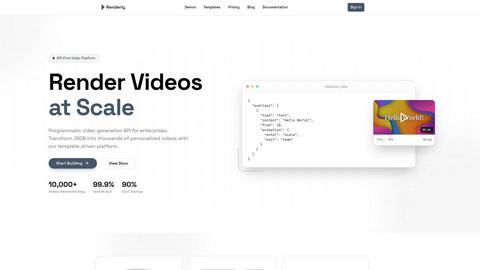
Renderly automates video production at scale, generating thousands of personalized videos quickly and cost-effectively.
Last updated: February 25, 2026

Shrinkpad
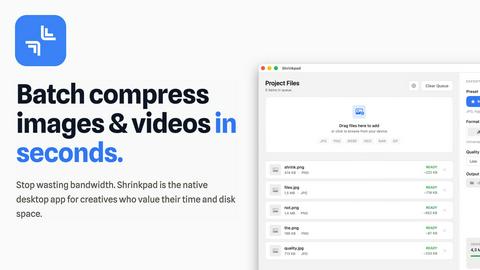
Effortlessly batch compress images and videos on Mac, optimizing file sizes while saving you time and bandwidth.
Last updated: February 26, 2026
Visual Comparison
Renderly
Shrinkpad
Feature Comparison
Renderly
API-First Architecture
Renderly boasts a RESTful API designed specifically for high-volume video generation, allowing developers to seamlessly integrate video capabilities into their applications. This architecture ensures that users can programmatically create videos with ease, making it suitable for both small projects and large-scale enterprises.
Template Management
With a centralized template library, Renderly provides users the ability to manage video templates effectively. This feature supports version control and JSON configuration, enabling dynamic content replacement based on user data, which is essential for personalized video production.
Scalable Infrastructure
Renderly operates on a cloud-native platform that features auto-scaling capabilities. This means that whether you need to render one video or 100,000, Renderly can handle the load without any performance dips, ensuring reliability during peak times.
Credit-Based Billing
Renderly offers a transparent, pay-per-render pricing model that includes volume discounts for enterprise customers. This billing approach allows users to only pay for what they render, making it a cost-effective solution for businesses of all sizes.
Shrinkpad
Efficient Batch Processing
Shrinkpad enables users to batch compress a multitude of images and videos simultaneously. No more tedious individual file handling; simply drag and drop entire folders to compress hundreds of files in mere seconds, significantly speeding up your workflow.
Advanced Compression Technology
Utilizing sophisticated algorithms, Shrinkpad automatically analyzes the visual complexity of media files to apply the optimal compression ratio. This ensures that the final output maintains high visual quality without noticeable artifacts, making it perfect for professional use.
Extensive Format Support
Supporting over 50 media formats right out of the box, Shrinkpad eliminates compatibility concerns. It seamlessly handles popular formats such as JPG, PNG, HEIC, WebP for images, and MP4, MOV for videos, allowing for comprehensive media optimization without the need for prior conversion.
Customizable Settings
Shrinkpad offers a high degree of customization, enabling users to choose quality presets or manually adjust compression settings. Users can select their preferred output formats, create custom file naming patterns, and even choose to preserve or strip metadata with ease, tailoring the process to fit individual workflows.
Use Cases
Renderly
Personalized Marketing Campaigns
Companies can utilize Renderly to create personalized marketing videos for their customers. By inputting customer data into the platform, businesses can automatically generate tailored video content that speaks directly to individual preferences, increasing engagement and conversion rates.
Social Media Content Generation
Social media managers can leverage Renderly to produce bulk video content for various platforms. By automating the rendering of multiple videos at once, teams can maintain a consistent posting schedule without the need for extensive manual labor.
Dynamic Data Visualizations
Data-driven organizations can benefit from Renderly's ability to create motion graphics that visualize complex datasets. By transforming JSON data into engaging videos, companies can present their findings in a more digestible and visually appealing format.
E-Learning and Training Videos
Educational institutions and corporations can use Renderly to automate the production of training videos. By utilizing templates and pre-defined content, they can quickly generate instructional materials that are both informative and visually engaging, enhancing the learning experience.
Shrinkpad
Photographers
For photographers who deal with high-resolution images, Shrinkpad allows for quick batch compression of RAW files, significantly reducing storage needs while preserving image quality for portfolios and client deliveries.
Content Creators
Content creators can effortlessly compress videos and images for their projects, ensuring faster upload times and improved performance on websites and social media platforms without sacrificing quality.
Web Developers
Web developers benefit from Shrinkpad’s ability to reduce image and video sizes, which can lead to faster loading times and better performance metrics for websites, enhancing user experience and SEO rankings.
Graphic Designers
Graphic designers can streamline their asset preparation by batch compressing files exported from design tools like Figma or Photoshop, saving time and ensuring that their media files are optimized for use in various applications and platforms.
Overview
About Renderly
Renderly is an innovative video infrastructure platform designed to revolutionize the way developers and creators produce video content. By automating video production at scale, Renderly eliminates the need for tedious manual rendering processes. This API-first platform is particularly beneficial for enterprises looking to generate personalized videos, bulk social media content, and data-driven motion graphics quickly and efficiently. With its robust template-driven architecture, users can transform JSON data into thousands of customized videos, allowing for high-volume production without compromising on quality. Renderly’s commitment to performance is evident in its impressive uptime SLA of 99.9% and the ability to render over 10,000 videos daily. By integrating Renderly into your workflow, you can reduce costs by up to 90% compared to traditional video rendering solutions, making it a go-to choice for those aiming to scale video content creation.
About Shrinkpad
Shrinkpad is a powerful desktop application designed exclusively for macOS users to batch compress images and videos efficiently. It caters to photographers, designers, content creators, and anyone looking to optimize their digital assets without sacrificing quality. By leveraging native macOS frameworks, Shrinkpad processes media files locally, ensuring privacy and eliminating the need for internet connectivity. Users can drag and drop hundreds of files or entire folders, customize compression settings, and achieve significant reductions in file size—up to 90%—while maintaining visual integrity. This not only saves valuable disk space but also enhances performance for web applications and mobile devices by reducing load times. With support for over 50 file formats and an intuitive interface, Shrinkpad streamlines the media optimization process, making it an essential tool for anyone tired of managing bloated file sizes.
Frequently Asked Questions
Renderly FAQ
What types of videos can I create with Renderly?
Renderly allows users to create a wide range of video types, including personalized marketing videos, social media content, motion graphics, and training videos, all tailored to specific audience needs.
How does Renderly ensure high-quality video rendering?
Renderly employs advanced rendering technology and a robust cloud-native infrastructure to guarantee high-quality video outputs. The platform is designed to handle high-volume rendering efficiently while maintaining visual fidelity.
Is Renderly easy to integrate with existing systems?
Yes, Renderly's RESTful API is designed for seamless integration with existing systems and applications. Comprehensive documentation, webhooks, and SDKs are provided to facilitate a smooth onboarding process for developers.
What kind of support does Renderly offer for its users?
Renderly offers extensive support through detailed documentation, a dedicated help center, and responsive customer service. Users can access resources to help them maximize the platform's capabilities and address any technical issues.
Shrinkpad FAQ
Can I use Shrinkpad for free?
Yes, Shrinkpad offers a Free Starter plan that includes essential tools for casual users, allowing you to batch process up to 10 files at a time in common formats.
What file formats does Shrinkpad support?
Shrinkpad supports over 50 formats, including JPG, PNG, WEBP, AVIF for images, and MP4, MOV for videos, ensuring versatility in media handling.
Does Shrinkpad support video compression?
Absolutely! Shrinkpad is capable of compressing video files, allowing users to optimize their media assets without any reduction in visual quality.
How many files can I process at once?
With the Free Starter plan, you can process up to 10 files per batch. However, with the Personal and Team plans, there are no limits on batch processing, allowing you to handle thousands of files seamlessly.
Alternatives
Renderly Alternatives
Renderly is an innovative video infrastructure platform that automates video production at scale, making it easier for developers and creators to produce high-quality video content efficiently. As an API-first solution, it caters to enterprises looking to streamline their video generation processes, particularly for personalized and bulk content. Users often seek alternatives to Renderly for various reasons, including pricing considerations, specific feature requirements, or the need for compatibility with existing platforms and workflows. When evaluating alternatives, it's essential to consider factors such as the ease of integration, scalability, template management capabilities, and overall value for money to ensure a solution meets unique production needs.
Shrinkpad Alternatives
Shrinkpad is a robust desktop application tailored for macOS users, specializing in the batch compression of images and videos. This tool is particularly valuable for photographers, designers, and content creators who seek to optimize their digital assets efficiently. Given its focus on local processing, Shrinkpad ensures user privacy while significantly reducing file sizes, which can enhance overall performance for various applications. Users often seek alternatives to Shrinkpad for various reasons, including pricing models, feature sets, or compatibility with different operating systems. When considering an alternative, it's crucial to evaluate factors such as ease of use, the range of supported file formats, and the effectiveness of the compression algorithms. These aspects can greatly influence the user experience and the quality of the final media outputs.