
Editaimg vs Seedream Image Generator
Side-by-side comparison to help you choose the right product.

Editaimg
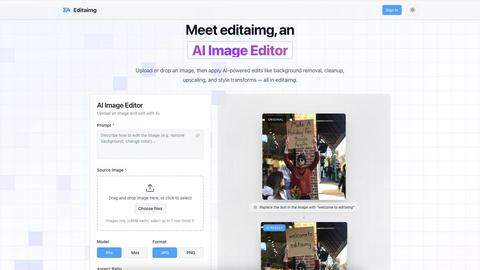
Editaimg is an AI image editor that effortlessly replaces backgrounds and removes objects using simple text commands.
Last updated: February 25, 2026

Seedream Image Generator
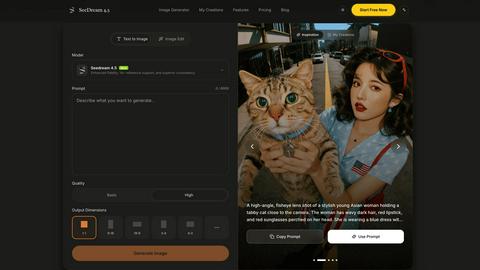
Seedream 4.5 generates stunning, production-ready images in seconds, mastering detail and consistency like never before.
Visual Comparison
Editaimg
Seedream Image Generator
Feature Comparison
Editaimg
AI-Powered Editing
Editaimg utilizes advanced AI algorithms to facilitate background removal, inpainting, and style transformations. Users can achieve professional results without needing extensive editing skills, making the platform accessible for everyone.
Add Someone to Photo
This feature allows users to seamlessly integrate additional characters into their images. With just a few clicks, users can enhance storytelling by placing a person into any photo naturally, ensuring a cohesive look.
AI Snow Tool
The AI Snow tool adds realistic snowfall and atmospheric effects to images, enabling users to create seasonal visuals that capture the essence of winter. This feature offers adjustable intensity and lighting, providing creative flexibility.
Gemini Watermark Remover
Editaimg’s Gemini watermark remover is a vital utility for cleaning up synthetic media. This feature ensures that users can export their images without visible watermarks, maintaining a professional appearance for all visual content.
Seedream Image Generator
Enhanced Fidelity
Seedream 4.5 offers enhanced fidelity in image generation, ensuring that the visuals produced closely mimic real-world details. This feature allows designers to create lifelike images that resonate with authenticity and professionalism.
Surgical Editing with Reference Images
With the ability to utilize over 14 reference images, Seedream allows users to perform surgical edits on specific sections of their visuals. This flexibility enables precise adjustments while preserving the overall style and context of the image.
Multi-Image Consistency
One of the standout features of Seedream 4.5 is its capability to maintain character consistency across a series of images. This is particularly beneficial for projects that require a uniform look, such as branding or storytelling, ensuring that characters remain cohesive in appearance.
Native 4K Support
Seedream 4.5 is equipped with native 4K support, allowing for the generation of high-resolution images suitable for professional use. This feature caters to industries that demand high-quality visuals, such as advertising, film production, and digital media.
Use Cases
Editaimg
E-commerce Product Photography
Editaimg can transform basic product images into stunning, professional visuals suitable for online stores. By changing backgrounds or adding context, sellers can create appealing product shots that attract consumers' attention.
Social Media Content Creation
For marketers and influencers, Editaimg provides an efficient way to produce high-quality images for social media. By quickly editing photos, users can maintain a consistent aesthetic across their platforms, enhancing engagement.
Travel Photo Enhancement
Travelers can use Editaimg to enhance their memories by removing unwanted distractions from their photos. This includes eliminating people or objects that detract from the beauty of the scene, resulting in cleaner, more captivating images.
Creative Storytelling
Writers and content creators can leverage Editaimg's features to develop compelling narratives through visuals. By adding characters or atmospheric elements to images, they can create a more immersive experience for their audience.
Seedream Image Generator
Marketing Campaigns
Seedream is an excellent tool for marketers looking to create eye-catching visuals for campaigns. Its ability to generate high-quality images quickly allows for rapid iteration and testing of creative concepts.
Character Design
For artists and designers working on character development, Seedream’s multi-image consistency feature ensures that characters remain visually consistent across various poses and expressions, streamlining the character design process.
Content Creation for Social Media
Content creators can leverage Seedream to produce engaging visuals tailored for social media platforms. The tool’s efficiency allows for the rapid generation of diverse content, keeping feeds fresh and appealing.
Product Visualization
E-commerce businesses can utilize Seedream to generate high-quality product images that attract potential customers. With the ability to perform detailed edits, businesses can showcase their products in the best possible light, enhancing online shopping experiences.
Overview
About Editaimg
Editaimg is an innovative AI-powered image editing platform designed to revolutionize the creation and enhancement of visual assets. By harnessing advanced generative intelligence, it simplifies complex design tasks into a user-friendly, text-driven process. The platform is particularly beneficial for developers, marketers, content creators, and anyone in need of professional-quality results without the steep learning curve associated with traditional editing software. The intuitive editor allows users to perform tasks such as background replacement, object removal, and text editing effortlessly by simply typing descriptions. This streamlining of the editing process not only saves time but also significantly reduces production costs, making Editaimg an essential tool for any digital project. With features tailored to address modern challenges in the digital landscape, Editaimg empowers users to transform their creative visions into high-quality outputs seamlessly.
About Seedream Image Generator
Seedream Image Generator is an advanced AI-driven tool designed to create stunning, production-ready visuals in mere seconds. Powered by its latest iteration, Seedream 4.5, this generator is tailored for professionals across various industries, including graphic design, marketing, and content creation. Its unique selling proposition lies in its ability to seamlessly render perfect text and maintain character consistencies across multiple images, making it an invaluable asset for projects requiring high fidelity and style retention. Beyond just generating images, Seedream 4.5 supports up to 14 reference images for surgical editing, allowing users to refine specific aspects of their visuals without compromising overall aesthetic integrity. With native 4K support and superior instruction-following capabilities, Seedream is optimized for delivering high-quality designs that meet commercial standards.
Frequently Asked Questions
Editaimg FAQ
What types of images can I edit with Editaimg?
Editaimg supports various image formats and allows users to upload images up to 10MB each. This flexibility ensures that users can work with a wide range of visuals for their projects.
How does the background removal feature work?
The background removal feature uses AI algorithms to intelligently identify and separate the foreground from the background. Users simply describe what they want removed, and the platform handles the rest, providing a clean final image.
Can I use Editaimg for commercial purposes?
Yes, users can utilize Editaimg for commercial projects, such as e-commerce or marketing materials. The platform's capabilities allow for the creation of high-quality images suitable for professional use.
Is there a learning curve associated with using Editaimg?
Editaimg is designed to be user-friendly, minimizing the learning curve compared to traditional editing software. Users can start editing by simply uploading an image and typing their desired edits, making it accessible for everyone.
Seedream Image Generator FAQ
What makes Seedream 4.5 different from other image generators?
Seedream 4.5 distinguishes itself through its advanced text rendering capabilities, multi-image consistency, and surgical editing features, allowing for high fidelity and precise adjustments.
How many reference images can I use for editing?
You can utilize up to 14 reference images for surgical editing in Seedream, enabling you to refine specific areas of your visuals without sacrificing the overall style.
Is there support for high-resolution outputs?
Yes, Seedream 4.5 supports native 4K resolution, making it ideal for professional design and commercial applications where high-quality visuals are a necessity.
Can Seedream be used for character design in animations?
Absolutely, Seedream is well-suited for character design in animations, as it maintains character consistency across multiple images, aiding in cohesive storytelling and branding efforts.