
Blueberry vs Requestly
Side-by-side comparison to help you choose the right product.

Blueberry
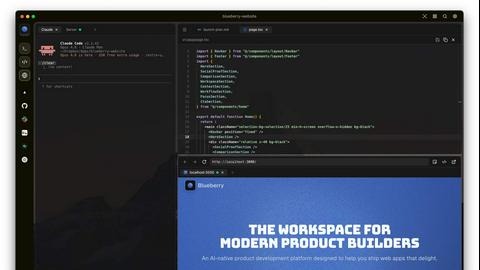
Blueberry is an all-in-one Mac app that unifies editing, terminal, and browsing for seamless web app development.
Last updated: February 25, 2026

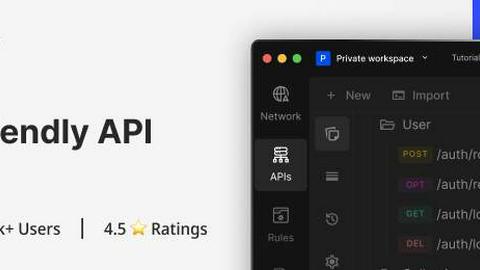
Requestly is a local-first, git-native API client with AI features and free team collaboration, offering a lightweight alternative to Postman.
Last updated: March 26, 2026
Visual Comparison
Blueberry
Requestly
Feature Comparison
Blueberry
Integrated Workspace
Blueberry combines a terminal, code editor, and preview browser into one cohesive environment, minimizing the disruption caused by switching between different applications. This integration allows developers to maintain focus and efficiency, making the coding process smoother and more enjoyable.
Advanced AI Integration
With Blueberry's MCP server, you can connect various AI models directly within your workspace. This means your AI can see your entire project in real-time, providing contextual assistance that enhances coding and debugging, ultimately resulting in faster development cycles.
Multi-Device Preview
The built-in preview feature supports multiple device views, including desktop, tablet, and mobile. This provides developers with the ability to see exactly how their applications will appear to users across different platforms without leaving the Blueberry workspace.
Pinned Apps and Command Bar
Blueberry allows you to pin essential applications like GitHub, Figma, and Linear directly in your workspace. Additionally, the command bar enables quick access to files, project navigation, and command execution, ensuring that developers can work efficiently without losing their flow.
Requestly
Git-Native Collections
Requestly revolutionizes API collaboration by storing collections as plain text files (in JSON format) on your local file system. This design allows you to place these files under Git version control. Teams can now branch, merge, commit, and review changes to their API specifications and test suites using the same familiar workflows they apply to their codebase. This eliminates the lock-in and sync issues associated with proprietary cloud storage, providing transparency, history, and robust collaboration directly through your existing DevOps tools.
Local-First & Login-Free Architecture
Prioritizing developer privacy and immediacy, Requestly operates on a local-first principle. No account or login is required to start using the application; you can download it and begin testing APIs within seconds. All your data—collections, environments, variables, and logs—resides securely on your local machine. This approach not only enhances security and performance by eliminating network latency for basic operations but also ensures you have full ownership and portability of your data at all times.
AI-Native API Development
Requestly incorporates artificial intelligence directly into the API workflow to accelerate development. The built-in AI can intelligently assist in composing complex requests, automatically generating test cases based on responses, and helping debug issues by analyzing API behavior. This embedded intelligence reduces manual effort, helps prevent errors, and allows developers, whether novice or expert, to work more efficiently and focus on building rather than on repetitive configuration tasks.
Comprehensive API Protocol Support
The tool offers robust support for both REST and GraphQL APIs, catering to modern backend architectures. For GraphQL, it provides a sophisticated client with schema introspection and auto-completion, making it easy to explore types and build valid queries. For all API types, it includes powerful features like pre-request and post-response scripts for dynamic request manipulation and response processing, environment variables for configuration management across different stages, and a collection runner for automating batch tests and workflows.
Use Cases
Blueberry
Streamlined Development Workflows
Developers can use Blueberry to create a personalized workspace that includes all necessary tools and apps. By saving specific setups for each project, they can quickly switch contexts and maintain productivity without the hassle of reopening and rearranging windows.
Enhanced Collaborative Projects
In team environments, Blueberry allows multiple users to work on the same project with shared access to the workspace. This fosters collaboration and real-time feedback, making it easier to manage group projects and track changes effectively.
Efficient Debugging and Testing
With the integrated AI models, debugging becomes a more manageable task. Developers can query their AI about code functionality or issues while observing real-time terminal output, significantly reducing the time spent on troubleshooting.
Rapid Prototyping
For product builders looking to test new ideas quickly, Blueberry's live preview and integrated tools facilitate rapid prototyping. The ability to see changes in real time helps teams iterate faster and validate concepts before full-scale development.
Requestly
Team-Based API Development and Review
Development teams can use Requestly's Git-native feature to collaboratively build and maintain API collections. Backend and frontend developers, or QA engineers, can work within a shared Git repository. Changes to endpoints, parameters, or test scripts can be proposed via branches and merged after review, ensuring consistency and quality in API contracts and integration tests. This use case formalizes API testing as part of the code review process.
Secure and Private API Testing in Regulated Industries
For organizations in finance, healthcare, or enterprise software where data sovereignty and security are paramount, Requestly's local-first architecture is ideal. Sensitive API keys, authentication tokens, and proprietary request/response data never get transmitted to or stored on third-party cloud servers. Developers can conduct thorough testing and debugging entirely offline, complying with strict internal security policies and regulatory requirements without compromising on tool capability.
Seamful Migration from Postman
Teams feeling constrained by Postman's licensing, cloud dependency, or collaboration costs can use Requestly for a frictionless transition. The one-click import feature seamlessly brings over collections, environments, and scripts. Teams can then immediately benefit from local storage, Git integration, and free collaboration features without losing their historical work, making the switch a practical and low-risk decision to regain control and reduce tooling expenses.
Automated API Testing and CI/CD Integration
Developers and DevOps engineers can integrate Requestly collections into Continuous Integration and Deployment pipelines. Since collections are stored as files in a Git repo, they can be checked out during build processes. The Requestly CLI or collection runner can be invoked to execute a suite of API tests against development, staging, or production environments, providing automated validation of API health and contract adherence with every code change.
Overview
About Blueberry
Blueberry is an innovative macOS application designed to integrate your editor, terminal, and browser into a single, focused workspace, streamlining the product development process. It serves as an AI-native platform that enables modern product builders to create web applications seamlessly and efficiently. By connecting with advanced AI models like Claude, Gemini, and Codex through its built-in MCP server, Blueberry provides your AI with full visibility of your files, terminal outputs, and live previews. This eliminates the need for tedious copy-pasting of context, allowing developers to focus on coding and creativity rather than managing multiple tools. Whether you are a solo developer or part of a larger team, Blueberry is crafted to enhance productivity, foster collaboration, and simplify workflows, making it an essential tool for anyone involved in web app development.
About Requestly
Requestly is a modern, developer-centric API client engineered for teams who prioritize performance, privacy, and seamless collaboration. It serves as a powerful, lightweight alternative to traditional cloud-based clients like Postman, built on a foundational principle of local-first architecture. This means all your sensitive API collections, environment variables, and request histories are stored directly on your machine as standard files, ensuring your data never leaves your control unless you choose to share it. Designed for the modern development workflow, Requestly integrates natively with Git, allowing teams to version control their API collections, create branches, and review changes through pull requests just as they do with their source code. It is AI-native, embedding intelligent assistance to help developers craft requests, generate tests, and debug APIs with unprecedented speed. Supporting both REST and GraphQL with full schema introspection, and equipped with features like pre/post-request scripts, environment variables, and a collection runner, Requestly provides a comprehensive toolkit for API development and testing. Its generous free tier includes essential team collaboration features such as shared workspaces and role-based access control, making professional-grade API management accessible without a login barrier. Trusted by over 300,000 developers at leading companies including Microsoft, Amazon, and Google, Requestly is the definitive choice for teams seeking a fast, secure, and collaborative API workflow.
Frequently Asked Questions
Blueberry FAQ
What operating system is Blueberry compatible with?
Blueberry is currently designed exclusively for macOS, ensuring optimal performance and integration within Apple's ecosystem.
Is Blueberry really free during the beta phase?
Yes, Blueberry is completely free during its beta phase, allowing users to experience its features without any financial commitment.
How does Blueberry handle AI model integration?
Blueberry features a built-in MCP server that allows users to connect to various AI models like Claude, Codex, and Gemini, providing them with contextual insight into the entire project.
Can I use Blueberry for collaborative projects?
Absolutely! Blueberry supports collaborative workflows by allowing multiple users to share the same workspace, making it easier to work together on projects in real time.
Requestly FAQ
How does Requestly's collaboration work if data is stored locally?
Requestly enables collaboration through shared Git repositories. Team members clone a repository containing the Requestly collection files. When someone makes changes, they commit and push to a branch, creating a pull request for team review. Once approved and merged, others can pull the updates to their local machines. The application itself also offers shared workspace synchronization via secure peer-to-peer or cloud-optional sync for real-time collaboration, while keeping the source of truth in version-controlled files.
Is Requestly really free for team collaboration?
Yes, a core differentiator of Requestly is that its free tier includes robust team collaboration features. This includes the ability to create shared workspaces, invite team members, and utilize role-based access control (RBAC) to assign Admin, Editor, or Viewer permissions. This stands in contrast to many competitors who restrict advanced collaboration to paid enterprise plans, making Requestly an exceptionally cost-effective solution for startups and development teams.
Can I import my existing Postman data into Requestly?
Absolutely. Requestly provides a straightforward, one-click import process specifically designed for Postman users. You can easily import your complete Postman collections, including all requests, folders, associated environment variables, and pre-request/test scripts. This ensures a smooth and immediate transition, allowing you to leverage Requestly's enhanced features without having to manually recreate your existing API testing infrastructure.
What makes Requestly a "lightweight" alternative to Postman?
Requestly is considered lightweight due to its focused architecture. It avoids the feature bloat and mandatory cloud synchronization that can slow down other clients. By operating locally-first, it launches quickly and performs operations without network delays for data access. Its interface is designed for efficiency, and it does not require a persistent user login or account dashboard for core functionality, resulting in a faster, more responsive developer experience dedicated specifically to API workflows.
Alternatives
Blueberry Alternatives
Blueberry is an innovative macOS application that falls under the category of development tools, specifically designed to unify the coding experience by integrating an editor, terminal, and browser into a single, focused workspace. This all-in-one platform is particularly attractive to web app developers, streamlining the development process through advanced AI integrations and a seamless user interface. Users often seek alternatives to Blueberry for various reasons, such as pricing concerns, specific feature requirements, or compatibility with different operating systems. When looking for an alternative, it's essential to consider factors like ease of use, integration capabilities with existing tools, and the overall effectiveness in enhancing productivity. Evaluating these aspects can help developers find a solution that best meets their unique workflow and project needs.
Requestly Alternatives
Requestly is a local-first, git-controlled API client designed for modern development teams. It belongs to the category of developer tools, specifically API testing and development platforms. It prioritizes data ownership and seamless integration into existing development workflows by storing collections as version-controlled files. Developers may seek alternatives to any tool for various reasons, including specific feature requirements, budget constraints, platform compatibility, or differing philosophies on data privacy and collaboration. The ideal tool varies based on team size, workflow complexity, and integration needs within the broader development ecosystem. When evaluating alternatives, key considerations include the tool's approach to data storage and security, its collaboration model, pricing transparency, and support for essential API standards like REST and GraphQL. The ability to integrate with version control systems and CI/CD pipelines is also a critical factor for teams practicing DevOps.