
Renderly vs Veo 4 AI Video Generator
Side-by-side comparison to help you choose the right product.

Renderly
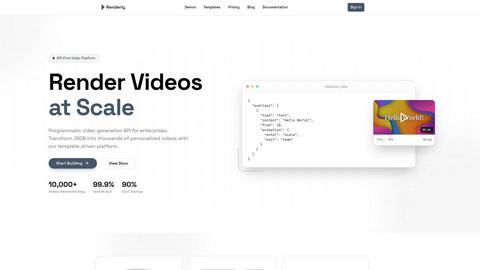
Renderly automates video production at scale, generating thousands of personalized videos quickly and cost-effectively.
Last updated: February 25, 2026

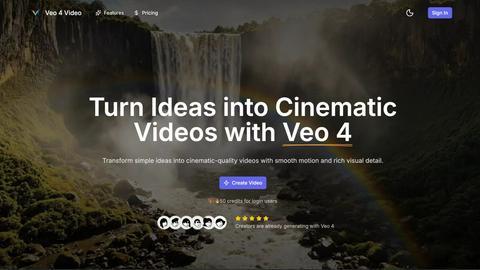
Veo 4 AI Video Generator transforms text and images into stunning cinematic videos in minutes, effortlessly bringing ...
Last updated: February 26, 2026
Visual Comparison
Renderly
Veo 4 AI Video Generator
Feature Comparison
Renderly
API-First Architecture
Renderly boasts a RESTful API designed specifically for high-volume video generation, allowing developers to seamlessly integrate video capabilities into their applications. This architecture ensures that users can programmatically create videos with ease, making it suitable for both small projects and large-scale enterprises.
Template Management
With a centralized template library, Renderly provides users the ability to manage video templates effectively. This feature supports version control and JSON configuration, enabling dynamic content replacement based on user data, which is essential for personalized video production.
Scalable Infrastructure
Renderly operates on a cloud-native platform that features auto-scaling capabilities. This means that whether you need to render one video or 100,000, Renderly can handle the load without any performance dips, ensuring reliability during peak times.
Credit-Based Billing
Renderly offers a transparent, pay-per-render pricing model that includes volume discounts for enterprise customers. This billing approach allows users to only pay for what they render, making it a cost-effective solution for businesses of all sizes.
Veo 4 AI Video Generator
Text-to-Video Engine
Veo 4 features a powerful text-to-video engine that converts clear prompts into coherent cinematic clips. Users can enhance their videos by adding details such as time of day, camera movement, and mood, ensuring that the final product closely aligns with their creative vision.
Image-to-Video Motion
This feature enables users to animate still images into videos seamlessly. By uploading one or two images, Veo 4 generates smooth transitions between frames, allowing for dynamic motion that enhances the storytelling aspect of the visual content.
Fast & Quality Modes
Veo 4 offers two operational modes: Fast for quick drafts and Quality for polished outputs. This flexibility allows users to choose the pace of their video production based on their specific needs, whether it's for rapid prototyping or detailed final edits.
Aspect Ratios + Clean Exports
With the ability to choose between multiple aspect ratios—Auto, 16:9, or 9:16—users can export clean 1080p videos without watermarks. This feature simplifies the sharing process across various platforms, ensuring that content is ready for immediate posting.
Use Cases
Renderly
Personalized Marketing Campaigns
Companies can utilize Renderly to create personalized marketing videos for their customers. By inputting customer data into the platform, businesses can automatically generate tailored video content that speaks directly to individual preferences, increasing engagement and conversion rates.
Social Media Content Generation
Social media managers can leverage Renderly to produce bulk video content for various platforms. By automating the rendering of multiple videos at once, teams can maintain a consistent posting schedule without the need for extensive manual labor.
Dynamic Data Visualizations
Data-driven organizations can benefit from Renderly's ability to create motion graphics that visualize complex datasets. By transforming JSON data into engaging videos, companies can present their findings in a more digestible and visually appealing format.
E-Learning and Training Videos
Educational institutions and corporations can use Renderly to automate the production of training videos. By utilizing templates and pre-defined content, they can quickly generate instructional materials that are both informative and visually engaging, enhancing the learning experience.
Veo 4 AI Video Generator
Product Ads
Veo 4 is ideal for creating short and engaging promotional clips. Businesses can transform concise pitches into visually appealing videos that effectively capture the essence of their products, making it perfect for landing pages and paid advertising campaigns.
Social Shorts
The platform is designed to generate loopable B-roll and short clips that are perfect for social media. Marketers and content creators can utilize Veo 4 to create captivating visuals from hooks or captions that enhance viewer engagement and retention.
Concept Visuals
For designers and artists, Veo 4 serves as a tool to visualize concepts quickly. Users can turn their ideas into motion graphics, making it easier to communicate their vision and iterate on design concepts with rich visual details.
Story-Driven Motion Pieces
Storytellers can leverage Veo 4 to create narrative-driven videos that combine text prompts with compelling visuals. This feature is especially useful for filmmakers and content creators looking to explore storytelling through innovative visual formats.
Overview
About Renderly
Renderly is an innovative video infrastructure platform designed to revolutionize the way developers and creators produce video content. By automating video production at scale, Renderly eliminates the need for tedious manual rendering processes. This API-first platform is particularly beneficial for enterprises looking to generate personalized videos, bulk social media content, and data-driven motion graphics quickly and efficiently. With its robust template-driven architecture, users can transform JSON data into thousands of customized videos, allowing for high-volume production without compromising on quality. Renderly’s commitment to performance is evident in its impressive uptime SLA of 99.9% and the ability to render over 10,000 videos daily. By integrating Renderly into your workflow, you can reduce costs by up to 90% compared to traditional video rendering solutions, making it a go-to choice for those aiming to scale video content creation.
About Veo 4 AI Video Generator
Veo 4 AI Video Generator is an advanced AI-powered platform designed to transform text and images into cinematic-quality video content. Utilizing cutting-edge technology, Veo 4 allows users to create stunning videos from simple prompts, making it an invaluable tool for creators, marketers, and anyone involved in visual storytelling. The platform excels at producing high-fidelity clips quickly, enabling users to generate dynamic 8-second videos that capture attention and convey messages effectively. With intuitive controls for motion, lighting, and camera simulation, Veo 4 democratizes video production, allowing individuals without technical editing skills to craft professional-grade videos. Whether for social media, product ads, or creative projects, Veo 4 makes video generation accessible, efficient, and expressive, empowering users to bring their ideas to life in just minutes.
Frequently Asked Questions
Renderly FAQ
What types of videos can I create with Renderly?
Renderly allows users to create a wide range of video types, including personalized marketing videos, social media content, motion graphics, and training videos, all tailored to specific audience needs.
How does Renderly ensure high-quality video rendering?
Renderly employs advanced rendering technology and a robust cloud-native infrastructure to guarantee high-quality video outputs. The platform is designed to handle high-volume rendering efficiently while maintaining visual fidelity.
Is Renderly easy to integrate with existing systems?
Yes, Renderly's RESTful API is designed for seamless integration with existing systems and applications. Comprehensive documentation, webhooks, and SDKs are provided to facilitate a smooth onboarding process for developers.
What kind of support does Renderly offer for its users?
Renderly offers extensive support through detailed documentation, a dedicated help center, and responsive customer service. Users can access resources to help them maximize the platform's capabilities and address any technical issues.
Veo 4 AI Video Generator FAQ
How long does it take to generate a video with Veo 4?
Generating a video typically takes only a few minutes, allowing users to quickly turn their ideas into cinematic clips without extensive waiting times.
Can I use Veo 4 for free?
New users are rewarded with 50 free credits upon signing up, providing an opportunity to explore the platform's capabilities before committing to a paid plan.
What types of media can I use with Veo 4?
Veo 4 supports both text inputs for the text-to-video feature and image uploads for the image-to-video functionality, enabling diverse creative expressions.
Is there a limit on video exports?
Users can export multiple videos in various aspect ratios without watermarks, making it easy to share content across different platforms without restrictions.
Alternatives
Renderly Alternatives
Renderly is an innovative video infrastructure platform that automates video production at scale, making it easier for developers and creators to produce high-quality video content efficiently. As an API-first solution, it caters to enterprises looking to streamline their video generation processes, particularly for personalized and bulk content. Users often seek alternatives to Renderly for various reasons, including pricing considerations, specific feature requirements, or the need for compatibility with existing platforms and workflows. When evaluating alternatives, it's essential to consider factors such as the ease of integration, scalability, template management capabilities, and overall value for money to ensure a solution meets unique production needs.
Veo 4 AI Video Generator Alternatives
Veo 4 AI Video Generator is an advanced platform that transforms text and images into cinematic-quality video content, catering to the needs of creators, marketers, and visual storytellers. As users explore video production tools, they often seek alternatives due to considerations like pricing structures, specific feature sets, platform compatibility, or varying levels of user support. The quest for alternatives typically stems from the desire for more flexibility, enhanced capabilities, or simply a better fit for individual project requirements. When selecting an alternative to Veo 4, users should evaluate key factors such as ease of use, the range of features offered, the quality of output, and how well the platform aligns with their specific video production goals. Additionally, assessing customer support, pricing options, and community feedback can significantly influence the decision-making process, ensuring that the chosen tool effectively meets their creative needs.