
Opal vs Vibrantsnap
Side-by-side comparison to help you choose the right product.

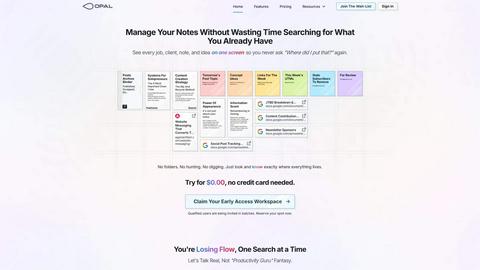
Opal empowers solopreneurs and neurodivergent thinkers to effortlessly manage their projects and notes in one intuitive platform.
Last updated: April 13, 2026

Vibrantsnap
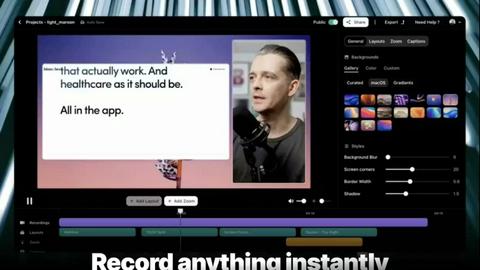
Transform screen recordings into polished, engaging videos with AI editing, voiceovers, and captions in minutes.
Last updated: February 25, 2026
Visual Comparison
Opal
Vibrantsnap
Feature Comparison
Opal
Visual Infinite Canvas
Opal provides a spacious digital workspace that allows users to visually organize their notes, tasks, and files. By presenting information in a spatial format, users can quickly grasp their entire workflow without unnecessary clicks or searches.
Markdown-Based Block Editor
The platform includes a rich markdown-based block editor, enabling users to create content with various media types. This feature is ideal for writing scripts, manuals, or articles, allowing for seamless integration of text, images, and links.
Real-Time Collaboration
Opal facilitates real-time collaboration, enabling multiple users to work on the same project simultaneously. This feature is essential for teams that require instant feedback and communication while managing tasks and documents.
AI Integration
With the Opal Recall skill, users can connect their own AI agents to the platform through an API. This integration enhances productivity by allowing users to retrieve information and insights quickly, making it easier to stay on top of tasks and projects.
Vibrantsnap
Built-in Video Analytics
Vibrantsnap provides comprehensive video analytics that allow users to track viewer engagement. You can see who watched your videos, how many times they were viewed, and where viewers tend to lose interest. This feature requires no setup and offers valuable insights that can inform future content strategies and optimize viewer retention.
Auto-Cut + Auto-Layout
Say goodbye to tedious video editing. With Vibrantsnap's auto-cut and auto-layout features, silences and filler words are automatically removed, and professional layouts are applied with just a couple of clicks. This ensures that your videos are polished and ready for sharing in a matter of seconds, allowing you to focus on content creation rather than lengthy editing processes.
AI Voiceover Integration
Vibrantsnap enhances the viewer experience with professional AI voiceovers. This feature allows users to add engaging audio narration to their videos seamlessly, creating a more immersive and informative presentation. The AI-generated voiceovers can be customized to match the tone and style of your brand, elevating the overall quality of your content.
Call-to-Action Buttons
Vibrantsnap makes it easy to drive conversions by integrating customizable call-to-action buttons directly within your videos. Whether you want viewers to book a call or make a purchase, you can add these interactive elements effortlessly. This feature not only enhances user engagement but also tracks clicks and interactions, providing insights into viewer behavior.
Use Cases
Opal
Project Management
Opal is perfect for project managers who need to track multiple tasks, clients, and deadlines. The visual organization helps keep everything in sight, ensuring that no detail is overlooked during project execution.
Content Creation
Writers and content creators can utilize Opal's markdown editor to draft articles, scripts, or manuals. The ability to organize thoughts and ideas visually aids in the creative process while streamlining content development.
Knowledge Management
For businesses that rely on standard operating procedures and documentation, Opal serves as a centralized knowledge management system. All essential information can be stored, linked, and accessed easily, reducing time spent searching for documents.
Client Management
Individuals managing client relationships can benefit from Opal's structure, allowing them to keep track of client notes, contracts, and communication history in one accessible space. This ensures that every detail is accounted for and easily retrievable.
Vibrantsnap
Product Demonstrations
Use Vibrantsnap to create compelling product demos that showcase your offerings in action. By recording your screen and applying automatic edits, you can produce engaging videos that highlight key features and benefits, making it easier for potential customers to understand your product.
Educational Tutorials
Vibrantsnap is ideal for creating educational content and tutorials. Whether you are demonstrating software functionalities or providing step-by-step guides, the platform enables you to produce clear and concise instructional videos that enhance learning and retention for your audience.
Marketing Campaigns
Incorporate Vibrantsnap videos into your marketing campaigns to capture attention and promote your brand. The ability to track viewer engagement and interactions allows you to tailor your messaging and optimize your strategies based on real-time analytics.
Sales Videos
Enhance your sales outreach with professional-looking sales videos created using Vibrantsnap. The platform's features allow you to produce high-quality content quickly, helping you engage prospects more effectively and drive conversions for your business.
Overview
About Opal
Opal is an innovative productivity tool designed to transform the way individuals and teams manage their notes, documents, and important files. Unlike traditional productivity applications that often bury information in complex folder structures, Opal offers a visual, infinite canvas where users can arrange their content spatially on a digital desk. This approach allows users to see everything at a glance, ensuring that important information remains top of mind. Whether you are a freelancer, a project manager, or a business owner, Opal caters to anyone who relies on effective knowledge management. Its primary value proposition lies in eliminating the frustration of searching for lost information, thereby enhancing focus, improving productivity, and ultimately enabling users to do their best work without the chaos of disorganized tools.
About Vibrantsnap
Vibrantsnap is a revolutionary AI-driven platform designed specifically for founders, creators, and businesses looking to transform how they present their products through engaging video content. With its intuitive interface and powerful auto-editing capabilities, Vibrantsnap allows users to create high-quality product videos and tutorials quickly and efficiently. The primary value proposition of Vibrantsnap lies in its ability to convert curious visitors into confident customers by showcasing products in a visually appealing manner, which is often more effective than static images or lengthy descriptions. Whether you are a solo founder or part of a larger team, Vibrantsnap streamlines the video creation process, enabling you to record, polish, and share professional-grade videos that capture attention and drive action.
Frequently Asked Questions
Opal FAQ
What makes Opal different from traditional productivity tools?
Opal stands out by offering a visual workspace that allows users to spatially organize their information, unlike traditional tools that often rely on hierarchical folder structures.
Can I collaborate with my team on Opal?
Yes, Opal features real-time collaboration capabilities, allowing multiple users to work together seamlessly on projects and documents.
Is there an AI integration available in Opal?
Absolutely. Opal offers the Opal Recall skill, enabling users to connect their AI agents through an API for enhanced productivity and quick information retrieval.
How does Opal help with knowledge management?
Opal serves as a centralized hub for all your essential documents and notes, making it easy to access and link information, streamlining your knowledge management processes.
Vibrantsnap FAQ
How does Vibrantsnap help improve viewer engagement?
Vibrantsnap enhances viewer engagement by providing tools to create visually appealing and informative videos that resonate with audiences. Features like built-in analytics help users understand viewer behavior and optimize content accordingly.
Is prior video editing experience required to use Vibrantsnap?
No, Vibrantsnap is designed for users of all skill levels. Its auto-editing capabilities and user-friendly interface eliminate the need for prior video editing experience, allowing anyone to create polished videos in minutes.
Can I customize the AI voiceovers in my videos?
Yes, Vibrantsnap allows you to customize AI voiceovers to fit your brand's tone and style. You can choose different voice options and adjust the narration to enhance the overall presentation of your videos.
What types of videos can I create with Vibrantsnap?
With Vibrantsnap, you can create a variety of video types, including product demonstrations, educational tutorials, marketing videos, and sales pitches. The platform's flexibility makes it suitable for diverse content needs across industries.
Alternatives
Opal Alternatives
Opal is a spatial knowledge management tool designed specifically for solopreneurs, freelancers, and neurodivergent thinkers. By providing a visual, infinite canvas, Opal allows users to organize their notes, documents, and important files in a way that prioritizes visibility and accessibility. Its unique approach helps users retain a sense of control over their projects and enhances productivity. Many users seek alternatives to Opal for various reasons, including budget constraints, specific feature requirements, or compatibility with their preferred platforms. When looking for an alternative, consider factors such as ease of use, the ability to integrate with existing tools, and the flexibility of the software to accommodate your unique workflow. Ensuring that the alternative aligns with your organizational style and project management needs is crucial for maximizing productivity and efficiency.
Vibrantsnap Alternatives
Vibrantsnap is an innovative, AI-driven platform that specializes in transforming screen recordings into polished, engaging videos. It primarily serves creators, founders, and businesses seeking efficient video production solutions, allowing them to present their products in a visually compelling manner. Despite its robust features, users may seek alternatives due to various factors such as pricing, specific feature sets, or compatibility with different platforms. When exploring alternatives, it is crucial to consider aspects like user interface, editing capabilities, support for various media types, and overall value for the investment. Finding the right alternative means assessing not just the feature set but also how well the tool aligns with your unique needs. Look for platforms that offer ease of use, flexibility in editing, and additional functionalities like analytics or voiceover options. The ideal alternative should enhance your video creation process and help you effectively engage your audience, ultimately supporting your goals in content production.