
Editaimg vs MyImageUpscaler
Side-by-side comparison to help you choose the right product.

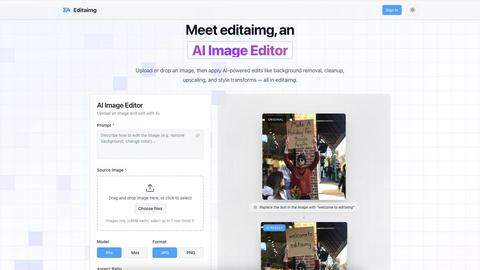
Editaimg is an AI image editor that effortlessly replaces backgrounds and removes objects using simple text commands.
Last updated: February 25, 2026

MyImageUpscaler
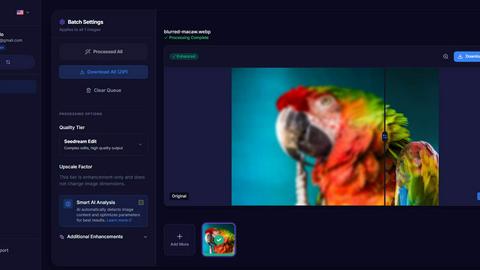
MyImageUpscaler uses AI to enhance images to 4K quality in seconds while preserving sharp text and real details.
Last updated: February 25, 2026
Visual Comparison
Editaimg
MyImageUpscaler
Feature Comparison
Editaimg
AI-Powered Editing
Editaimg utilizes advanced AI algorithms to facilitate background removal, inpainting, and style transformations. Users can achieve professional results without needing extensive editing skills, making the platform accessible for everyone.
Add Someone to Photo
This feature allows users to seamlessly integrate additional characters into their images. With just a few clicks, users can enhance storytelling by placing a person into any photo naturally, ensuring a cohesive look.
AI Snow Tool
The AI Snow tool adds realistic snowfall and atmospheric effects to images, enabling users to create seasonal visuals that capture the essence of winter. This feature offers adjustable intensity and lighting, providing creative flexibility.
Gemini Watermark Remover
Editaimg’s Gemini watermark remover is a vital utility for cleaning up synthetic media. This feature ensures that users can export their images without visible watermarks, maintaining a professional appearance for all visual content.
MyImageUpscaler
Advanced Detail Preservation
MyImageUpscaler employs sophisticated algorithms that effectively preserve fine details in images during the upscaling process. This results in crisp, clear images without the typical blur or artifacts that can occur with standard upscaling techniques.
Fast Processing Times
Users can process images in under 10 seconds, making MyImageUpscaler an incredibly efficient tool for those needing to enhance large volumes of images quickly. This speed is particularly advantageous for businesses that require rapid turnaround times for their visual content.
Batch Processing Capability
The platform supports batch processing, allowing users to upscale up to 500 images at once. This feature is invaluable for photographers or businesses that need to process large quantities of images simultaneously, saving time and effort.
Platform-Ready Presets
MyImageUpscaler includes presets tailored for various platforms such as Amazon, Instagram, YouTube, and TikTok. These presets ensure that images are optimized for specific requirements, helping users maintain visual consistency across different channels.
Use Cases
Editaimg
E-commerce Product Photography
Editaimg can transform basic product images into stunning, professional visuals suitable for online stores. By changing backgrounds or adding context, sellers can create appealing product shots that attract consumers' attention.
Social Media Content Creation
For marketers and influencers, Editaimg provides an efficient way to produce high-quality images for social media. By quickly editing photos, users can maintain a consistent aesthetic across their platforms, enhancing engagement.
Travel Photo Enhancement
Travelers can use Editaimg to enhance their memories by removing unwanted distractions from their photos. This includes eliminating people or objects that detract from the beauty of the scene, resulting in cleaner, more captivating images.
Creative Storytelling
Writers and content creators can leverage Editaimg's features to develop compelling narratives through visuals. By adding characters or atmospheric elements to images, they can create a more immersive experience for their audience.
MyImageUpscaler
E-commerce Sellers
E-commerce sellers can utilize MyImageUpscaler to enhance product images for their online stores. By improving image quality, they can attract more customers and increase conversion rates, making their products stand out in a competitive market.
Content Creators for Social Media
Content creators can benefit from the platform by resizing images for social media posts. With the ability to enhance quality while maintaining sharpness, creators can ensure their visuals are eye-catching and engaging for their followers.
Real Estate Agents
Real estate agents can use MyImageUpscaler to prepare high-quality images for MLS listings. By enhancing property photographs, agents can present homes in their best light, ultimately driving more interest and potential buyers.
Photographers Processing Large Batches
Professional photographers can expedite their workflow by using MyImageUpscaler for batch processing. Whether for client work or personal projects, the ability to upscale and enhance multiple images at once helps photographers save time and focus on their creative vision.
Overview
About Editaimg
Editaimg is an innovative AI-powered image editing platform designed to revolutionize the creation and enhancement of visual assets. By harnessing advanced generative intelligence, it simplifies complex design tasks into a user-friendly, text-driven process. The platform is particularly beneficial for developers, marketers, content creators, and anyone in need of professional-quality results without the steep learning curve associated with traditional editing software. The intuitive editor allows users to perform tasks such as background replacement, object removal, and text editing effortlessly by simply typing descriptions. This streamlining of the editing process not only saves time but also significantly reduces production costs, making Editaimg an essential tool for any digital project. With features tailored to address modern challenges in the digital landscape, Editaimg empowers users to transform their creative visions into high-quality outputs seamlessly.
About MyImageUpscaler
MyImageUpscaler is a cutting-edge AI-powered platform designed to enhance and upscale images for businesses and content creators. By leveraging advanced machine learning algorithms, MyImageUpscaler can increase the resolution of images by 2x to 4x without compromising on quality. The platform is particularly beneficial for e-commerce sellers, real estate agents, photographers, and social media content creators who require high-quality visuals for marketing and promotional purposes. With a focus on maintaining sharpness and enhancing fine details, MyImageUpscaler ensures that every image looks professional and polished. It offers a free tier with 10 credits, allowing users to experience its capabilities without the need for a credit card. As a result, MyImageUpscaler stands out as a reliable solution for anyone looking to improve their image quality efficiently and effectively.
Frequently Asked Questions
Editaimg FAQ
What types of images can I edit with Editaimg?
Editaimg supports various image formats and allows users to upload images up to 10MB each. This flexibility ensures that users can work with a wide range of visuals for their projects.
How does the background removal feature work?
The background removal feature uses AI algorithms to intelligently identify and separate the foreground from the background. Users simply describe what they want removed, and the platform handles the rest, providing a clean final image.
Can I use Editaimg for commercial purposes?
Yes, users can utilize Editaimg for commercial projects, such as e-commerce or marketing materials. The platform's capabilities allow for the creation of high-quality images suitable for professional use.
Is there a learning curve associated with using Editaimg?
Editaimg is designed to be user-friendly, minimizing the learning curve compared to traditional editing software. Users can start editing by simply uploading an image and typing their desired edits, making it accessible for everyone.
MyImageUpscaler FAQ
What image formats does MyImageUpscaler support?
MyImageUpscaler supports a variety of image formats including JPEG, PNG, and AVIF, ensuring versatility for users with different types of images.
How does the free tier work?
The free tier provides users with 10 credits to use on image enhancements without requiring a credit card. Unused credits can accumulate, allowing users to try the platform without any financial commitment.
Can I upscale images for print?
Yes, MyImageUpscaler is designed to maintain high quality even at larger resolutions, making it suitable for preparing images for print while ensuring clarity and detail.
Is there a limit on how long enhanced images are stored?
Enhanced images are automatically deleted after 7 to 30 days, depending on the specific plan chosen. This helps maintain user privacy and manage storage efficiently.
Alternatives
Editaimg Alternatives
Editaimg is an advanced AI image editing platform that specializes in simplifying complex design tasks, allowing users to replace backgrounds and remove objects using intuitive text commands. It falls within the categories of image and photo editing, as well as image generation, making it an essential tool for developers, marketers, and content creators seeking professional-quality visuals without the need for extensive editing expertise. Users often seek alternatives to Editaimg for various reasons, including pricing, specific feature sets, and platform compatibility. When exploring alternatives, it’s crucial to consider aspects such as ease of use, the breadth of available features, cost-effectiveness, and the overall user experience. Identifying an alternative that meets your specific editing needs and seamlessly integrates into your workflow can enhance your creative projects and improve productivity.
MyImageUpscaler Alternatives
MyImageUpscaler is a state-of-the-art AI-powered platform that specializes in enhancing and upscaling images to stunning 4K quality. This tool falls under the category of productivity and management, catering to businesses and content creators who require high-resolution visuals for their marketing efforts. Users often seek alternatives to MyImageUpscaler for various reasons, including pricing structures, specific feature sets, and varying platform needs that align better with their individual workflows or project requirements. When searching for an alternative, it is essential to consider factors such as processing speed, quality of image enhancement, batch processing capabilities, and compatibility with various platforms. Additionally, evaluating user experience, customer support, and pricing can help users find a solution that best meets their needs while ensuring that the final output maintains the level of professionalism they require.