
Hush Touch | Voice-to-Text for MacOS vs Opal
Side-by-side comparison to help you choose the right product.

Hush Touch | Voice-to-Text for MacOS
Hush Touch is an offline voice-to-text app for macOS that learns your vocabulary and formats dictation intelligently.
Last updated: February 25, 2026

Opal empowers solopreneurs and neurodivergent thinkers to effortlessly manage their projects and notes in one intuitive platform.
Last updated: April 13, 2026
Visual Comparison
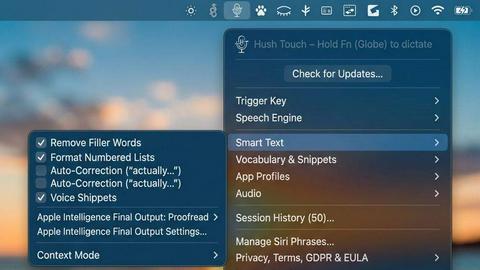
Hush Touch | Voice-to-Text for MacOS
Opal
Feature Comparison
Hush Touch | Voice-to-Text for MacOS
Dual Engine Recognition
Hush Touch combines the capabilities of two Apple dictation engines: DictationTranscriber and SFSpeechRecognizer. This dual-engine approach optimizes natural flow and punctuation while enhancing custom vocabulary recognition, resulting in superior accuracy and responsiveness during dictation.
Custom Vocabulary
The app supports up to 500 custom vocabulary terms and features an auto-learn functionality that recognizes corrections made by the user. This ensures that industry-specific jargon, brand names, and other unique phrases are accurately transcribed, providing a personalized dictation experience.
Smart Text Processing
Hush Touch employs advanced text processing features that automatically remove filler words, correct common mistakes, and format lists. This real-time processing occurs entirely on the user's device, resulting in cleaner, more coherent text output without the need for manual editing.
Context Modes & Hands-Free Functionality
Users can switch between different context modes—General, Email, Code, and Notes—to optimize dictation for specific tasks. The hands-free feature allows users to initiate dictation using Siri and utilizes auto-insertion after a brief pause, making it easier to dictate without interruption.
Opal
Visual Infinite Canvas
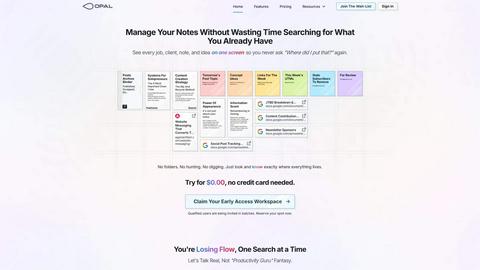
Opal provides a spacious digital workspace that allows users to visually organize their notes, tasks, and files. By presenting information in a spatial format, users can quickly grasp their entire workflow without unnecessary clicks or searches.
Markdown-Based Block Editor
The platform includes a rich markdown-based block editor, enabling users to create content with various media types. This feature is ideal for writing scripts, manuals, or articles, allowing for seamless integration of text, images, and links.
Real-Time Collaboration
Opal facilitates real-time collaboration, enabling multiple users to work on the same project simultaneously. This feature is essential for teams that require instant feedback and communication while managing tasks and documents.
AI Integration
With the Opal Recall skill, users can connect their own AI agents to the platform through an API. This integration enhances productivity by allowing users to retrieve information and insights quickly, making it easier to stay on top of tasks and projects.
Use Cases
Hush Touch | Voice-to-Text for MacOS
Professional Email Drafting
Hush Touch is ideal for professionals who need to draft emails quickly and efficiently. With voice activation and hands-free capabilities, users can compose responses and messages without being tethered to their keyboards, streamlining communication.
Academic Note-Taking
Students can leverage Hush Touch for taking lecture notes or preparing study materials. The app's ability to learn specialized vocabulary makes it particularly useful for subjects with technical terms, aiding in accurate note-taking during classes.
Creative Writing
Writers can use Hush Touch to brainstorm ideas and draft content effortlessly. The app's seamless integration into creative workflows allows authors to focus on their thoughts without the distraction of typing, enhancing productivity and creativity.
Medical Documentation
Healthcare professionals can dictate patient notes and medical records using Hush Touch. The app's custom vocabulary learning feature ensures that it accurately captures complex medical terminology, making it a valuable tool for physicians and medical staff.
Opal
Project Management
Opal is perfect for project managers who need to track multiple tasks, clients, and deadlines. The visual organization helps keep everything in sight, ensuring that no detail is overlooked during project execution.
Content Creation
Writers and content creators can utilize Opal's markdown editor to draft articles, scripts, or manuals. The ability to organize thoughts and ideas visually aids in the creative process while streamlining content development.
Knowledge Management
For businesses that rely on standard operating procedures and documentation, Opal serves as a centralized knowledge management system. All essential information can be stored, linked, and accessed easily, reducing time spent searching for documents.
Client Management
Individuals managing client relationships can benefit from Opal's structure, allowing them to keep track of client notes, contracts, and communication history in one accessible space. This ensures that every detail is accounted for and easily retrievable.
Overview
About Hush Touch | Voice-to-Text for MacOS
Hush Touch is an innovative voice-to-text application specifically designed for macOS users who seek a fast, natural, and private dictation experience. Unlike many dictation tools that rely on cloud processing, Hush Touch operates entirely on-device, ensuring that all voice data remains private and secure. By leveraging two powerful Apple transcription engines and an advanced Apple Intelligence final pass, the app delivers high accuracy and cleaner text output. With its lightweight footprint of just 5.5 MB, Hush Touch integrates seamlessly into everyday writing workflows, allowing users to dictate emails, messages, notes, and documents effortlessly. The app is tailored for professionals, students, and anyone who requires hands-free dictation without the hassle of complex setups or ongoing subscriptions. For a one-time fee of $20, users gain lifetime access to a tool that not only improves dictation efficiency but also learns and adapts to their unique vocabulary over time.
About Opal
Opal is an innovative productivity tool designed to transform the way individuals and teams manage their notes, documents, and important files. Unlike traditional productivity applications that often bury information in complex folder structures, Opal offers a visual, infinite canvas where users can arrange their content spatially on a digital desk. This approach allows users to see everything at a glance, ensuring that important information remains top of mind. Whether you are a freelancer, a project manager, or a business owner, Opal caters to anyone who relies on effective knowledge management. Its primary value proposition lies in eliminating the frustration of searching for lost information, thereby enhancing focus, improving productivity, and ultimately enabling users to do their best work without the chaos of disorganized tools.
Frequently Asked Questions
Hush Touch | Voice-to-Text for MacOS FAQ
How does Hush Touch ensure privacy?
Hush Touch processes all voice data entirely on-device, meaning no information is sent to the cloud. This guarantees privacy and security for users who are concerned about data collection.
Can I customize the vocabulary in Hush Touch?
Yes, Hush Touch allows users to add up to 500 custom vocabulary terms. The app also learns from your corrections, ensuring it adapts to your specific language and jargon over time.
Is there a free trial available for Hush Touch?
Yes, Hush Touch offers a 7-day free trial with no credit card required. This allows users to experience the app's features and capabilities before committing to a purchase.
What platforms does Hush Touch support?
Hush Touch is specifically designed for macOS, ensuring optimal performance and integration with Apple's ecosystem. The app is lightweight and can run smoothly on most Mac devices.
Opal FAQ
What makes Opal different from traditional productivity tools?
Opal stands out by offering a visual workspace that allows users to spatially organize their information, unlike traditional tools that often rely on hierarchical folder structures.
Can I collaborate with my team on Opal?
Yes, Opal features real-time collaboration capabilities, allowing multiple users to work together seamlessly on projects and documents.
Is there an AI integration available in Opal?
Absolutely. Opal offers the Opal Recall skill, enabling users to connect their AI agents through an API for enhanced productivity and quick information retrieval.
How does Opal help with knowledge management?
Opal serves as a centralized hub for all your essential documents and notes, making it easy to access and link information, streamlining your knowledge management processes.
Alternatives
Hush Touch | Voice-to-Text for MacOS Alternatives
Hush Touch | Voice-to-Text for MacOS is an advanced offline dictation application designed specifically for macOS users, falling under the productivity and management category. It offers a unique, private dictation experience by processing voice data entirely on-device, ensuring user confidentiality while providing high accuracy through dual engine recognition. Users often seek alternatives to Hush Touch for various reasons, including pricing concerns, feature requirements, or compatibility with different platforms. When selecting an alternative, it is essential to consider factors such as voice recognition accuracy, customization options, user interface, and whether the solution operates offline or relies on cloud services. Evaluating these aspects can help ensure that the chosen application meets individual dictation needs effectively.
Opal Alternatives
Opal is a spatial knowledge management tool designed specifically for solopreneurs, freelancers, and neurodivergent thinkers. By providing a visual, infinite canvas, Opal allows users to organize their notes, documents, and important files in a way that prioritizes visibility and accessibility. Its unique approach helps users retain a sense of control over their projects and enhances productivity. Many users seek alternatives to Opal for various reasons, including budget constraints, specific feature requirements, or compatibility with their preferred platforms. When looking for an alternative, consider factors such as ease of use, the ability to integrate with existing tools, and the flexibility of the software to accommodate your unique workflow. Ensuring that the alternative aligns with your organizational style and project management needs is crucial for maximizing productivity and efficiency.