
File Studio vs QuoteCraft AI
Side-by-side comparison to help you choose the right product.

File Studio
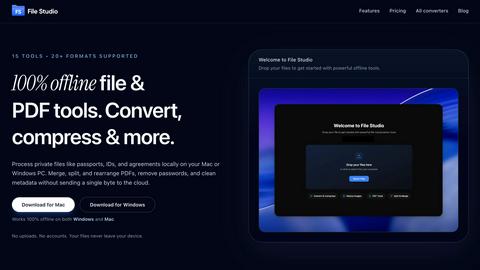
File Studio offers powerful offline tools to convert, compress, merge, and edit files securely on your Mac or Windows.
Last updated: February 25, 2026

QuoteCraft AI
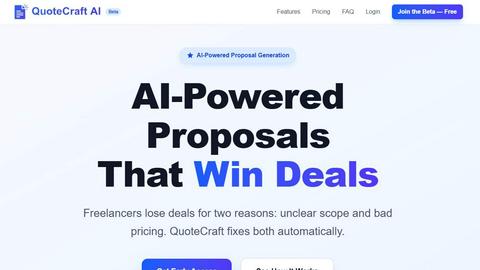
QuoteCraft AI generates winning proposals for freelancers in seconds, ensuring clear scope and competitive pricing.
Last updated: February 27, 2026
Visual Comparison
File Studio
QuoteCraft AI
Feature Comparison
File Studio
100% Offline Processing
File Studio ensures that all file processing occurs locally on your Mac or PC. With no uploads required, users can manage their documents and images without ever sending data to the cloud, thereby maintaining complete control over their sensitive information.
Comprehensive PDF Tools
The application offers a suite of five dedicated PDF tools that allow users to merge, split, edit, and unlock PDF documents. This functionality enables full management of PDF files without the need for internet access, streamlining tasks while keeping data secure.
Versatile Image Tools
File Studio includes ten powerful image tools that support over 20 different formats. Users can convert, resize, compress, crop, and watermark images, making it an indispensable resource for anyone who regularly works with various image types and needs them to be optimized for different uses.
Batch Processing Capabilities
With its batch processing feature, File Studio can handle hundreds of files simultaneously. Users can convert, resize, or compress entire folders in a single operation, significantly increasing efficiency and saving valuable time for busy professionals.
QuoteCraft AI
Voice-to-Proposal
QuoteCraft AI's voice-to-proposal feature allows users to describe their project verbally, with the system instantly transcribing their words into a professional proposal. This innovative approach eliminates the need for manual typing and speeds up the proposal creation process significantly.
Interactive Proposals
The platform includes interactive proposals that enable clients to customize their requests before accepting. Clients can toggle line items on or off, with real-time updates to the total pricing, making it easier for both parties to agree on terms that suit their needs.
Context Engine
The Context Engine is an intelligent feature that learns from past proposals, analyzing accepted and rejected submissions to refine future suggestions. It personalizes proposals based on the freelancer's unique voice and style, ensuring consistency and professionalism.
Smart Follow-Ups
QuoteCraft AI automates follow-up reminders for clients who have not yet viewed proposals. Users can control the timing of these nudges, allowing for strategic engagement without being intrusive, thereby increasing the chances of contract acceptance.
Use Cases
File Studio
Professional Photographers
Photographers can leverage File Studio to convert RAW files to more accessible formats like JPEG or PNG, resize images for web use, and batch process multiple photos for events or portfolios, all while ensuring their original files remain secure.
Freelancers Managing Client Documents
Freelancers often deal with multiple client contracts and sensitive documents. File Studio allows them to merge contracts, remove passwords, and convert files to various formats, making document handling straightforward and private, without needing to rely on cloud storage.
Remote Workers Handling Confidential Files
For remote workers, especially those in industries like finance or healthcare, File Studio provides the tools to manage confidential documents securely. They can edit, compress, and share important files while ensuring that sensitive information never leaves their device.
Students Organizing Research Materials
Students can benefit from File Studio by merging research papers, converting PDFs to images for presentations, and compressing files to save space on their devices. The offline capabilities make it easy to work on projects without worrying about internet access.
QuoteCraft AI
Web Design Projects
Freelancers in web design can leverage QuoteCraft AI to quickly create tailored proposals that outline project scope, design concepts, and timelines. This enables them to respond to client inquiries promptly, which is critical in a competitive market.
Marketing Agencies
Marketing agencies can use the platform to draft comprehensive proposals that detail strategies, deliverables, and pricing models. The ability to customize line items ensures that clients feel involved in the process, fostering stronger relationships.
Creative Studios
Creative professionals can benefit from QuoteCraft AI by generating proposals that accurately reflect their artistic vision and project requirements. This facilitates clear communication with clients, reducing the likelihood of misunderstandings.
Consulting Firms
Consultants can rapidly produce detailed proposals that address client needs and expectations. By utilizing the platform’s learning capabilities, they can refine their proposals over time, making them more effective and tailored to their target audience.
Overview
About File Studio
File Studio is a robust desktop application designed to process PDFs and images entirely offline on your Mac or Windows PC. This powerful tool is tailored for individuals and professionals who handle sensitive documents such as passports, IDs, and contracts, providing a level of privacy that cloud-based solutions cannot offer. By enabling users to merge multiple PDFs, split documents into pages, reorder and rotate files, remove passwords, and convert files to various image formats, File Studio simplifies the management of digital assets without compromising security. With support for over 20 file formats including HEIC, WebP, AVIF, and various RAW types, it caters to a wide audience including photographers, freelancers, and remote workers who prioritize speed and confidentiality in their workflow. With a one-time purchase model, users gain lifetime access to the software, ensuring they can rely on its capabilities without ongoing subscription fees.
About QuoteCraft AI
QuoteCraft AI is an innovative tool specifically designed for freelancers and small businesses to streamline the proposal creation process. It enables users to generate professional proposals in mere seconds rather than spending hours on the task. By simply describing the project or selecting from seven starter templates, the platform utilizes advanced AI technology to produce a comprehensive proposal that includes essential elements such as scope, pricing, line items, and timelines. This tool is particularly valuable for freelancers in creative fields like web design, marketing, and consulting, where clear communication and effective pricing strategies are crucial for winning deals. With features like voice-to-proposal transcription, interactive proposals, and automated follow-ups, QuoteCraft AI not only simplifies the proposal process but also enhances the likelihood of securing contracts. Currently in beta, the platform offers free access, allowing users to benefit from its cutting-edge capabilities without any upfront costs.
Frequently Asked Questions
File Studio FAQ
Is my data ever uploaded?
No, File Studio processes everything locally on your device. Your files never leave your computer, ensuring 100% offline processing and maximum privacy.
Do you offer a free trial?
Yes, you can try File Studio to explore its features and determine if it fits your needs before making a purchase.
Can I use File Studio on both Mac and Windows?
Absolutely! File Studio is designed to work seamlessly on both Mac and Windows operating systems, providing a consistent user experience across platforms.
What is included in the lifetime plan?
The lifetime plan includes unlimited conversions, one year of updates, offline processing, and access to both the PDF and image toolkits, all for a one-time payment.
QuoteCraft AI FAQ
How does the AI generate proposals?
The AI generates proposals by analyzing the project details provided by the user, whether through text input or voice description. It then compiles the necessary elements—such as scope, pricing, and timelines—into a polished document.
Will my proposals look generic?
No, your proposals will not look generic. The Context Engine learns from your previous proposals and adapts the generated content to match your unique style and voice, ensuring that each proposal is tailored and professional.
Can I edit proposals after generation?
Yes, users can edit and customize proposals after they are generated. This feature allows for adjustments in pricing, scope, and specific details to better meet client expectations before sending the final version.
Is my data secure?
QuoteCraft AI prioritizes data security and implements robust measures to protect your information. All proposals and client interactions are secured, ensuring confidentiality and integrity throughout the proposal process.
Alternatives
File Studio Alternatives
File Studio is a powerful desktop application designed for processing PDF and image files on both Mac and Windows platforms. As part of the productivity and management category, it caters to both individuals and professionals who require secure offline tools for handling sensitive documents. Users often seek alternatives to File Studio for various reasons, including pricing models, feature sets, and specific platform compatibility. When searching for an alternative, it is crucial to consider factors such as offline capabilities, the range of supported file formats, ease of use, and the overall value for money. Finding the right alternative involves evaluating your specific needs, such as the types of files you work with, the complexity of tasks you intend to perform, and whether you prefer a one-time purchase or a subscription model. It is essential to identify solutions that provide robust security measures, especially when dealing with confidential documents. Additionally, user support and regular updates can be important considerations to ensure the software remains effective over time.
QuoteCraft AI Alternatives
QuoteCraft AI is an innovative AI proposal generator designed specifically for freelancers, enabling them to create professional proposals in a matter of seconds. By simply describing their project or selecting from a variety of starter templates, users can receive comprehensive proposals that include detailed scope, pricing, timelines, and e-signatures. As a tool within the productivity and management category, QuoteCraft AI streamlines the proposal process, eliminating the hours typically spent on drafting and formatting. Users often seek alternatives to QuoteCraft AI for various reasons, such as pricing, specific feature sets, or compatibility with their existing platforms. When choosing an alternative, it’s essential to consider factors such as ease of use, customization options, integration capabilities, and overall value for money. A suitable alternative should not only meet your immediate needs but also enhance your workflow and productivity.