
Decode This Text vs File Studio
Side-by-side comparison to help you choose the right product.

Decode This Text
Decode This Text provides clear, human-like analyses of confusing conversations in just 30 seconds for total clarity.
Last updated: February 25, 2026

File Studio
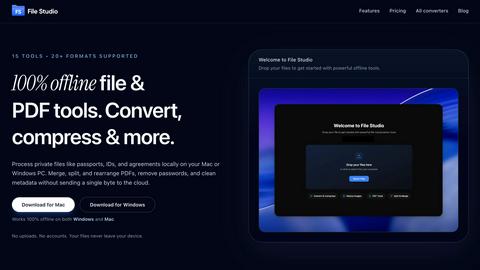
File Studio offers powerful offline tools to convert, compress, merge, and edit files securely on your Mac or Windows.
Last updated: February 25, 2026
Visual Comparison
Decode This Text

File Studio
Feature Comparison
Decode This Text
Instant Message Analysis
With a quick paste of your conversation or the upload of a screenshot, Decode This Text provides immediate insights into the underlying emotions and intentions of the messages. This feature is perfect for those who want answers fast, ensuring that you can respond effectively and timely.
Tone Assessment
Understanding the emotional tone of a message is crucial in interpreting its true meaning. Decode This Text analyzes the tone—whether it is friendly, sarcastic, or indifferent—allowing users to grasp the emotional context behind the words and avoid misinterpretations.
Pattern Detection
This feature identifies communication patterns that may go unnoticed, such as whether someone only responds during late hours or consistently avoids certain questions. Recognizing these patterns can help users understand the dynamics of their interactions and adjust their responses accordingly.
Response Suggestions
Not sure how to reply? Decode This Text offers tailored response suggestions based on the analysis of the conversation. Users receive three distinct options—calm, direct, or assertive—allowing them to choose the response style that best fits their approach and the situation at hand.
File Studio
100% Offline Processing
File Studio ensures that all file processing occurs locally on your Mac or PC. With no uploads required, users can manage their documents and images without ever sending data to the cloud, thereby maintaining complete control over their sensitive information.
Comprehensive PDF Tools
The application offers a suite of five dedicated PDF tools that allow users to merge, split, edit, and unlock PDF documents. This functionality enables full management of PDF files without the need for internet access, streamlining tasks while keeping data secure.
Versatile Image Tools
File Studio includes ten powerful image tools that support over 20 different formats. Users can convert, resize, compress, crop, and watermark images, making it an indispensable resource for anyone who regularly works with various image types and needs them to be optimized for different uses.
Batch Processing Capabilities
With its batch processing feature, File Studio can handle hundreds of files simultaneously. Users can convert, resize, or compress entire folders in a single operation, significantly increasing efficiency and saving valuable time for busy professionals.
Use Cases
Decode This Text
Workplace Communication
In professional settings, deciphering short or ambiguous emails can lead to misunderstandings. Decode This Text helps you interpret your boss's one-word replies or a colleague's vague messages, ensuring you respond appropriately and maintain professionalism.
Navigating Friendships
Friendships can sometimes involve complicated dynamics. If a friend goes silent after a text, using Decode This Text can help you understand whether they are genuinely busy or if there is a shift in their interest, guiding you on how to reconnect.
Family Interactions
Family messages can often carry emotional weight. Decode This Text aids in clarifying confusing texts from relatives, helping you navigate sensitive topics with care and understanding, and ensuring family communications remain supportive.
Client Relations
When dealing with clients, the stakes are high. Decode This Text allows you to understand nuanced messages from clients, helping you determine their satisfaction levels or concerns. This insight enables you to address issues proactively and maintain strong client relationships.
File Studio
Professional Photographers
Photographers can leverage File Studio to convert RAW files to more accessible formats like JPEG or PNG, resize images for web use, and batch process multiple photos for events or portfolios, all while ensuring their original files remain secure.
Freelancers Managing Client Documents
Freelancers often deal with multiple client contracts and sensitive documents. File Studio allows them to merge contracts, remove passwords, and convert files to various formats, making document handling straightforward and private, without needing to rely on cloud storage.
Remote Workers Handling Confidential Files
For remote workers, especially those in industries like finance or healthcare, File Studio provides the tools to manage confidential documents securely. They can edit, compress, and share important files while ensuring that sensitive information never leaves their device.
Students Organizing Research Materials
Students can benefit from File Studio by merging research papers, converting PDFs to images for presentations, and compressing files to save space on their devices. The offline capabilities make it easy to work on projects without worrying about internet access.
Overview
About Decode This Text
Decode This Text is an innovative solution designed to help individuals decipher the true meanings behind text messages, emails, and chats. In our fast-paced communication landscape, it can often be challenging to interpret the intent, tone, and emotions behind written words. Decode This Text steps in to eliminate confusion, providing users with clarity and insight into their communications. Whether you are trying to understand a colleague's email, a friend's text, or a client's ambiguous message, this tool is crafted for anyone who seeks to enhance their communication skills. With just a simple copy and paste, or by uploading a screenshot, users receive an analysis that reveals the underlying messages within 30 seconds. The main value proposition lies in empowering users to respond with confidence, fostering better connections with coworkers, friends, and family without the stress of overanalyzing.
About File Studio
File Studio is a robust desktop application designed to process PDFs and images entirely offline on your Mac or Windows PC. This powerful tool is tailored for individuals and professionals who handle sensitive documents such as passports, IDs, and contracts, providing a level of privacy that cloud-based solutions cannot offer. By enabling users to merge multiple PDFs, split documents into pages, reorder and rotate files, remove passwords, and convert files to various image formats, File Studio simplifies the management of digital assets without compromising security. With support for over 20 file formats including HEIC, WebP, AVIF, and various RAW types, it caters to a wide audience including photographers, freelancers, and remote workers who prioritize speed and confidentiality in their workflow. With a one-time purchase model, users gain lifetime access to the software, ensuring they can rely on its capabilities without ongoing subscription fees.
Frequently Asked Questions
Decode This Text FAQ
How does Decode This Text ensure privacy?
Decode This Text prioritizes user confidentiality. No human reads your texts; all analyses are conducted anonymously, ensuring that your information remains secure and private.
Can I use Decode This Text for multiple conversations?
Absolutely! You can analyze as many conversations as you like. Whether it's work-related emails, personal texts, or client communications, Decode This Text is versatile and designed to handle various interactions.
What if I don't want to type out my conversation?
You can easily upload a screenshot of your chat instead of typing it out. This feature simplifies the process for those who prefer visual inputs, making it convenient and user-friendly.
How long does it take to get my analysis?
The analysis is prompt, typically delivered within 30 seconds of submitting your text or screenshot. This allows you to gain clarity and respond quickly, without unnecessary delays.
File Studio FAQ
Is my data ever uploaded?
No, File Studio processes everything locally on your device. Your files never leave your computer, ensuring 100% offline processing and maximum privacy.
Do you offer a free trial?
Yes, you can try File Studio to explore its features and determine if it fits your needs before making a purchase.
Can I use File Studio on both Mac and Windows?
Absolutely! File Studio is designed to work seamlessly on both Mac and Windows operating systems, providing a consistent user experience across platforms.
What is included in the lifetime plan?
The lifetime plan includes unlimited conversions, one year of updates, offline processing, and access to both the PDF and image toolkits, all for a one-time payment.
Alternatives
Decode This Text Alternatives
Decode This Text is an innovative tool that falls under the Productivity & Management category, specifically designed to clarify and decode the sometimes confusing nuances of written communication. Users often seek alternatives to Decode This Text for various reasons, including pricing considerations, feature sets that may better suit their specific needs, or compatibility with different platforms. As communication continues to evolve in our digital world, finding the right tool can make a significant difference in how effectively individuals interpret and respond to messages. When searching for an alternative, it is essential to evaluate several factors, such as the accuracy and speed of message analysis, the ability to assess tone and context, and any additional features that may enhance communication clarity. User experience and support options can also play a crucial role in ensuring that the chosen tool meets individual requirements and improves overall communication skills.
File Studio Alternatives
File Studio is a powerful desktop application designed for processing PDF and image files on both Mac and Windows platforms. As part of the productivity and management category, it caters to both individuals and professionals who require secure offline tools for handling sensitive documents. Users often seek alternatives to File Studio for various reasons, including pricing models, feature sets, and specific platform compatibility. When searching for an alternative, it is crucial to consider factors such as offline capabilities, the range of supported file formats, ease of use, and the overall value for money. Finding the right alternative involves evaluating your specific needs, such as the types of files you work with, the complexity of tasks you intend to perform, and whether you prefer a one-time purchase or a subscription model. It is essential to identify solutions that provide robust security measures, especially when dealing with confidential documents. Additionally, user support and regular updates can be important considerations to ensure the software remains effective over time.