
Amovera vs File Studio
Side-by-side comparison to help you choose the right product.

Amovera
Amovera is a comprehensive wedding planning tool that offers lifetime access to manage your guest list, budget, seating, and inspiration effortlessly.
Last updated: April 13, 2026

File Studio
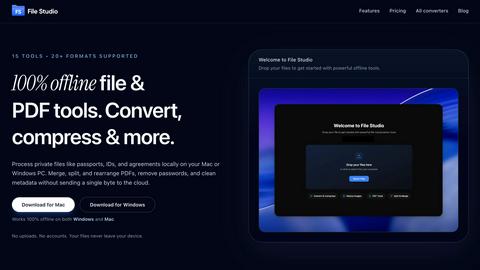
File Studio offers powerful offline tools to convert, compress, merge, and edit files securely on your Mac or Windows.
Last updated: February 25, 2026
Visual Comparison
Amovera

File Studio
Feature Comparison
Amovera
Guest List & RSVP Management
Amovera's guest list management feature allows users to effortlessly organize their guest list and track RSVPs. Couples can send personalized RSVP links to guests, making it easy to manage confirmations and maintain an organized list.
Budget Tracker
The budget tracker is an essential tool that helps couples keep their wedding costs under control. It allows users to input expenses, set budget limits, and monitor spending, ensuring that financial planning remains transparent and manageable throughout the wedding journey.
Seating Planner
With the interactive seating planner, couples can visually arrange their seating layouts using a drag-and-drop interface. This feature simplifies the seating process, allowing users to ensure that guests are seated according to their preferences and relationships, creating a harmonious atmosphere at the event.
Task Management
Amovera's task management feature includes organized wedding checklists that help couples stay on top of important deadlines. With clearly defined tasks, users can ensure that every detail is attended to, from booking vendors to finalizing the ceremony details.
File Studio
100% Offline Processing
File Studio ensures that all file processing occurs locally on your Mac or PC. With no uploads required, users can manage their documents and images without ever sending data to the cloud, thereby maintaining complete control over their sensitive information.
Comprehensive PDF Tools
The application offers a suite of five dedicated PDF tools that allow users to merge, split, edit, and unlock PDF documents. This functionality enables full management of PDF files without the need for internet access, streamlining tasks while keeping data secure.
Versatile Image Tools
File Studio includes ten powerful image tools that support over 20 different formats. Users can convert, resize, compress, crop, and watermark images, making it an indispensable resource for anyone who regularly works with various image types and needs them to be optimized for different uses.
Batch Processing Capabilities
With its batch processing feature, File Studio can handle hundreds of files simultaneously. Users can convert, resize, or compress entire folders in a single operation, significantly increasing efficiency and saving valuable time for busy professionals.
Use Cases
Amovera
Coordinating a Large Wedding
For couples planning a wedding with a significant number of guests, Amovera simplifies coordination. Users can manage an extensive guest list, track RSVPs, and efficiently handle seating arrangements, ensuring a smooth experience for everyone involved.
Budget-Conscious Planning
Amovera is ideal for budget-conscious couples who want to keep their wedding expenses in check. With the budget tracker, users can monitor their spending and make informed decisions, ensuring they stay within their financial limits without sacrificing their vision.
Collaborative Planning
Couples who prefer to plan together will find Amovera's shared access feature invaluable. Both partners can log in simultaneously, edit details, and communicate in real-time, promoting teamwork and reducing the likelihood of miscommunication.
Generating Inspiration
Amovera's moodboard feature allows couples to collect and share wedding inspiration beautifully. Users can curate images, color schemes, and themes, making it easy to visualize their dream wedding and communicate their ideas effectively with vendors.
File Studio
Professional Photographers
Photographers can leverage File Studio to convert RAW files to more accessible formats like JPEG or PNG, resize images for web use, and batch process multiple photos for events or portfolios, all while ensuring their original files remain secure.
Freelancers Managing Client Documents
Freelancers often deal with multiple client contracts and sensitive documents. File Studio allows them to merge contracts, remove passwords, and convert files to various formats, making document handling straightforward and private, without needing to rely on cloud storage.
Remote Workers Handling Confidential Files
For remote workers, especially those in industries like finance or healthcare, File Studio provides the tools to manage confidential documents securely. They can edit, compress, and share important files while ensuring that sensitive information never leaves their device.
Students Organizing Research Materials
Students can benefit from File Studio by merging research papers, converting PDFs to images for presentations, and compressing files to save space on their devices. The offline capabilities make it easy to work on projects without worrying about internet access.
Overview
About Amovera
Amovera is a comprehensive wedding planning tool designed to simplify the wedding planning process for couples. It offers a centralized platform where users can manage every aspect of their wedding, from guest list and RSVP management to budget tracking, seating chart creation, and vendor organization. Tailored for couples, Amovera allows both partners to collaborate seamlessly without the hassle of switching between multiple apps or spreadsheets. Unlike many free wedding planning tools that monetize user data, Amovera operates on a one-time payment model, providing lifetime access without any hidden fees or spam. Available in English and German, with plans to support more languages, Amovera ensures a user-friendly experience. The platform also comes with a 60-day money-back guarantee, demonstrating confidence in its service and commitment to customer satisfaction.
About File Studio
File Studio is a robust desktop application designed to process PDFs and images entirely offline on your Mac or Windows PC. This powerful tool is tailored for individuals and professionals who handle sensitive documents such as passports, IDs, and contracts, providing a level of privacy that cloud-based solutions cannot offer. By enabling users to merge multiple PDFs, split documents into pages, reorder and rotate files, remove passwords, and convert files to various image formats, File Studio simplifies the management of digital assets without compromising security. With support for over 20 file formats including HEIC, WebP, AVIF, and various RAW types, it caters to a wide audience including photographers, freelancers, and remote workers who prioritize speed and confidentiality in their workflow. With a one-time purchase model, users gain lifetime access to the software, ensuring they can rely on its capabilities without ongoing subscription fees.
Frequently Asked Questions
Amovera FAQ
How does Amovera work?
Amovera operates as a fully online platform, granting users immediate access to all features upon signing up. This includes guest list management, budget tracking, seating planning, and more, all for a one-time payment.
Can both partners use it?
Yes, Amovera is designed for collaboration. Couples can easily share access, allowing both partners to log in and manage their wedding planning together in real-time, enhancing the planning experience.
Do I need to install anything?
No, Amovera is completely browser-based and requires no installation. Users can access the platform from any device, including laptops, tablets, or phones, making it convenient to plan on the go.
What if I need help?
Amovera provides email support as part of the purchase, along with comprehensive guides and tutorials to assist users in navigating the platform and utilizing its features effectively.
File Studio FAQ
Is my data ever uploaded?
No, File Studio processes everything locally on your device. Your files never leave your computer, ensuring 100% offline processing and maximum privacy.
Do you offer a free trial?
Yes, you can try File Studio to explore its features and determine if it fits your needs before making a purchase.
Can I use File Studio on both Mac and Windows?
Absolutely! File Studio is designed to work seamlessly on both Mac and Windows operating systems, providing a consistent user experience across platforms.
What is included in the lifetime plan?
The lifetime plan includes unlimited conversions, one year of updates, offline processing, and access to both the PDF and image toolkits, all for a one-time payment.
Alternatives
Amovera Alternatives
Amovera is a comprehensive wedding planning tool designed to streamline the planning process for couples. This all-in-one platform encompasses essential features such as guest list management, RSVP tracking, seating chart creation, budget tracking, moodboards, and vendor contacts, all within a singular app. Many users seek alternatives to Amovera due to various reasons, including specific feature needs, pricing concerns, or the desire for platform compatibility with existing tools. When exploring alternatives, consider crucial factors such as usability, available features, pricing structure, and data privacy practices to ensure the chosen tool aligns with your wedding planning needs.
File Studio Alternatives
File Studio is a powerful desktop application designed for processing PDF and image files on both Mac and Windows platforms. As part of the productivity and management category, it caters to both individuals and professionals who require secure offline tools for handling sensitive documents. Users often seek alternatives to File Studio for various reasons, including pricing models, feature sets, and specific platform compatibility. When searching for an alternative, it is crucial to consider factors such as offline capabilities, the range of supported file formats, ease of use, and the overall value for money. Finding the right alternative involves evaluating your specific needs, such as the types of files you work with, the complexity of tasks you intend to perform, and whether you prefer a one-time purchase or a subscription model. It is essential to identify solutions that provide robust security measures, especially when dealing with confidential documents. Additionally, user support and regular updates can be important considerations to ensure the software remains effective over time.