
Dokta vs Invoice Guru
Side-by-side comparison to help you choose the right product.

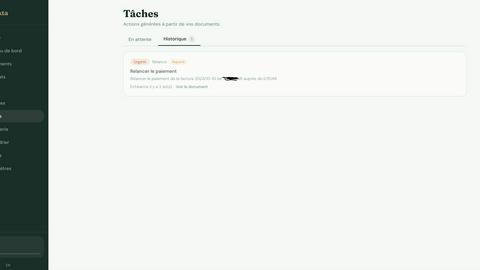
Dokta automates document management for freelancers and SMBs, streamlining invoices, quotes, and contracts with AI-driven efficiency.
Last updated: April 4, 2026

Invoice Guru
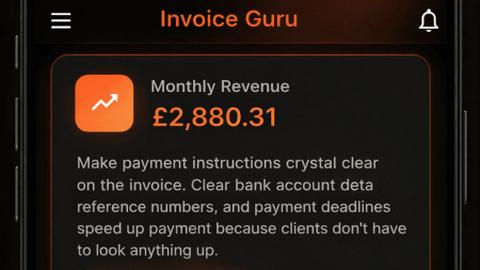
Invoice Guru is a mobile invoicing app that helps UK tradespeople create compliant invoices on-site in under a minute.
Last updated: February 26, 2026
Visual Comparison
Dokta
Invoice Guru
Feature Comparison
Dokta
Automated Invoice Management
Dokta simplifies invoice management by allowing users to create professional invoices and quotes in just a few clicks. With automated tracking of payments and reminders for overdue invoices, this feature ensures that freelancers and entrepreneurs can focus on their work rather than administrative tasks.
Real-Time Cash Flow Tracking
With Dokta, users gain instant visibility into their financial situation. The platform provides a comprehensive overview of billed revenue, received payments, outstanding invoices, and VAT, all represented graphically for easy understanding over a 12-month period.
AI-Driven Document Analysis
The heart of Dokta's functionality lies in its AI-powered document analysis. Users can upload various document types—photos, scans, or PDFs—and within 60 seconds, Dokta automatically reads, classifies, and extracts critical data, such as document type, amount, due date, and client information.
Client and Supplier Management
Dokta enhances user efficiency through automatic enrichment of client and supplier data. It includes payment scoring and a complete history for each entity, ensuring that users can manage their relationships effectively, with reduced risk of errors.
Invoice Guru
Instant Invoice Creation
Create and send professional invoices in under a minute with Invoice Guru. Simply enter your client’s details, add items, and your logo, and the app automatically generates a compliant invoice. This feature eliminates the need for cumbersome Excel or Word templates, providing a streamlined, mobile-ready solution tailored to the user’s needs.
Automatic Invoice Numbering
Invoice Guru automatically numbers and dates each invoice according to your fiscal year settings. This feature ensures that your invoices remain organized and compliant, helping you maintain a clear financial record without manual tracking or data entry.
OCR Receipt Scanner (AI Recognition)
The innovative OCR receipt scanner allows users to take a photo of their receipts, enabling the app’s AI to extract vital information such as the supplier, date, amount, and VAT. This feature simplifies expense tracking and reporting, making it easier than ever to manage business costs while reducing the risk of data entry errors.
Smart Payment Tracking
With smart payment tracking, Invoice Guru automatically matches incoming bank transactions with unpaid invoices. Users are instantly notified of which clients have paid and which invoices are overdue, allowing for efficient cash flow management and timely follow-ups without additional manual effort.
Use Cases
Dokta
Freelance Developers
Freelance developers benefit from Dokta's ability to generate monthly invoices based on time-based contracts. The platform automates the billing process, allowing developers to focus on coding rather than administrative duties.
Creative Professionals
Creative freelancers can utilize Dokta to streamline their project management from the initial quote to final invoice. The feature that transforms quotes into invoices with a single click ensures a smooth workflow throughout their projects.
Auto-Entrepreneurs
For auto-entrepreneurs, Dokta provides a straightforward solution for compliant invoicing and effective tracking of payment receipts. Users receive alerts for upcoming deadlines, ensuring they remain compliant with regulatory requirements without hassle.
Small to Medium-Sized Businesses
SMBs can leverage Dokta to manage their entire document lifecycle efficiently. By utilizing features such as automated reminders and document tracking, businesses can significantly reduce administrative burdens and enhance productivity.
Invoice Guru
Quick Invoicing for Tradespeople
Tradespeople can utilize Invoice Guru to create invoices on-site immediately after completing a job. This instantaneous invoicing capability minimizes the time spent on administrative tasks, enabling professionals to focus more on their work rather than paperwork.
Expense Management for Small Businesses
Small business owners can benefit from the OCR receipt scanner to manage their expenses efficiently. By simply taking photos of receipts, users can easily categorize and track expenses, facilitating clearer financial reporting and analysis without the hassle of manual entry.
Compliance with Regulatory Standards
As regulations evolve, especially for UK tradespeople with HMRC compliance requirements, Invoice Guru ensures users remain compliant with built-in templates and features designed to meet these standards. This allows businesses to adapt to regulatory changes without needing to switch tools or undergo extensive training.
Streamlined Payment Reminders
Freelancers and small service providers can take advantage of the smart payment tracking and reminders feature to manage overdue invoices effectively. The app sends timely reminders based on user preferences, helping to maintain healthy cash flow and client relations.
Overview
About Dokta
Dokta is an innovative, AI-powered document management platform designed specifically for freelancers, solo entrepreneurs, auto-entrepreneurs, and small to medium-sized businesses (SMBs). It revolutionizes how users handle their documents by allowing them to drop any file, such as invoices, quotes, or contracts, into the platform. Within under 60 seconds, Dokta's advanced AI engine reads, classifies, and extracts essential data from these documents. This capability streamlines the document lifecycle, enabling users to create professional invoices and quotes, track payments, and automate reminders for unpaid invoices. By managing contracts and deadlines efficiently, Dokta eliminates the stress of lost files or missed deadlines. The platform helps build a comprehensive client database and provides real-time cash flow tracking, with the ability to export data to CSV for accounting purposes. Whether you are a freelance developer, consultant, trades contractor, or managing a growing SMB, Dokta centralizes document management with AI, allowing you to focus on your core business activities.
About Invoice Guru
Invoice Guru is a mobile-first invoicing application designed specifically for tradespeople and small service businesses, such as painters, plumbers, electricians, and cleaners. Recognizing that traditional invoicing tools often cater to desktop users, Invoice Guru emphasizes the need for a solution that empowers users to quickly create and send invoices directly from their mobile devices. The app is engineered for speed, simplicity, and automation, allowing users to generate invoices in seconds, track payments seamlessly, and significantly reduce administrative burdens. Key features include automatic reports for accountants, bank integration for payment matching, and OCR receipt scanning for effortless expense tracking. Furthermore, Invoice Guru is built with compliance in mind, ensuring that it meets upcoming regulations in the UK and Poland, thus providing users with a reliable tool that adapts as regulatory landscapes evolve. With its roots in the trades, Invoice Guru is developed by a tradesperson who deeply understands the challenges of running a small business, making it a unique and practical tool for professionals in the field.
Frequently Asked Questions
Dokta FAQ
How does Dokta ensure data security?
Dokta prioritizes data security by hosting all information in Europe (AWS) and implementing AES-256 encryption. This ensures that user data is protected in compliance with GDPR regulations.
Can I try Dokta before subscribing?
Yes, Dokta offers a free tier that allows users to manage up to 15 documents per month without requiring a credit card. This lets potential users explore the platform's features risk-free.
What types of documents can I upload to Dokta?
Dokta supports a wide range of document types, including invoices, quotes, contracts, and more, in various formats such as photos, scans, or PDFs, making it versatile for different business needs.
Is customer support available for users?
Yes, Dokta provides email support for all users, including those on the free tier. This ensures that any questions or concerns can be addressed promptly, enhancing the user experience.
Invoice Guru FAQ
How does Invoice Guru ensure compliance with HMRC?
Invoice Guru incorporates HMRC-compliant templates and features that are regularly updated to align with current regulations. This ensures that users can confidently create and send invoices without worrying about compliance issues.
Can I access Invoice Guru from multiple devices?
Yes, Invoice Guru is designed to be mobile-first, allowing users to access the app from their smartphones or tablets. This flexibility ensures that you can manage your invoicing on-the-go, regardless of the device you are using.
Is there a free trial available for new users?
Yes, Invoice Guru offers a 10-day free trial with no credit card required. This allows new users to explore the app's features and capabilities before committing to a subscription.
What types of businesses benefit the most from Invoice Guru?
Invoice Guru is particularly beneficial for tradespeople, freelancers, and small service businesses that require quick and efficient invoicing solutions. Its design and features cater specifically to the unique needs of these professionals, making it an ideal tool for managing invoicing and expenses.
Alternatives
Dokta Alternatives
Dokta is an AI-powered document management platform designed specifically for freelancers, solo entrepreneurs, auto-entrepreneurs, and small to medium-sized businesses. It simplifies the management of important documents such as invoices, quotes, and contracts by utilizing advanced AI technology to classify and extract key data swiftly. Users often seek alternatives to Dokta for various reasons, including pricing concerns, specific feature requirements, or compatibility with their existing platforms. When searching for an alternative, consider factors such as the range of features offered, ease of use, integration capabilities, pricing structures, and customer support. It's essential to identify a solution that fits your business needs and enhances your document management processes efficiently.
Invoice Guru Alternatives
Invoice Guru is a mobile invoicing application specifically designed for tradespeople and small service businesses in the UK. It allows users to create compliant invoices on-site quickly and efficiently, addressing the unique needs of professionals such as plumbers, electricians, and cleaners. Users often seek alternatives to Invoice Guru for various reasons, including pricing, additional features, or specific platform compatibility. When searching for an alternative, it is essential to consider factors such as ease of use, mobile functionality, compliance capabilities, and customer support to ensure the chosen tool meets the unique requirements of their business. --- FAQ_SEPARATOR--- [{"question": "What is Invoice Guru?", "answer": "Invoice Guru is a mobile invoicing app designed for tradespeople and small service businesses, enabling them to create compliant invoices quickly and efficiently."},{"question": "Who is Invoice Guru for?", "answer": "Invoice Guru is tailored for tradespeople such as painters, plumbers, electricians, and cleaners who require a mobile solution for invoicing."},{"question": "Is Invoice Guru free?", "answer": "The pricing details for Invoice Guru may vary, and it is advisable to check their official website for the most current information on any available free trials or pricing plans."}]