
Decode This Text vs Opal
Side-by-side comparison to help you choose the right product.

Decode This Text
Decode This Text provides clear, human-like analyses of confusing conversations in just 30 seconds for total clarity.
Last updated: February 25, 2026

Opal empowers solopreneurs and neurodivergent thinkers to effortlessly manage their projects and notes in one intuitive platform.
Last updated: April 13, 2026
Visual Comparison
Decode This Text

Opal
Feature Comparison
Decode This Text
Instant Message Analysis
With a quick paste of your conversation or the upload of a screenshot, Decode This Text provides immediate insights into the underlying emotions and intentions of the messages. This feature is perfect for those who want answers fast, ensuring that you can respond effectively and timely.
Tone Assessment
Understanding the emotional tone of a message is crucial in interpreting its true meaning. Decode This Text analyzes the tone—whether it is friendly, sarcastic, or indifferent—allowing users to grasp the emotional context behind the words and avoid misinterpretations.
Pattern Detection
This feature identifies communication patterns that may go unnoticed, such as whether someone only responds during late hours or consistently avoids certain questions. Recognizing these patterns can help users understand the dynamics of their interactions and adjust their responses accordingly.
Response Suggestions
Not sure how to reply? Decode This Text offers tailored response suggestions based on the analysis of the conversation. Users receive three distinct options—calm, direct, or assertive—allowing them to choose the response style that best fits their approach and the situation at hand.
Opal
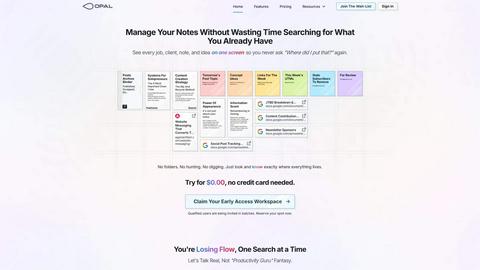
Visual Infinite Canvas
Opal provides a spacious digital workspace that allows users to visually organize their notes, tasks, and files. By presenting information in a spatial format, users can quickly grasp their entire workflow without unnecessary clicks or searches.
Markdown-Based Block Editor
The platform includes a rich markdown-based block editor, enabling users to create content with various media types. This feature is ideal for writing scripts, manuals, or articles, allowing for seamless integration of text, images, and links.
Real-Time Collaboration
Opal facilitates real-time collaboration, enabling multiple users to work on the same project simultaneously. This feature is essential for teams that require instant feedback and communication while managing tasks and documents.
AI Integration
With the Opal Recall skill, users can connect their own AI agents to the platform through an API. This integration enhances productivity by allowing users to retrieve information and insights quickly, making it easier to stay on top of tasks and projects.
Use Cases
Decode This Text
Workplace Communication
In professional settings, deciphering short or ambiguous emails can lead to misunderstandings. Decode This Text helps you interpret your boss's one-word replies or a colleague's vague messages, ensuring you respond appropriately and maintain professionalism.
Navigating Friendships
Friendships can sometimes involve complicated dynamics. If a friend goes silent after a text, using Decode This Text can help you understand whether they are genuinely busy or if there is a shift in their interest, guiding you on how to reconnect.
Family Interactions
Family messages can often carry emotional weight. Decode This Text aids in clarifying confusing texts from relatives, helping you navigate sensitive topics with care and understanding, and ensuring family communications remain supportive.
Client Relations
When dealing with clients, the stakes are high. Decode This Text allows you to understand nuanced messages from clients, helping you determine their satisfaction levels or concerns. This insight enables you to address issues proactively and maintain strong client relationships.
Opal
Project Management
Opal is perfect for project managers who need to track multiple tasks, clients, and deadlines. The visual organization helps keep everything in sight, ensuring that no detail is overlooked during project execution.
Content Creation
Writers and content creators can utilize Opal's markdown editor to draft articles, scripts, or manuals. The ability to organize thoughts and ideas visually aids in the creative process while streamlining content development.
Knowledge Management
For businesses that rely on standard operating procedures and documentation, Opal serves as a centralized knowledge management system. All essential information can be stored, linked, and accessed easily, reducing time spent searching for documents.
Client Management
Individuals managing client relationships can benefit from Opal's structure, allowing them to keep track of client notes, contracts, and communication history in one accessible space. This ensures that every detail is accounted for and easily retrievable.
Overview
About Decode This Text
Decode This Text is an innovative solution designed to help individuals decipher the true meanings behind text messages, emails, and chats. In our fast-paced communication landscape, it can often be challenging to interpret the intent, tone, and emotions behind written words. Decode This Text steps in to eliminate confusion, providing users with clarity and insight into their communications. Whether you are trying to understand a colleague's email, a friend's text, or a client's ambiguous message, this tool is crafted for anyone who seeks to enhance their communication skills. With just a simple copy and paste, or by uploading a screenshot, users receive an analysis that reveals the underlying messages within 30 seconds. The main value proposition lies in empowering users to respond with confidence, fostering better connections with coworkers, friends, and family without the stress of overanalyzing.
About Opal
Opal is an innovative productivity tool designed to transform the way individuals and teams manage their notes, documents, and important files. Unlike traditional productivity applications that often bury information in complex folder structures, Opal offers a visual, infinite canvas where users can arrange their content spatially on a digital desk. This approach allows users to see everything at a glance, ensuring that important information remains top of mind. Whether you are a freelancer, a project manager, or a business owner, Opal caters to anyone who relies on effective knowledge management. Its primary value proposition lies in eliminating the frustration of searching for lost information, thereby enhancing focus, improving productivity, and ultimately enabling users to do their best work without the chaos of disorganized tools.
Frequently Asked Questions
Decode This Text FAQ
How does Decode This Text ensure privacy?
Decode This Text prioritizes user confidentiality. No human reads your texts; all analyses are conducted anonymously, ensuring that your information remains secure and private.
Can I use Decode This Text for multiple conversations?
Absolutely! You can analyze as many conversations as you like. Whether it's work-related emails, personal texts, or client communications, Decode This Text is versatile and designed to handle various interactions.
What if I don't want to type out my conversation?
You can easily upload a screenshot of your chat instead of typing it out. This feature simplifies the process for those who prefer visual inputs, making it convenient and user-friendly.
How long does it take to get my analysis?
The analysis is prompt, typically delivered within 30 seconds of submitting your text or screenshot. This allows you to gain clarity and respond quickly, without unnecessary delays.
Opal FAQ
What makes Opal different from traditional productivity tools?
Opal stands out by offering a visual workspace that allows users to spatially organize their information, unlike traditional tools that often rely on hierarchical folder structures.
Can I collaborate with my team on Opal?
Yes, Opal features real-time collaboration capabilities, allowing multiple users to work together seamlessly on projects and documents.
Is there an AI integration available in Opal?
Absolutely. Opal offers the Opal Recall skill, enabling users to connect their AI agents through an API for enhanced productivity and quick information retrieval.
How does Opal help with knowledge management?
Opal serves as a centralized hub for all your essential documents and notes, making it easy to access and link information, streamlining your knowledge management processes.
Alternatives
Decode This Text Alternatives
Decode This Text is an innovative tool that falls under the Productivity & Management category, specifically designed to clarify and decode the sometimes confusing nuances of written communication. Users often seek alternatives to Decode This Text for various reasons, including pricing considerations, feature sets that may better suit their specific needs, or compatibility with different platforms. As communication continues to evolve in our digital world, finding the right tool can make a significant difference in how effectively individuals interpret and respond to messages. When searching for an alternative, it is essential to evaluate several factors, such as the accuracy and speed of message analysis, the ability to assess tone and context, and any additional features that may enhance communication clarity. User experience and support options can also play a crucial role in ensuring that the chosen tool meets individual requirements and improves overall communication skills.
Opal Alternatives
Opal is a spatial knowledge management tool designed specifically for solopreneurs, freelancers, and neurodivergent thinkers. By providing a visual, infinite canvas, Opal allows users to organize their notes, documents, and important files in a way that prioritizes visibility and accessibility. Its unique approach helps users retain a sense of control over their projects and enhances productivity. Many users seek alternatives to Opal for various reasons, including budget constraints, specific feature requirements, or compatibility with their preferred platforms. When looking for an alternative, consider factors such as ease of use, the ability to integrate with existing tools, and the flexibility of the software to accommodate your unique workflow. Ensuring that the alternative aligns with your organizational style and project management needs is crucial for maximizing productivity and efficiency.