
Blueberry vs Crawlkit
Side-by-side comparison to help you choose the right product.

Blueberry
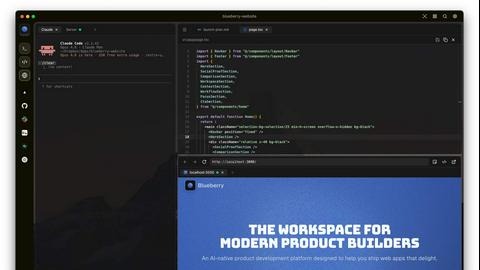
Blueberry is an all-in-one Mac app that unifies editing, terminal, and browsing for seamless web app development.
Last updated: February 25, 2026

CrawlKit is a powerful API-first web scraping platform that enables developers to extract and monitor data from any w...
Last updated: February 26, 2026
Visual Comparison
Blueberry
Crawlkit
Feature Comparison
Blueberry
Integrated Workspace
Blueberry combines a terminal, code editor, and preview browser into one cohesive environment, minimizing the disruption caused by switching between different applications. This integration allows developers to maintain focus and efficiency, making the coding process smoother and more enjoyable.
Advanced AI Integration
With Blueberry's MCP server, you can connect various AI models directly within your workspace. This means your AI can see your entire project in real-time, providing contextual assistance that enhances coding and debugging, ultimately resulting in faster development cycles.
Multi-Device Preview
The built-in preview feature supports multiple device views, including desktop, tablet, and mobile. This provides developers with the ability to see exactly how their applications will appear to users across different platforms without leaving the Blueberry workspace.
Pinned Apps and Command Bar
Blueberry allows you to pin essential applications like GitHub, Figma, and Linear directly in your workspace. Additionally, the command bar enables quick access to files, project navigation, and command execution, ensuring that developers can work efficiently without losing their flow.
Crawlkit
Simplified API Access
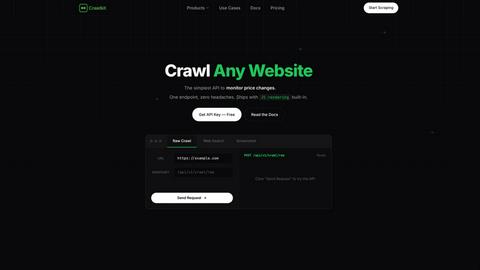
CrawlKit provides a straightforward API that allows developers to extract data from any URL effortlessly. With built-in JavaScript rendering, users can access dynamic content without additional configuration, making the process efficient and user-friendly.
Reliable Data Monitoring
With CrawlKit, users can monitor price changes, stock levels, and content updates in real-time. This feature is particularly beneficial for businesses that need to stay competitive by tracking market fluctuations or content changes on competitor sites.
Screenshot Capture
The platform enables users to capture full-page screenshots of any URL in PNG or PDF format with a single API call. This feature is invaluable for documentation, archiving, or visual analysis of web pages.
High Success Rates
CrawlKit boasts industry-leading success rates for web crawling, consistently achieving 98% success over 30 days. This reliability ensures that users can extract data even when websites implement new anti-scraping measures, making it a trustworthy choice for data-driven applications.
Use Cases
Blueberry
Streamlined Development Workflows
Developers can use Blueberry to create a personalized workspace that includes all necessary tools and apps. By saving specific setups for each project, they can quickly switch contexts and maintain productivity without the hassle of reopening and rearranging windows.
Enhanced Collaborative Projects
In team environments, Blueberry allows multiple users to work on the same project with shared access to the workspace. This fosters collaboration and real-time feedback, making it easier to manage group projects and track changes effectively.
Efficient Debugging and Testing
With the integrated AI models, debugging becomes a more manageable task. Developers can query their AI about code functionality or issues while observing real-time terminal output, significantly reducing the time spent on troubleshooting.
Rapid Prototyping
For product builders looking to test new ideas quickly, Blueberry's live preview and integrated tools facilitate rapid prototyping. The ability to see changes in real time helps teams iterate faster and validate concepts before full-scale development.
Crawlkit
E-commerce Price Tracking
CrawlKit is an ideal solution for e-commerce businesses that need to monitor price changes across competitors' websites. With real-time tracking capabilities, businesses can adjust their pricing strategies effectively to remain competitive.
Market Research
Researchers can utilize CrawlKit to gather and analyze data from various web sources efficiently. The ability to extract structured data and perform automated searches streamlines the research process, enabling quicker insights and decision-making.
Content Aggregation
Media companies and content creators can leverage CrawlKit to aggregate content from multiple sources. By extracting relevant data and visual snapshots, organizations can curate timely and engaging content for their audiences.
Lead Generation
CrawlKit's ability to extract professional data from platforms like LinkedIn allows sales and marketing teams to build targeted lead lists. This is crucial for businesses looking to enhance their outreach and improve conversion rates through personalized engagement.
Overview
About Blueberry
Blueberry is an innovative macOS application designed to integrate your editor, terminal, and browser into a single, focused workspace, streamlining the product development process. It serves as an AI-native platform that enables modern product builders to create web applications seamlessly and efficiently. By connecting with advanced AI models like Claude, Gemini, and Codex through its built-in MCP server, Blueberry provides your AI with full visibility of your files, terminal outputs, and live previews. This eliminates the need for tedious copy-pasting of context, allowing developers to focus on coding and creativity rather than managing multiple tools. Whether you are a solo developer or part of a larger team, Blueberry is crafted to enhance productivity, foster collaboration, and simplify workflows, making it an essential tool for anyone involved in web app development.
About Crawlkit
CrawlKit is an advanced web data extraction platform tailored for developers and data teams seeking seamless and scalable access to web data without the burdens of maintaining complex scraping infrastructure. In today's digital landscape, modern web scraping can be fraught with challenges such as rotating proxies, headless browsers, anti-bot protections, and frequent site updates that can break scrapers. CrawlKit simplifies this process by handling all the intricacies of web data extraction. With a single API request, users can bypass common obstacles such as proxy rotation, browser rendering, and rate limits, allowing them to concentrate on data utilization instead of data collection. CrawlKit supports various data extraction types, including raw page content, structured search results, visual snapshots, and specialized data from platforms like LinkedIn, making it a versatile solution for diverse data needs.
Frequently Asked Questions
Blueberry FAQ
What operating system is Blueberry compatible with?
Blueberry is currently designed exclusively for macOS, ensuring optimal performance and integration within Apple's ecosystem.
Is Blueberry really free during the beta phase?
Yes, Blueberry is completely free during its beta phase, allowing users to experience its features without any financial commitment.
How does Blueberry handle AI model integration?
Blueberry features a built-in MCP server that allows users to connect to various AI models like Claude, Codex, and Gemini, providing them with contextual insight into the entire project.
Can I use Blueberry for collaborative projects?
Absolutely! Blueberry supports collaborative workflows by allowing multiple users to share the same workspace, making it easier to work together on projects in real time.
Crawlkit FAQ
What types of data can I extract with CrawlKit?
CrawlKit allows users to extract a variety of data types, including raw HTML content, structured search results, visual snapshots of web pages, and professional data from LinkedIn, catering to diverse data needs.
Is there a limit on the number of API calls I can make?
CrawlKit operates on a pay-as-you-go pricing model with no cap on API calls. The more credits you purchase, the lower the price per credit, ensuring flexibility for users with varying data extraction needs.
How does CrawlKit handle website protections?
CrawlKit is designed to navigate common anti-bot protections, handling proxy rotation, retries, and browser rendering automatically. This ensures that users can extract data from sites with stringent security measures without manual intervention.
What programming languages does CrawlKit support?
CrawlKit offers SDKs for multiple programming languages, including Node.js, Python, and Go, making it accessible for developers regardless of their preferred coding environment.
Alternatives
Blueberry Alternatives
Blueberry is an innovative macOS application that falls under the category of development tools, specifically designed to unify the coding experience by integrating an editor, terminal, and browser into a single, focused workspace. This all-in-one platform is particularly attractive to web app developers, streamlining the development process through advanced AI integrations and a seamless user interface. Users often seek alternatives to Blueberry for various reasons, such as pricing concerns, specific feature requirements, or compatibility with different operating systems. When looking for an alternative, it's essential to consider factors like ease of use, integration capabilities with existing tools, and the overall effectiveness in enhancing productivity. Evaluating these aspects can help developers find a solution that best meets their unique workflow and project needs.
Crawlkit Alternatives
CrawlKit is a powerful API-first web scraping platform designed for developers and data teams seeking efficient access to web data. By simplifying the complexities of web data extraction, CrawlKit allows users to focus on utilizing the data rather than managing the infrastructure required for scraping. Users often explore alternatives to CrawlKit due to a variety of reasons, including pricing considerations, specific feature requirements, or compatibility with existing platforms. When choosing an alternative, it is essential to evaluate factors such as ease of use, reliability, customer support, and the ability to handle dynamic content effectively.