
Antigravity AI Directory vs Blueberry
Side-by-side comparison to help you choose the right product.

Antigravity AI Directory
Antigravity AI Directory offers curated workflows and prompts for developers, enhancing productivity with zero cost.
Last updated: February 26, 2026

Blueberry
Blueberry is an all-in-one Mac app that unifies editing, terminal, and browsing for seamless web app development.
Last updated: February 25, 2026
Visual Comparison
Antigravity AI Directory
Blueberry
Feature Comparison
Antigravity AI Directory
Extensive Prompt Collection
The Antigravity AI Directory boasts an extensive library of over 125 carefully curated prompts that cover a wide range of functionalities, from API integrations to real-time data handling. These prompts serve as a foundational resource for developers, enabling them to quickly implement complex features without having to start from scratch.
Comprehensive MCP Server Integrations
With access to 430+ MCP servers, users can effortlessly integrate various services such as Supabase, AWS, and GitHub into their applications. This vast array of integrations simplifies the development process, allowing developers to focus on building innovative features rather than dealing with backend complexities.
Community-Driven Content
The directory thrives on a vibrant community of contributors who continuously add new prompts and share insights. Users can benefit from the latest developments and popular tools, ensuring they have access to fresh ideas and methodologies that can enhance their projects.
User-Friendly Categories and Navigation
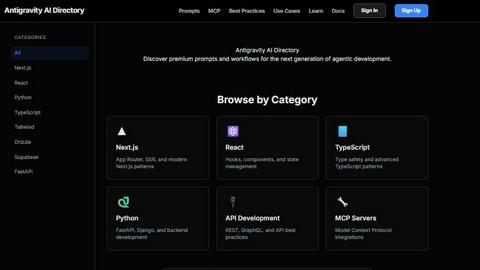
Antigravity AI Directory is organized into intuitive categories such as Next.js, React, TypeScript, and more, allowing users to easily navigate through different sections. This structured approach not only saves time but also helps developers quickly find the resources they need to address specific challenges.
Blueberry
Integrated Workspace
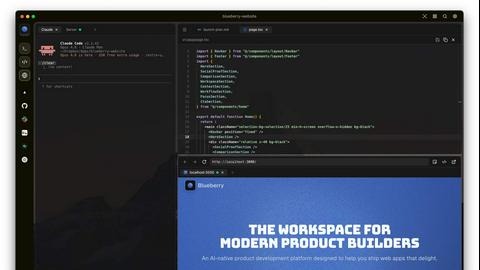
Blueberry combines a terminal, code editor, and preview browser into one cohesive environment, minimizing the disruption caused by switching between different applications. This integration allows developers to maintain focus and efficiency, making the coding process smoother and more enjoyable.
Advanced AI Integration
With Blueberry's MCP server, you can connect various AI models directly within your workspace. This means your AI can see your entire project in real-time, providing contextual assistance that enhances coding and debugging, ultimately resulting in faster development cycles.
Multi-Device Preview
The built-in preview feature supports multiple device views, including desktop, tablet, and mobile. This provides developers with the ability to see exactly how their applications will appear to users across different platforms without leaving the Blueberry workspace.
Pinned Apps and Command Bar
Blueberry allows you to pin essential applications like GitHub, Figma, and Linear directly in your workspace. Additionally, the command bar enables quick access to files, project navigation, and command execution, ensuring that developers can work efficiently without losing their flow.
Use Cases
Antigravity AI Directory
Rapid Application Development
Developers can utilize the Antigravity AI Directory to accelerate application development by leveraging pre-built prompts and MCP server integrations. This allows teams to deliver projects faster, meet deadlines, and respond to market demands more efficiently.
Real-Time Data Applications
By implementing features such as GraphQL subscriptions and Server-Sent Events, developers can create robust real-time applications that enhance user engagement. The directory provides the necessary tools to build these features seamlessly, ensuring a smooth user experience.
A/B Testing and Analytics
With built-in prompts for A/B testing and analytics integration, developers can easily gather data-driven insights to optimize their applications. This enables them to make informed decisions that improve performance and user satisfaction.
Security and Authentication
Antigravity AI Directory equips developers with essential features for implementing secure authentication flows and configuring security headers. This ensures that applications are not only functional but also secure, safeguarding user data and maintaining compliance with industry standards.
Blueberry
Streamlined Development Workflows
Developers can use Blueberry to create a personalized workspace that includes all necessary tools and apps. By saving specific setups for each project, they can quickly switch contexts and maintain productivity without the hassle of reopening and rearranging windows.
Enhanced Collaborative Projects
In team environments, Blueberry allows multiple users to work on the same project with shared access to the workspace. This fosters collaboration and real-time feedback, making it easier to manage group projects and track changes effectively.
Efficient Debugging and Testing
With the integrated AI models, debugging becomes a more manageable task. Developers can query their AI about code functionality or issues while observing real-time terminal output, significantly reducing the time spent on troubleshooting.
Rapid Prototyping
For product builders looking to test new ideas quickly, Blueberry's live preview and integrated tools facilitate rapid prototyping. The ability to see changes in real time helps teams iterate faster and validate concepts before full-scale development.
Overview
About Antigravity AI Directory
Antigravity AI Directory is the premier resource for developers looking to leverage the power of AI in their coding projects. Designed specifically for users of the Google Antigravity IDE, this directory offers a comprehensive collection of over 125 prompts and 430 MCP (Model-Configured Prompt) servers tailored for Gemini 3 agentic development. Whether you are a seasoned developer or just starting, the Antigravity AI Directory provides essential tools and resources to streamline your workflow, enhance productivity, and foster innovation. Its user-friendly interface and extensive categorization make it easy to find relevant prompts and servers, while the community-driven content ensures that you have access to the latest trends and best practices in AI development. The directory not only helps developers build better applications faster but also empowers them with the knowledge and resources to code smarter, ensuring that they stay ahead in an increasingly competitive tech landscape.
About Blueberry
Blueberry is an innovative macOS application designed to integrate your editor, terminal, and browser into a single, focused workspace, streamlining the product development process. It serves as an AI-native platform that enables modern product builders to create web applications seamlessly and efficiently. By connecting with advanced AI models like Claude, Gemini, and Codex through its built-in MCP server, Blueberry provides your AI with full visibility of your files, terminal outputs, and live previews. This eliminates the need for tedious copy-pasting of context, allowing developers to focus on coding and creativity rather than managing multiple tools. Whether you are a solo developer or part of a larger team, Blueberry is crafted to enhance productivity, foster collaboration, and simplify workflows, making it an essential tool for anyone involved in web app development.
Frequently Asked Questions
Antigravity AI Directory FAQ
What is Antigravity AI Directory?
Antigravity AI Directory is a specialized resource for developers using the Google Antigravity IDE, offering a vast collection of prompts and MCP servers for efficient AI-driven development.
How can I benefit from the prompts available?
The prompts available in the Antigravity AI Directory help streamline your coding process by providing ready-to-use solutions for common challenges, allowing you to focus on building unique features.
Is there a community aspect to the directory?
Yes, the Antigravity AI Directory is community-driven, with contributions from developers who share new prompts and best practices. This collaborative environment fosters knowledge sharing and continuous improvement.
How do I navigate the directory?
The directory is organized into specific categories like Next.js, React, and TypeScript, making it easy to find relevant prompts and MCP servers. The user-friendly interface enhances the overall experience for developers.
Blueberry FAQ
What operating system is Blueberry compatible with?
Blueberry is currently designed exclusively for macOS, ensuring optimal performance and integration within Apple's ecosystem.
Is Blueberry really free during the beta phase?
Yes, Blueberry is completely free during its beta phase, allowing users to experience its features without any financial commitment.
How does Blueberry handle AI model integration?
Blueberry features a built-in MCP server that allows users to connect to various AI models like Claude, Codex, and Gemini, providing them with contextual insight into the entire project.
Can I use Blueberry for collaborative projects?
Absolutely! Blueberry supports collaborative workflows by allowing multiple users to share the same workspace, making it easier to work together on projects in real time.
Alternatives
Antigravity AI Directory Alternatives
The Antigravity AI Directory is a premier resource designed for developers, offering a curated collection of workflows and prompts to enhance productivity in coding projects. It falls under the category of developer tools, providing essential resources that leverage artificial intelligence to streamline development processes. Users often seek alternatives due to various factors, including pricing, specific feature sets, or compatibility with different platforms. A well-rounded alternative should offer a similar range of prompts and integrations while ensuring ease of use and access to community-driven content, which can be pivotal for ongoing learning and innovation. When exploring alternatives, it is crucial to consider the directory's prompt collection, the breadth of MCP server integrations, and the vibrancy of the community behind it. Look for user-friendly interfaces that facilitate quick access to relevant resources, as well as platforms that keep pace with the latest trends in AI development. Evaluating these aspects can help ensure that you choose an alternative that truly meets your development needs.
Blueberry Alternatives
Blueberry is an innovative macOS application that falls under the category of development tools, specifically designed to unify the coding experience by integrating an editor, terminal, and browser into a single, focused workspace. This all-in-one platform is particularly attractive to web app developers, streamlining the development process through advanced AI integrations and a seamless user interface. Users often seek alternatives to Blueberry for various reasons, such as pricing concerns, specific feature requirements, or compatibility with different operating systems. When looking for an alternative, it's essential to consider factors like ease of use, integration capabilities with existing tools, and the overall effectiveness in enhancing productivity. Evaluating these aspects can help developers find a solution that best meets their unique workflow and project needs.