
retroshelf
Retroshelf automatically logs your retro handheld gaming sessions, helping you track, discover, and share your gaming journey.
Visit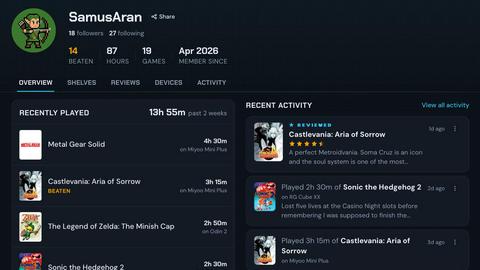
About retroshelf
retroshelf is an innovative play-tracking and discovery application designed specifically for retro handheld gaming enthusiasts. This app enables users to log their gaming sessions effortlessly, providing a public shelf to showcase the games they are playing, finishing, reviewing, or replaying. With retroshelf, players can conveniently record vital details about their gaming experience, such as the game title, playtime, and the specific handheld device used, all while eliminating the need for scattered notes across different platforms. The app transforms individual gaming sessions into a comprehensive, browseable history, allowing players to easily revisit their gaming journey. This tool is especially beneficial for retro gaming aficionados looking to connect with others in the community, explore trending games, and share insights with fellow players. Ultimately, retroshelf serves as a valuable resource for anyone seeking to enhance their gaming experience and engage with a passionate community.
Features of retroshelf
Automatic Session Logging
retroshelf features a tiny plugin that operates seamlessly on your handheld device, capturing every gaming session automatically. This includes recording the game title, the duration of play, and the specific device used. As a result, players do not need to manually track their gameplay, allowing for a more immersive gaming experience.
Browseable Game Timeline
The app transforms scattered gaming sessions into a coherent timeline, making it easy for users to browse their complete gaming history. Players can see what games they played, when they played them, and any notes they left along the way. This feature enhances nostalgia and helps players reflect on their gaming experiences.
Community Insights
retroshelf allows users to discover trending games among their peers through public shelves. Players can see what games are currently popular, which devices are being used, and what others are finishing or replaying. This fosters a sense of community and encourages gamers to try out new titles based on collective preferences.
Device-Specific Reviews
The platform provides context to game reviews by associating star ratings with the handheld devices used for gameplay. This feature offers deeper insights into the gaming experience, helping potential players make informed decisions based on the device-specific performance of each game.
Use Cases of retroshelf
Tracking Progress
retroshelf is ideal for players who want to keep track of their gaming progress across multiple retro handheld devices. With automatic session logging, users can effortlessly see how many games they have completed and how much time they have invested in each title.
Discovering New Games
For gamers looking to expand their library, retroshelf serves as a valuable tool to discover new games. By browsing the public shelves and seeing what others are currently playing or enjoying, users can find hidden gems that they may not have considered before.
Sharing Experiences
retroshelf facilitates sharing gaming experiences within the community. Users can leave notes and reviews on their shelves, providing insights into gameplay, difficulty, and overall enjoyment, which can be beneficial for others looking for recommendations.
Connecting with Other Gamers
The app helps users connect with other retro gaming enthusiasts. By seeing who is playing what and for how long, players can engage in discussions about their favorite games, share tips and tricks, and foster relationships within the retro gaming community.
Frequently Asked Questions
How do I get started with retroshelf?
To begin using retroshelf, simply sign up for beta access on their website. Once granted access, download the plugin and place it on your SD card. Link your device, and your gaming sessions will be logged automatically.
What devices are supported by retroshelf?
retroshelf currently supports several retro handheld devices, including those running muOS and OnionOS. You can filter your gaming shelves based on the specific device you use, ensuring a tailored experience.
Can I edit my gaming sessions after they are logged?
Yes, users can edit their gaming sessions after they have been logged. This functionality allows players to update details such as notes or correct any inaccuracies in the recorded information.
Is retroshelf free to use?
While specific pricing details are not mentioned, retroshelf is currently in a closed beta. Interested users are encouraged to request beta access to explore the features and provide feedback for future improvements.
Explore more in this category:
Top Alternatives to retroshelf

HavenBook
HavenBook is the all-in-one app that organizes home maintenance tasks, reminders, and contacts to prevent costly repairs and keep your home running.
NinjaHackz
NinjaHackz is a portable CS2 cheat offering aimbot, wallhack, and ESPs to let you play without limits while keeping your privacy secure.

True Moments
Transform your cherished photos into captivating animations in seconds, preserving memories like never before with True Moments.

It's a Date
It's a Date alerts you the exact moment NYC's most coveted restaurant reservations open, so you can book the impossible table.

Movies2Watch
Movies2Watch is a free streaming platform offering over 68,000 HD movies and TV shows without registration or hidden fees.
Saga20
Saga20 automates your TTRPG notes and world-building, capturing sessions and summarizing key events effortlessly for seamless gameplay.

Not Pink
Not Pink helps couples turn shared dreams into planned adventures with real-time sync, curated ideas, and memory-keeping tools.

Loot Aura
Loot Aura connects buyers and sellers by mapping local yard, garage, and estate sales for easy discovery and increased foot traffic.