
QuickTextTools
QuickTextTools offers 76 free browser-based utilities for writers, SEOs, and students to process text instantly without sign-up.
Visit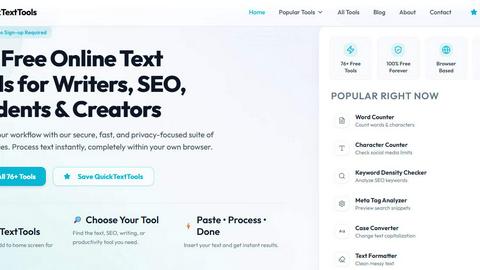
About QuickTextTools
QuickTextTools is a comprehensive, free online platform that provides over 76 browser-based utilities designed for writers, marketers, developers, students, SEO professionals, and content creators. This all-in-one toolkit eliminates the need for expensive software subscriptions or complicated installations by offering fast, simple, and privacy-friendly tools that operate entirely within your web browser. The platform’s core value proposition lies in its ability to streamline everyday text processing tasks, from formatting and cleaning to analysis and encoding, all without requiring any sign-up or downloads. Users can instantly access a wide array of utilities, including text formatting tools, SEO utilities, writing helpers, keyword cleaning tools, encoding and developer utilities, and productivity enhancers. Whether you need to clean keyword lists, analyze meta tags, compare text, convert case formatting, encode URLs, format JSON, or improve writing workflows, QuickTextTools provides practical, instant solutions. The platform is built on principles of ease of use, speed, and accessibility, making it an indispensable resource for anyone who works with text regularly. By processing all data client-side, QuickTextTools ensures that your information never leaves your computer, offering a secure and private environment for all your text processing needs. This combination of functionality, simplicity, and privacy positions QuickTextTools as a leading choice for professionals and students seeking efficient, no-fuss online utilities.
Features of QuickTextTools
Comprehensive Text Analysis and Counting
QuickTextTools offers a robust suite of analytical tools that go beyond basic word counting. Users can access a Word Counter, Character Counter, Sentence Counter, Paragraph Counter, and Line Counter to gain deep insights into their content structure. The platform also includes specialized tools like a Reading Time Calculator and a Readability Checker, which provide critical metrics for optimizing content for audience engagement and comprehension. These features are essential for writers, editors, and SEO professionals who need to adhere to specific content length requirements or ensure their writing is accessible to their target audience. The instant, accurate results allow for rapid iteration and refinement of text, making the editing process significantly more efficient.
Advanced SEO and Marketing Utilities
This feature set is specifically designed to enhance online content performance. QuickTextTools includes a Keyword Density Checker, Keyword Counter, Word Frequency Counter, Duplicate Keyword Remover, and Keyword Combiner, which are vital for SEO keyword research and optimization. Additionally, the platform offers a Meta Tag Generator, Meta Title Preview Tool, UTM Link Builder, Robots.txt Generator, and Sitemap.xml Generator. These tools allow marketers and webmasters to optimize their sites for search engines directly from the browser, preview how their pages will appear in search results, and build trackable marketing URLs. This comprehensive suite eliminates the need for multiple specialized tools, consolidating essential SEO tasks into one accessible platform.
Powerful Text Formatting and Cleaning Capabilities
QuickTextTools provides a versatile set of tools for manipulating and sanitizing text. Users can instantly change text case with the Case Converter, Title Case Converter, Lowercase Converter, Uppercase Converter, and Capitalize Text tool. For cleaning messy data, the Text Cleaner removes special characters and extra spaces, while the Duplicate Line Remover and Remove Extra Spaces tools ensure data is pristine and ready for use. These utilities are invaluable for content creators who import text from various sources, developers preparing data for applications, and anyone needing to standardize formatting quickly. The tools operate with a simple paste-and-process workflow, delivering clean, formatted text in seconds.
Developer and Productivity Tools
Beyond text and SEO, QuickTextTools includes a range of utilities for developers and productivity-focused users. The Random Password Generator creates secure, complex passwords instantly, while the QR Code Generator allows for the quick creation and download of QR codes. For developers, there are tools for encoding URLs, decoding Base64, and formatting JSON. The Slug Generator creates SEO-friendly URL slugs from any text, and the platform also offers a robust Text Cleaner for stripping HTML tags. These tools are designed to save time on common, repetitive tasks, allowing developers to focus on more complex work. The browser-based nature of these utilities means they are always available without the need for additional software installations.
Use Cases of QuickTextTools
SEO Content Optimization and Keyword Analysis
SEO professionals and content marketers can use QuickTextTools to refine their content strategy. By employing the Keyword Density Checker and Word Frequency Counter, they can analyze articles to ensure target keywords are used appropriately without stuffing. The Meta Tag Generator and Meta Title Preview Tool allow for the creation and testing of search snippets before publishing, ensuring they are compelling and correctly formatted. The UTM Link Builder is essential for tracking campaign performance, while the Robots.txt and Sitemap.xml generators help manage site crawling. This integrated workflow streamlines the entire SEO process, from keyword research to technical implementation.
Academic Writing and Content Verification
Students and academic writers can leverage QuickTextTools for rigorous content analysis. The Word Counter and Character Counter are essential for meeting strict assignment length requirements. The Readability Checker helps ensure that complex academic papers are accessible to a wider audience, while the Sentence and Paragraph Counters aid in structural analysis. The Text Cleaner is perfect for removing unwanted formatting when copying text from PDFs or websites, ensuring a clean manuscript. These tools help maintain high standards of writing and formatting, saving students significant time during the editing and proofreading phases.
Social Media Content Creation and Management
Social media managers and content creators can use QuickTextTools to generate and optimize posts for various platforms. The Instagram Caption Generator, Hashtag Generator, Pinterest Pin Title Generator, and YouTube Title Generator provide creative starting points for engaging content. The Character Counter is crucial for adhering to platform-specific character limits, such as Twitter's 280-character cap. The Case Converter can be used to format headlines or calls to action for maximum impact. This suite of tools allows for rapid content creation and ensures that all posts are optimized for their respective platforms, enhancing engagement and reach.
Data Cleaning and Preparation for Development
Developers and data analysts can use QuickTextTools to prepare and sanitize data efficiently. The Duplicate Line Remover is invaluable for cleaning up lists of emails, URLs, or other data points. The Text Cleaner can strip out unwanted HTML tags, special characters, and extra spaces from scraped data. The Case Converter can standardize data formats, and the Keyword Combiner can generate variations for testing. The developer tools for URL encoding and Base64 decoding are essential for preparing data for APIs or web applications. This use case highlights the platform's utility beyond simple text editing, serving as a practical data preprocessing hub.
Frequently Asked Questions
Is QuickTextTools really free, and do I need to sign up?
Yes, QuickTextTools is 100% free to use with no hidden costs or premium tiers. There is absolutely no sign-up or registration required to access any of the 76+ tools. You can simply visit the website, choose your tool, and start processing text immediately. This commitment to free, unrestricted access is a core principle of the platform.
How does QuickTextTools ensure my data privacy and security?
Privacy is a fundamental design principle of QuickTextTools. All text processing occurs entirely within your web browser using client-side JavaScript. This means that your data is never uploaded to any server or stored on any external system. Your text remains on your own computer, ensuring complete confidentiality and security for sensitive information like drafts, keyword lists, or proprietary content.
What types of tools are available on QuickTextTools?
The platform offers a comprehensive suite of over 76 tools organized into several categories. These include Writing Tools (word counter, readability checker), SEO Tools (keyword density checker, meta tag generator), Social Media Tools (caption generator, hashtag generator), Case Conversion Tools (uppercase, lowercase, title case), Text Cleaning Tools (remove extra spaces, duplicate lines), and Developer Tools (password generator, QR code generator). This wide variety ensures that most common text processing needs are covered.
Can I use QuickTextTools on my mobile device or tablet?
Yes, QuickTextTools is designed to be fully responsive and works seamlessly on all devices, including desktops, laptops, tablets, and smartphones. The browser-based interface adapts to your screen size, and all tools function directly in your mobile browser without requiring any app installation. You can even bookmark the site or add it to your home screen for instant access on any device.
Explore more in this category:
Top Alternatives to QuickTextTools

Very Good Calendar Sync
Very Good Calendar Sync quietly aligns work, personal, and client calendars on your Mac without linking accounts or exposing data.

Cece AI
Cece AI is your intelligent email assistant that streamlines scheduling, follow-ups, and operations, allowing you to focus on what truly matters.

Texas Pro Build
Texas Pro Build offers expert roofing solutions in Fort Worth, specializing in repairs, replacements, and storm damage restoration with guaranteed.


Commenter AI
Commenter AI organizes your LinkedIn DMs, prioritizing sales conversations to ensure you focus on what matters most today.

ThisVid Video Downloader
Save web videos to computer via browser extension.
MPulse CMMS Software
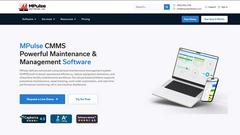
MPulse CMMS software enhances maintenance efficiency, reduces downtime, and streamlines asset management for any industry, all on a user-friendly.