
Gemini Omni Video
Gemini Omni Video Generator turns text, images, and audio into professionally synced short-form AI clips with multimodal control.
Visit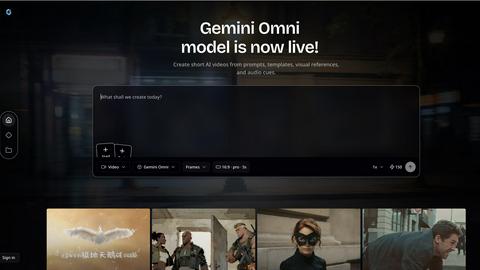
About Gemini Omni Video
Gemini Omni Video is a next-generation AI video generator that redefines the creative workflow for content creators, marketers, and media professionals. Unlike traditional text-to-video tools that operate in isolation, Gemini Omni Video is powered by Google's flagship omni-modality AI, allowing users to seamlessly integrate text prompts, reference images, existing video clips, and audio tracks into a single, unified creative session. The core value proposition is transforming AI video creation from a technical, multi-tool management process into an intuitive, tool-like experience. This product is designed for social media managers producing quick reels, product marketers creating consistent ad assets, and creative professionals exploring rapid visual concepts. By accepting multiple input types simultaneously, Gemini Omni Video ensures that every creative intent, from a product's visual identity to its background music and scene mood, is respected and synthesized into a cohesive output. It eliminates the need to stitch together separate image, video, and audio generators, providing a single surface for brief development. With native audio-visual synchronization, users no longer face the tedious post-production task of syncing sound effects and music to visuals. The platform supports multiple state-of-the-art AI models, including Gemini Omni Flash for multimodal fusion and Veo 3.1 for efficient text-to-video, all accessible through one interface. This makes Gemini Omni Video a powerful, credible solution for anyone looking to generate high-quality, short-form video content faster and with greater creative control.
Features of Gemini Omni Video
Multimodal Input Engine
Gemini Omni Video's core strength lies in its multimodal input engine, which accepts text prompts, reference images, existing video clips, and audio tracks as simultaneous inputs. This feature liberates creators from the limitations of a single written description. For example, you can combine a product photo with a detailed scene description and a specific background music track to generate a video that respects every creative input. The engine fuses these diverse elements into a single, coherent creative brief, ensuring that the visual style, character looks, motion rhythm, and sound direction are all aligned from the first draft. This capability is essential for maintaining brand consistency and achieving precise creative control without requiring complex technical workflows.
Built-in Audio-Visual Synchronization
Unlike other AI video generators that produce silent clips requiring extensive manual audio editing, Gemini Omni Video generates synchronized audio alongside the video in a single pass. This feature plans footsteps, ambience, music, dialogue cues, and sound texture directly alongside the visual design. The result is a finished video where sound effects, ambient noise, and music are perfectly timed to the on-screen action. This eliminates the tedious post-production process of syncing audio tracks to video frames, saving significant time and effort. By treating audio as an integral part of the scene design rather than an afterthought, Gemini Omni Video delivers a more polished and professional final product.
Reference-Driven Creation
Gemini Omni Video offers powerful reference-driven creation, allowing users to upload a variety of reference media to guide the AI's output. You can use product shots, character designs, mood boards, style frames, or even existing video clips as visual anchors. This feature ensures that the generated video maintains visual consistency with your brand or creative vision. With support for multiple reference inputs per generation, you get precise control over every aspect of the output, from the specific look of a character to the lighting and color palette of a scene. This is particularly valuable for creating branded content, product demos, and series where visual continuity is critical.
Multi-Model Architecture
The platform provides access to multiple state-of-the-art AI video models through a single, unified interface. Each model within the architecture has distinct strengths, such as Gemini Omni Flash for superior multimodal fusion, Veo 3.1 for efficient and high-quality text-to-video generation, and Seedance 2.0 for reference-heavy workflows. This flexibility allows users to switch between models based on the specific requirements of their project without needing to learn new tools or manage separate accounts. This architecture ensures that creators always have access to the best AI technology for the task at hand, whether they need speed, fidelity, or complex reference handling.
Use Cases of Gemini Omni Video
Social Media Content Creation
Gemini Omni Video is ideally suited for generating short-form video content for platforms like Instagram Reels, TikTok, and YouTube Shorts. Social media managers can quickly turn a text prompt describing a trending topic or a brand message into an engaging, visually appealing video. By combining a brand logo image with a specific music track and a prompt for a dynamic visual style, creators can produce consistent, high-volume content that maintains brand identity. The built-in audio synchronization ensures that the final video is ready to post without additional editing, significantly accelerating the content pipeline for social media campaigns.
Product Demos and Advertisements
Marketers can use Gemini Omni Video to create compelling product demos and advertisements with minimal effort. By uploading a product image as a reference and providing a text prompt describing its key features and benefits, the AI can generate a short video showcasing the product in action. The ability to add a background music track and specify a scene mood, such as energetic or sophisticated, allows for the creation of tailored ad assets for different platforms and audiences. This use case is perfect for e-commerce businesses, SaaS companies, and marketing teams looking to produce high-quality visual assets for landing pages, social ads, and email campaigns.
Creative Concept Visualization
For creative professionals like designers, filmmakers, and advertising creatives, Gemini Omni Video serves as a powerful tool for rapid concept visualization. Instead of spending hours or days creating storyboards or animatics, users can input a text description of a scene, a mood board image, and a reference for camera movement to generate a realistic video preview. This allows for quick iteration and exploration of different visual directions, camera angles, and pacing. The ability to generate audio alongside the video provides a more complete sense of the final piece, making it easier to communicate the creative vision to clients or team members.
Brand Style Guide Enforcement
Gemini Omni Video can be used to enforce brand style guides across all video content. By creating a set of reusable prompt patterns that include brand-specific keywords, color palettes, and camera feels, marketing teams can ensure that every generated video adheres to the established brand identity. For example, a prompt pattern could include "cinematic lighting, warm color tones, and a slow, deliberate camera movement" to match a luxury brand's aesthetic. This repeatable workflow allows for the consistent production of explainer videos, landing page media, and social clips that look and feel like they belong to the same cohesive campaign.
Frequently Asked Questions
What types of inputs can I use with Gemini Omni Video?
Gemini Omni Video accepts a wide range of inputs simultaneously, including text prompts, reference images (product shots, character designs, mood boards), existing video clips, and audio tracks (music, sound effects, dialogue). This multimodal input engine allows you to combine these elements into a single creative brief, ensuring the generated video respects all your creative intentions.
How does the built-in audio synchronization work?
The AI generates synchronized audio alongside the video in a single pass, meaning sound effects, ambient noise, and music are perfectly timed to the visual content from the moment of creation. This eliminates the need for manual post-production syncing, saving you significant time and effort. The audio is treated as an integral part of the scene design, not an afterthought.
Can I control the output format and duration of my videos?
Yes, Gemini Omni Video offers flexible output formats. You can generate content in multiple aspect ratios, including 16:9 landscape, 9:16 portrait, and 1:1 square, making it suitable for YouTube, Instagram Reels, TikTok, and website hero videos. You can also choose from various clip durations, such as 5, 8, or 10 seconds, to fit specific platform requirements.
What AI models power Gemini Omni Video?
Gemini Omni Video is powered by a multi-model architecture, giving you access to several state-of-the-art AI models through one interface. These include Gemini Omni Flash for advanced multimodal fusion, Veo 3.1 for efficient text-to-video generation, and Seedance 2.0 for complex reference-heavy workflows. You can switch between these models based on the specific needs of your project.
Explore more in this category:
Top Alternatives to Gemini Omni Video

IDPhotoAI
Effortless online ID photos for passport, visa, and IDs.

Voloshow
Create stunning AI-generated images easily with Voloshow—generate, edit, and polish visuals in one studio.
PixUnblur
AI-powered image extender, enhancer, and restoration—expand canvases, sharpen details, and revive old photos.

PixUnblur
PixUnblur — AI-powered photo enhancer and sharpener that restores detail and clarity to blurry images online.

HappyHorse AI Video
Free AI video generator — turn text or images into cinematic short videos online.

OmniGemini
OmniGemini is a multimodal AI tool that enables effortless video and image creation, remixing, and editing using diverse media inputs.

AI 3D
AI 3D generates production-ready, fully textured GLB models from text or images using Tencent Hunyuan3D and ByteDance Seed3D.

Floor Plan AI
Generate professional floor plans instantly with our AI floor plan generator.