
ProcessBankStatement vs Tradepal
Side-by-side comparison to help you choose the right product.

ProcessBankStatement
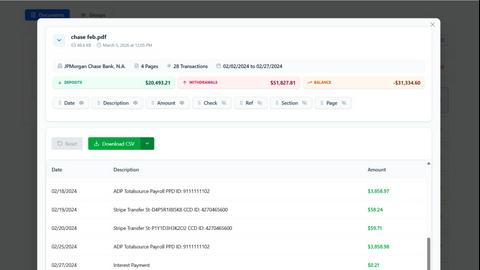
ProcessBankStatement instantly converts PDF bank statements into clean, structured CSV files for financial analysis.
Last updated: March 11, 2026

Tradepal
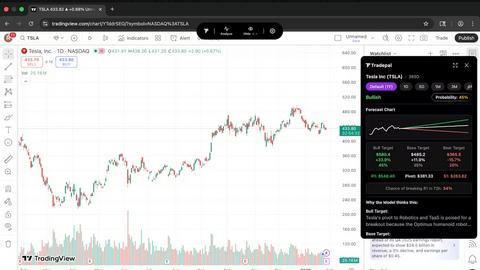
Tradepal delivers AI-driven stock analysis from screenshots, providing insights, price targets, and confidence scores.
Last updated: February 25, 2026
Visual Comparison
ProcessBankStatement
Tradepal
Feature Comparison
ProcessBankStatement
Intelligent PDF Parser
The core engine of ProcessBankStatement is its advanced parser, which intelligently identifies and extracts key data points from any bank statement PDF. It accurately captures transaction dates, descriptions, deposits, withdrawals, and running balances, even from complex or multi-column layouts. The technology handles both digital text-based PDFs and scanned image documents, ensuring clean, structured output ready for analysis without manual cleanup.
Bank-Grade Security & Privacy
Security is paramount. All file uploads and data transfers are protected with robust encryption protocols. Users maintain complete control over their data, with the ability to view and permanently delete uploaded statements and generated files from the system at any time. This commitment to privacy ensures that sensitive financial information is handled with the utmost care and confidentiality.
Seamless Software Integration
The tool is built for practical workflow integration. The generated CSV files are meticulously formatted for direct import into popular accounting platforms like QuickBooks and spreadsheet applications like Microsoft Excel or Google Sheets. This eliminates the need for reformatting or data manipulation, allowing for instant reconciliation, reporting, and financial analysis.
High-Volume Batch Processing
For professionals handling multiple client accounts or monthly statements, the batch upload capability is a significant time-saver. Users can upload several PDF statements at once, and the system will process them sequentially, providing individual CSV outputs for each file. This feature scales the efficiency gains, making it ideal for accounting firms and bookkeepers during peak periods.
Tradepal
In-Depth AI Stock Analysis
Tradepal offers real-time sentiment analysis and forecasting capabilities, providing traders with in-depth research and insights right on their screens. This feature ensures that users are well-informed about market conditions, enabling them to make data-driven decisions quickly.
Price Cone Projections
With Tradepal's price cone projections, users can visualize potential future price movements directly on their charts. This intuitive layout can be customized to match individual trading styles, allowing traders to save personalized views for future analysis sessions.
News and Sentiment Analysis
Tradepal aggregates market sentiment from professional trader sources and financial news into a single stream. This feature helps traders track the overall market mood and recognize when crowd conviction is building, offering a strategic advantage before significant market moves occur.
Breakout Signals
Tradepal identifies early signals of breakout strength or weakness through live sentiment analysis, order flow insights, and momentum shifts. This feature equips traders with the necessary tools to act promptly on potential trading opportunities.
Use Cases
ProcessBankStatement
Streamlining Bookkeeping & Client Accounting
Accountants and bookkeepers can drastically reduce the time spent on client onboarding and monthly reconciliations. Instead of manually keying in data from various client-provided PDF statements, they upload the documents and receive standardized CSVs. This allows them to focus on higher-value advisory services, analysis, and ensuring financial accuracy rather than data entry.
Accelerating Loan & Mortgage Processing
Loan processors and underwriters often need to analyze months of bank statements for applicants. Manually reviewing PDFs is slow. With ProcessBankStatement, they can instantly convert statements into CSV format, enabling quick filtering, summation of deposits, and identification of transaction patterns using spreadsheet tools, significantly speeding up the verification and decision-making process.
Empowering Small Business Financial Management
Small business owners can take control of their finances without dedicated bookkeeping staff. By converting their monthly bank statements to CSV, they can easily import transactions into their accounting software, track expenses, prepare for tax season, and generate cash flow reports—all with minimal effort and technical expertise.
Enhancing Financial Analysis & Reporting
Financial analysts and consultants who need to examine transaction histories for budgeting, auditing, or forensic accounting benefit from structured data. The clean CSV output allows for advanced pivot tables, trend analysis, and custom reporting in Excel, turning unstructured PDFs into a powerful dataset for informed business insights.
Tradepal
Real-Time Chart Analysis
Active traders can utilize Tradepal for real-time chart analysis while using any trading platform. By clicking Analyze, they receive instant insights that allow them to validate their trading strategies and adjust their positions accordingly.
Risk Management
Traders can leverage Tradepal’s AI forecasts to assess risk levels for intraday trading. By identifying potential ranges, reversals, and volatility, users can manage their risk exposure effectively and make more informed trading decisions.
Sentiment Monitoring
Investors can use Tradepal to monitor market sentiment and news developments in real-time. By staying updated on the latest trends and sentiment shifts, they can position themselves advantageously and respond to market changes proactively.
Customized Watchlists
With Tradepal, traders can create personalized watchlists that include smart alerts for unusual activity and risk events. This feature ensures that they remain prepared for market movements without needing to constantly monitor their screens.
Overview
About ProcessBankStatement
ProcessBankStatement is a sophisticated, AI-powered tool designed to eliminate the tedious and error-prone manual data entry associated with bank statements. It serves as a critical bridge between raw financial documents and actionable data. By simply uploading a PDF bank statement, users receive a clean, structured, and downloadable CSV file within seconds. The platform's intelligent parsing engine accurately extracts transaction details, dates, amounts, and descriptions, formatting the data for immediate use in accounting software like QuickBooks, spreadsheets like Excel, or custom financial analysis. It is specifically engineered for finance professionals, accountants, bookkeepers, small business owners, and loan processors who require efficiency and accuracy. Its core value proposition lies in transforming hours of manual work into a secure, automated process that is both fast and reliable, ensuring data integrity while giving users full control over their sensitive financial information.
About Tradepal
Tradepal is an innovative AI-powered trading assistant designed specifically for active traders and investors seeking fast and objective chart analysis. By eliminating the manual guesswork that often plagues trading, Tradepal enables users to analyze any U.S.-listed stock chart efficiently. Users have the flexibility to analyze charts in real-time by clicking the Analyze button or by uploading screenshots through the web app. Tradepal employs advanced AI technology to detect critical technical patterns, identify support and resistance levels, assess trend strength, and evaluate momentum. This results in clear scenarios—bull, base, and bear—complete with confidence scores and price targets. Unlike traditional trading platforms, Tradepal does not execute trades but acts as a supportive co-pilot, helping traders validate their ideas, minimize emotional bias, and make informed decisions. Designed to seamlessly integrate into existing workflows, Tradepal enhances the trading experience without altering how or where traders operate.
Frequently Asked Questions
ProcessBankStatement FAQ
What types of bank statement files are supported?
ProcessBankStatement currently supports PDF files exclusively. This includes both modern, text-based PDFs directly downloaded from your online banking portal, as well as scanned PDFs or images of physical statements that have been saved as a PDF. The intelligent parser is designed to handle both formats accurately.
Is there a free plan or trial available?
Yes, there is a free tier available. Unregistered guest users can process up to 3 pages per day. By registering for a free account, users receive enhanced limits of 5 pages per day at no cost, allowing you to thoroughly test the service's capabilities and accuracy with your own statements before committing to a paid plan.
How secure is my financial data when using this tool?
Your data security is our top priority. All files are encrypted during upload and download (in transit). We adhere to strict data handling protocols, and you retain full ownership and control. You can permanently delete your uploaded statements and generated CSV files from our servers at any time through your account dashboard.
Which banks are supported by the parser?
The tool is trusted to work reliably with statements from all major U.S. banks and credit unions, including Chase, Bank of America, Wells Fargo, Citibank, and many others. The system is continuously updated to support new statement formats. Currently, international bank statements are not supported, but more formats are being added over time.
Tradepal FAQ
How do I use Tradepal?
After signing up, you can download Tradepal for macOS or Windows, where it remains accessible while you trade. Simply click Analyze when viewing a U.S.-listed stock chart on any platform, or upload a screenshot to receive AI-powered insights directly in your browser.
Is Tradepal financial advice?
Tradepal provides analytical insights based on AI-driven data and market trends. However, it is important to note that it does not constitute financial advice. Users should conduct their own research and consult with financial professionals as needed.
What charts are compatible with Tradepal?
Tradepal is designed to work with any chart from any trading platform. Its AI technology can read charts and deliver forecasts and sentiment analysis quickly, making it a versatile tool for traders.
Does Tradepal work on all timeframes?
Yes, Tradepal is capable of providing analysis across various timeframes. Whether day trading or investing for the long term, users can benefit from its insights tailored to their specific trading strategies.
Alternatives
ProcessBankStatement Alternatives
ProcessBankStatement is a specialized tool in the business and finance software category, designed to automate the conversion of PDF bank statements into structured CSV files. This process, traditionally manual and error-prone, is critical for bookkeeping, reconciliation, and financial analysis. Users may seek alternatives for various reasons, including budget constraints, the need for different output formats, or integration with specific accounting platforms. Some may require batch processing capabilities, support for international banks, or a different pricing model that better suits their transaction volume. When evaluating alternatives, key considerations should include the accuracy and reliability of the data extraction, the range of supported financial institutions, data security protocols, and the overall ease of use. The ideal solution should seamlessly fit into your existing financial workflow, saving time while ensuring data integrity.
Tradepal Alternatives
Tradepal is an innovative AI-driven trading assistant tailored for active traders and investors seeking efficient and objective stock analysis. By providing insights through advanced AI technology, Tradepal enables users to analyze U.S.-listed stock charts quickly, eliminating the manual guesswork often associated with trading decisions. The platform enhances the trading experience by offering features such as price targets, confidence scores, and real-time sentiment analysis, making it a valuable tool for traders looking to validate their ideas and minimize emotional bias. Users often seek alternatives to Tradepal for various reasons including pricing considerations, feature sets, or specific platform needs that align more closely with their trading strategies. When exploring alternatives, it is essential to evaluate key aspects such as the depth of analysis offered, user interface and experience, integration capabilities with existing workflows, and the overall reliability of the platform. Understanding these factors will help traders make informed decisions that best suit their trading requirements.