
Gleem.AI Studio vs Seedream Image Generator
Side-by-side comparison to help you choose the right product.

Gleem.AI Studio
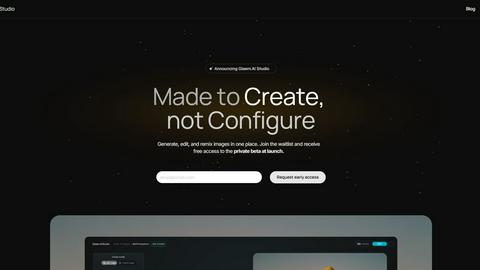
Gleem.AI Studio empowers you to effortlessly generate, edit, and personalize visuals in one intuitive workspace.
Last updated: February 25, 2026

Seedream Image Generator
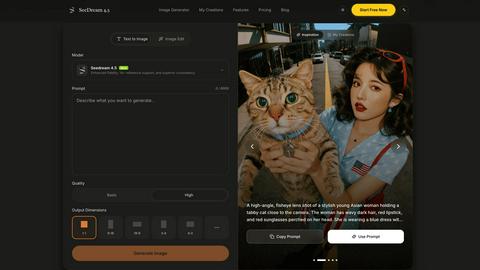
Seedream 4.5 generates stunning, production-ready images in seconds, mastering detail and consistency like never before.
Visual Comparison
Gleem.AI Studio
Seedream Image Generator
Feature Comparison
Gleem.AI Studio
Text-to-Image Generator
Gleem.AI Studio features an advanced text-to-image generator that transforms your ideas into stunning visuals. Users can easily select their desired size, set their creative vision, and utilize the Prompt Enhance tool to refine their input, ensuring high-quality outputs that resonate with their intended message.
AI Image Editing
The platform offers an intuitive AI image editing feature that allows users to make significant modifications within a single interface. With simple and natural prompts, users can add or remove objects, adjust poses, apply filters, and restore old images, enhancing the creative process without the need to switch between different tools.
AI Avatars
Gleem.AI Studio also includes a powerful AI avatar generation tool. Users can create, personalize, and place their own AI avatars into various scenes, enabling them to appear in any photo, adjust poses, or try on different outfits—all without requiring an additional photoshoot, making it ideal for dynamic content creation.
Seamless Workflow and Project Management
The platform is designed to keep all workflows organized and efficient. Each project has its dedicated space, complete with saved prompts, edits, and version history. This structure fosters easy reuse and iteration, allowing users to build on their ideas without the risk of losing context or important changes.
Seedream Image Generator
Enhanced Fidelity
Seedream 4.5 offers enhanced fidelity in image generation, ensuring that the visuals produced closely mimic real-world details. This feature allows designers to create lifelike images that resonate with authenticity and professionalism.
Surgical Editing with Reference Images
With the ability to utilize over 14 reference images, Seedream allows users to perform surgical edits on specific sections of their visuals. This flexibility enables precise adjustments while preserving the overall style and context of the image.
Multi-Image Consistency
One of the standout features of Seedream 4.5 is its capability to maintain character consistency across a series of images. This is particularly beneficial for projects that require a uniform look, such as branding or storytelling, ensuring that characters remain cohesive in appearance.
Native 4K Support
Seedream 4.5 is equipped with native 4K support, allowing for the generation of high-resolution images suitable for professional use. This feature caters to industries that demand high-quality visuals, such as advertising, film production, and digital media.
Use Cases
Gleem.AI Studio
Marketing Asset Creation
Marketers can leverage Gleem.AI Studio to quickly generate and edit high-quality visuals for campaigns. Whether designing banners, social media posts, or promotional materials, the platform simplifies the process, enabling rapid iteration and consistent branding.
Social Media Visuals
Content creators can utilize the platform to craft eye-catching visuals tailored for various social media channels. By combining image generation and editing in one place, users can create unique graphics that engage their audience while maintaining a cohesive aesthetic.
Product Image Development
E-commerce businesses can benefit from Gleem.AI Studio by creating and modifying product images efficiently. Users can generate high-quality visuals that showcase their products effectively, making it easier to attract customers and improve sales.
Creative Testing and Variations
Gleem.AI Studio is ideal for teams looking to test different creative variations. Users can quickly generate multiple iterations of an idea, edit them as needed, and compare results within the same workspace, streamlining the creative testing process.
Seedream Image Generator
Marketing Campaigns
Seedream is an excellent tool for marketers looking to create eye-catching visuals for campaigns. Its ability to generate high-quality images quickly allows for rapid iteration and testing of creative concepts.
Character Design
For artists and designers working on character development, Seedream’s multi-image consistency feature ensures that characters remain visually consistent across various poses and expressions, streamlining the character design process.
Content Creation for Social Media
Content creators can leverage Seedream to produce engaging visuals tailored for social media platforms. The tool’s efficiency allows for the rapid generation of diverse content, keeping feeds fresh and appealing.
Product Visualization
E-commerce businesses can utilize Seedream to generate high-quality product images that attract potential customers. With the ability to perform detailed edits, businesses can showcase their products in the best possible light, enhancing online shopping experiences.
Overview
About Gleem.AI Studio
Gleem.AI Studio is a cutting-edge, unified AI image workspace tailored for creatives who prioritize creation over configuration. It eliminates the hassle of juggling multiple tools for image generation, editing, and revisions, offering a streamlined workflow that promotes efficiency and creativity. Designed specifically for marketers, creators, and small teams, Gleem.AI Studio integrates AI image generation with intuitive editing capabilities, allowing users to iterate seamlessly on their designs without starting from scratch with every change. The platform focuses on enhancing creative flow and visual decision-making, providing an environment where users can generate marketing assets, social media visuals, and product images quickly and consistently. By removing unnecessary technical complexity, Gleem.AI Studio empowers users to harness their creativity without being bogged down by advanced settings and fragmented tools.
About Seedream Image Generator
Seedream Image Generator is an advanced AI-driven tool designed to create stunning, production-ready visuals in mere seconds. Powered by its latest iteration, Seedream 4.5, this generator is tailored for professionals across various industries, including graphic design, marketing, and content creation. Its unique selling proposition lies in its ability to seamlessly render perfect text and maintain character consistencies across multiple images, making it an invaluable asset for projects requiring high fidelity and style retention. Beyond just generating images, Seedream 4.5 supports up to 14 reference images for surgical editing, allowing users to refine specific aspects of their visuals without compromising overall aesthetic integrity. With native 4K support and superior instruction-following capabilities, Seedream is optimized for delivering high-quality designs that meet commercial standards.
Frequently Asked Questions
Gleem.AI Studio FAQ
What is Gleem.AI Studio?
Gleem.AI Studio is a unified AI image workspace that combines image generation and editing in one streamlined platform, designed for marketers and creators.
How does the text-to-image generator work?
Users input text prompts to generate images, while the platform's Prompt Enhance feature refines these inputs for optimal visual results, making the process intuitive and effective.
Can I edit images after generating them?
Yes, the platform allows for seamless editing of images after generation, enabling users to make adjustments such as adding or removing objects, applying filters, and more—all in one place.
Is there a limit to the number of projects I can create?
Gleem.AI Studio provides dedicated spaces for each project, allowing users to manage multiple projects simultaneously without losing track of saved edits and versions.
Seedream Image Generator FAQ
What makes Seedream 4.5 different from other image generators?
Seedream 4.5 distinguishes itself through its advanced text rendering capabilities, multi-image consistency, and surgical editing features, allowing for high fidelity and precise adjustments.
How many reference images can I use for editing?
You can utilize up to 14 reference images for surgical editing in Seedream, enabling you to refine specific areas of your visuals without sacrificing the overall style.
Is there support for high-resolution outputs?
Yes, Seedream 4.5 supports native 4K resolution, making it ideal for professional design and commercial applications where high-quality visuals are a necessity.
Can Seedream be used for character design in animations?
Absolutely, Seedream is well-suited for character design in animations, as it maintains character consistency across multiple images, aiding in cohesive storytelling and branding efforts.