
ProcessBankStatement vs Redbark
Side-by-side comparison to help you choose the right product.

ProcessBankStatement
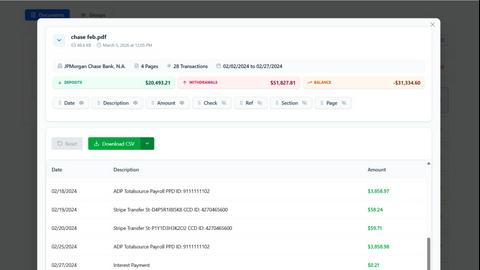
ProcessBankStatement instantly converts PDF bank statements into clean, structured CSV files for financial analysis.
Last updated: March 11, 2026

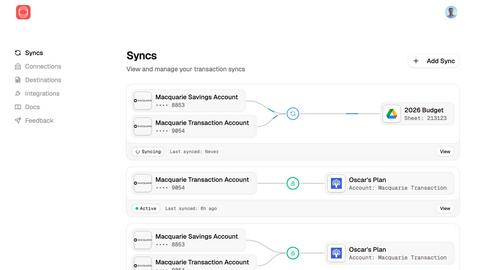
Redbark automatically syncs your Australian bank and brokerage data to tools like Google Sheets and YNAB.
Last updated: February 28, 2026
Visual Comparison
ProcessBankStatement
Redbark
Feature Comparison
ProcessBankStatement
Intelligent PDF Parser
The core engine of ProcessBankStatement is its advanced parser, which intelligently identifies and extracts key data points from any bank statement PDF. It accurately captures transaction dates, descriptions, deposits, withdrawals, and running balances, even from complex or multi-column layouts. The technology handles both digital text-based PDFs and scanned image documents, ensuring clean, structured output ready for analysis without manual cleanup.
Bank-Grade Security & Privacy
Security is paramount. All file uploads and data transfers are protected with robust encryption protocols. Users maintain complete control over their data, with the ability to view and permanently delete uploaded statements and generated files from the system at any time. This commitment to privacy ensures that sensitive financial information is handled with the utmost care and confidentiality.
Seamless Software Integration
The tool is built for practical workflow integration. The generated CSV files are meticulously formatted for direct import into popular accounting platforms like QuickBooks and spreadsheet applications like Microsoft Excel or Google Sheets. This eliminates the need for reformatting or data manipulation, allowing for instant reconciliation, reporting, and financial analysis.
High-Volume Batch Processing
For professionals handling multiple client accounts or monthly statements, the batch upload capability is a significant time-saver. Users can upload several PDF statements at once, and the system will process them sequentially, providing individual CSV outputs for each file. This feature scales the efficiency gains, making it ideal for accounting firms and bookkeepers during peak periods.
Redbark
Secure CDR & Open Banking Integration
Redbark prioritizes security and regulatory compliance by connecting to Australian banks exclusively through the Consumer Data Right (CDR) framework via an ACCC-accredited intermediary. This provides a government-regulated, bank-approved method for data access, ensuring transparent user consent and the right to withdraw access at any time. It is a fundamentally more secure and reliable approach than outdated and fragile screen-scraping techniques, offering users peace of mind that their financial data access is legitimate and protected.
Pass-Through Data Architecture
A cornerstone of Redbark's privacy-first design is its pass-through data architecture. Your sensitive financial information, including transactions, balances, and account details, flows directly from your bank or brokerage to your connected destination tool. Redbark acts as a secure conduit, never storing or retaining your financial data on its servers. This significantly reduces data breach risk and ensures your information remains under your control, only residing where you intend it to be.
Multi-Destination & Multi-Account Sync
Redbark offers unparalleled flexibility by allowing you to sync data from a single financial account to multiple destinations simultaneously. You can send transactions to Google Sheets for custom analysis, to YNAB for budgeting, and to Actual Budget for local-first finance management all at once. Furthermore, it supports connections to over 100 Australian banks, credit unions, New Zealand banks via Akahu, and global brokerages and crypto exchanges via SnapTrade, consolidating all your financial data into one automated workflow.
Intelligent Deduplication & Automated Syncing
The platform employs smart, ID-based deduplication logic with overlap buffers to intelligently catch and prevent duplicate transactions, such as those that post late. This ensures your spreadsheets and budgets remain clean and accurate. Syncing is fully automated via webhooks; when your bank pushes new transaction data, Redbark triggers an immediate background sync, updating your connected tools in near real-time without any manual intervention required.
Use Cases
ProcessBankStatement
Streamlining Bookkeeping & Client Accounting
Accountants and bookkeepers can drastically reduce the time spent on client onboarding and monthly reconciliations. Instead of manually keying in data from various client-provided PDF statements, they upload the documents and receive standardized CSVs. This allows them to focus on higher-value advisory services, analysis, and ensuring financial accuracy rather than data entry.
Accelerating Loan & Mortgage Processing
Loan processors and underwriters often need to analyze months of bank statements for applicants. Manually reviewing PDFs is slow. With ProcessBankStatement, they can instantly convert statements into CSV format, enabling quick filtering, summation of deposits, and identification of transaction patterns using spreadsheet tools, significantly speeding up the verification and decision-making process.
Empowering Small Business Financial Management
Small business owners can take control of their finances without dedicated bookkeeping staff. By converting their monthly bank statements to CSV, they can easily import transactions into their accounting software, track expenses, prepare for tax season, and generate cash flow reports—all with minimal effort and technical expertise.
Enhancing Financial Analysis & Reporting
Financial analysts and consultants who need to examine transaction histories for budgeting, auditing, or forensic accounting benefit from structured data. The clean CSV output allows for advanced pivot tables, trend analysis, and custom reporting in Excel, turning unstructured PDFs into a powerful dataset for informed business insights.
Redbark
Automated Business Expense Tracking
Freelancers and small business owners can connect their business transaction accounts to automatically sync all income and expenses directly into a Google Sheets ledger. This eliminates manual receipt entry and bank statement downloads, saving hours each month and providing an always-up-to-date view of cash flow for simplified accounting, tax preparation, and financial reporting.
Live Investment Portfolio Dashboard
Investors managing holdings across multiple platforms like CommSec, Stake, and other global brokerages can use Redbark to sync live portfolio balances, profit/loss figures, and full trade histories into a centralized spreadsheet. This enables the creation of a real-time dashboard that aggregates all investments, providing a comprehensive view of asset allocation and performance without logging into each brokerage individually.
Streamlined Personal Budget Management
Individuals seeking to automate their personal finance can connect their everyday spending, savings, and loan accounts to budgeting apps like YNAB or Actual Budget. Redbark automatically feeds new transactions into these categories, ensuring budgets are always current. This removes the friction of manual entry, encouraging consistent budget adherence and providing immediate insight into spending habits.
Consolidated Financial Reporting
Financial analysts, bookkeepers, or individuals managing complex finances can use Redbark to pull data from numerous bank accounts, credit cards, and offset accounts into a single master Google Sheet or Airtable base. This creates a unified source of truth for generating custom reports, cash flow forecasts, and net worth statements, all updated automatically with the latest data from every connected institution.
Overview
About ProcessBankStatement
ProcessBankStatement is a sophisticated, AI-powered tool designed to eliminate the tedious and error-prone manual data entry associated with bank statements. It serves as a critical bridge between raw financial documents and actionable data. By simply uploading a PDF bank statement, users receive a clean, structured, and downloadable CSV file within seconds. The platform's intelligent parsing engine accurately extracts transaction details, dates, amounts, and descriptions, formatting the data for immediate use in accounting software like QuickBooks, spreadsheets like Excel, or custom financial analysis. It is specifically engineered for finance professionals, accountants, bookkeepers, small business owners, and loan processors who require efficiency and accuracy. Its core value proposition lies in transforming hours of manual work into a secure, automated process that is both fast and reliable, ensuring data integrity while giving users full control over their sensitive financial information.
About Redbark
Redbark is a sophisticated financial data automation platform designed to seamlessly connect your Australian bank accounts and global investment portfolios directly to the productivity and budgeting tools you already use. It eliminates the tedious, error-prone process of manual data entry and CSV file management by automating the flow of your financial data. Built on a foundation of security and compliance, Redbark leverages Australia's Consumer Data Right (CDR) framework for bank-approved, secure data access, moving beyond unreliable legacy screen-scraping methods. Its core value proposition is a unique pass-through architecture: your transaction, balance, and holdings data flows in real-time from your financial institution to your chosen destination like Google Sheets, Notion, or Airtable, without ever being stored on Redbark's servers. This makes it an indispensable tool for freelancers, investors, small business owners, and any individual who demands accurate, automated, and private financial tracking without requiring any technical expertise.
Frequently Asked Questions
ProcessBankStatement FAQ
What types of bank statement files are supported?
ProcessBankStatement currently supports PDF files exclusively. This includes both modern, text-based PDFs directly downloaded from your online banking portal, as well as scanned PDFs or images of physical statements that have been saved as a PDF. The intelligent parser is designed to handle both formats accurately.
Is there a free plan or trial available?
Yes, there is a free tier available. Unregistered guest users can process up to 3 pages per day. By registering for a free account, users receive enhanced limits of 5 pages per day at no cost, allowing you to thoroughly test the service's capabilities and accuracy with your own statements before committing to a paid plan.
How secure is my financial data when using this tool?
Your data security is our top priority. All files are encrypted during upload and download (in transit). We adhere to strict data handling protocols, and you retain full ownership and control. You can permanently delete your uploaded statements and generated CSV files from our servers at any time through your account dashboard.
Which banks are supported by the parser?
The tool is trusted to work reliably with statements from all major U.S. banks and credit unions, including Chase, Bank of America, Wells Fargo, Citibank, and many others. The system is continuously updated to support new statement formats. Currently, international bank statements are not supported, but more formats are being added over time.
Redbark FAQ
How is Redbark different from screen-scraping tools?
Redbark is fundamentally different and superior to legacy screen-scraping tools. It uses Australia's official Consumer Data Right (CDR) framework, a regulated, bank-approved system for data access. Screen-scraping requires you to share your online banking credentials, violates most bank terms of service, and is prone to breaking. CDR is secure, reliable, and provides you with legal rights over your data, including transparent consent and easy access revocation.
Is my financial data stored on Redbark's servers?
No. Redbark employs a unique pass-through data architecture. Your raw financial data, including transactions and balances, is never stored on Redbark's systems. It flows securely and directly from your bank or brokerage to your chosen destination tool like Google Sheets. Redbark only processes the data momentarily to facilitate the transfer, ensuring maximum privacy and security.
Which banks and brokerages does Redbark support?
Redbark supports over 100 financial institutions. This includes all major Australian banks and credit unions via the CDR system, New Zealand banks via the Akahu platform, and a wide array of global brokerages and crypto exchanges through its partnership with SnapTrade. This covers most major providers like CommBank, Westpac, NAB, ANZ, Macquarie, ING, CommSec, and Stake.
What happens if a transaction posts to my bank late?
Redbark's intelligent deduplication feature is designed specifically for this scenario. It uses a combination of unique transaction IDs and overlap buffers when syncing data. This smart logic identifies transactions that have already been synced, even if they appear later in a new data feed, and prevents them from creating duplicate entries in your spreadsheet or budgeting app.
Alternatives
ProcessBankStatement Alternatives
ProcessBankStatement is a specialized tool in the business and finance software category, designed to automate the conversion of PDF bank statements into structured CSV files. This process, traditionally manual and error-prone, is critical for bookkeeping, reconciliation, and financial analysis. Users may seek alternatives for various reasons, including budget constraints, the need for different output formats, or integration with specific accounting platforms. Some may require batch processing capabilities, support for international banks, or a different pricing model that better suits their transaction volume. When evaluating alternatives, key considerations should include the accuracy and reliability of the data extraction, the range of supported financial institutions, data security protocols, and the overall ease of use. The ideal solution should seamlessly fit into your existing financial workflow, saving time while ensuring data integrity.
Redbark Alternatives
Redbark is a financial data automation service that securely syncs Australian bank transactions and global brokerage data directly into productivity platforms like Google Sheets, Notion, and Airtable. It operates within the fintech category, specifically focusing on open banking and personal financial management tools. Users often explore alternatives for various reasons, including budget constraints, the need for different destination apps, or a requirement for broader international bank support beyond Australia and New Zealand. Some may seek more advanced analytics or a different user interface than what a sync-focused tool provides. When evaluating alternatives, key considerations should include the security model and data access method, the range of supported financial institutions and destination apps, the pricing structure and transparency, and the overall reliability and automation of the sync process. The ideal solution should align with your specific financial tracking workflow.