
MyImageUpscaler vs PhotoWeather
Side-by-side comparison to help you choose the right product.

MyImageUpscaler
MyImageUpscaler uses AI to enhance images to 4K quality in seconds while preserving sharp text and real details.
Last updated: February 25, 2026

PhotoWeather
PhotoWeather alerts photographers to ideal conditions like golden hour and fog, ensuring they never miss a perfect shot.
Last updated: February 25, 2026
Visual Comparison
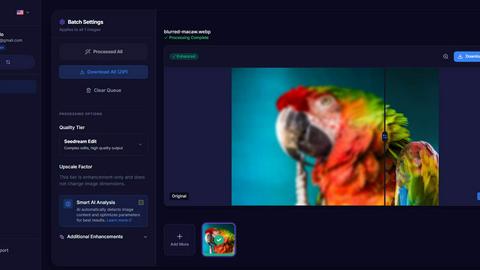
MyImageUpscaler
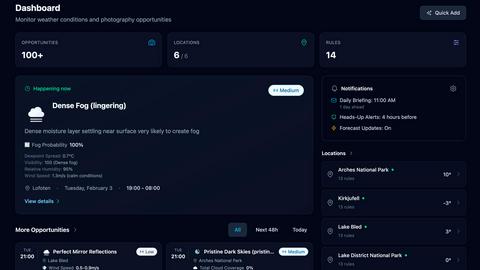
PhotoWeather
Feature Comparison
MyImageUpscaler
Advanced Detail Preservation
MyImageUpscaler employs sophisticated algorithms that effectively preserve fine details in images during the upscaling process. This results in crisp, clear images without the typical blur or artifacts that can occur with standard upscaling techniques.
Fast Processing Times
Users can process images in under 10 seconds, making MyImageUpscaler an incredibly efficient tool for those needing to enhance large volumes of images quickly. This speed is particularly advantageous for businesses that require rapid turnaround times for their visual content.
Batch Processing Capability
The platform supports batch processing, allowing users to upscale up to 500 images at once. This feature is invaluable for photographers or businesses that need to process large quantities of images simultaneously, saving time and effort.
Platform-Ready Presets
MyImageUpscaler includes presets tailored for various platforms such as Amazon, Instagram, YouTube, and TikTok. These presets ensure that images are optimized for specific requirements, helping users maintain visual consistency across different channels.
PhotoWeather
Ready-Made Templates
PhotoWeather offers a variety of ready-made templates tailored specifically for photographers. These templates include conditions like "Fog and Mist," "Golden and Blue Hour," and "Aurora Visibility." By utilizing these templates, users can quickly set up alerts that align with their desired photography settings, ensuring they are notified when the perfect conditions arise.
Powerful Rule Builder
With over 80 weather parameters available, the powerful rule builder in PhotoWeather allows users to create custom alerts that match their specific photography needs. Parameters such as cloud cover, visibility, and wind speed can be combined using AND/OR/NOT logic, enabling photographers to define precise conditions for their shoots. This level of customization ensures that users are alerted only when the conditions meet their exact standards.
Smart Notifications
PhotoWeather's smart notification system keeps photographers informed with daily digests and real-time alerts. Users can choose to receive reminders before opportunities start or notifications when forecasts change. Additionally, the app supports calendar synchronization, allowing opportunities to be automatically updated in the user's calendar, making planning effortless.
Trusted Forecast Sources
PhotoWeather pulls data from some of the most reputable weather services, including ECMWF, NOAA, and Météo-France. This ensures that users receive accurate and reliable forecasts tailored for outdoor photography. The integration of multiple forecast models provides users with a multi-model confidence score, enhancing the reliability of the alerts they receive.
Use Cases
MyImageUpscaler
E-commerce Sellers
E-commerce sellers can utilize MyImageUpscaler to enhance product images for their online stores. By improving image quality, they can attract more customers and increase conversion rates, making their products stand out in a competitive market.
Content Creators for Social Media
Content creators can benefit from the platform by resizing images for social media posts. With the ability to enhance quality while maintaining sharpness, creators can ensure their visuals are eye-catching and engaging for their followers.
Real Estate Agents
Real estate agents can use MyImageUpscaler to prepare high-quality images for MLS listings. By enhancing property photographs, agents can present homes in their best light, ultimately driving more interest and potential buyers.
Photographers Processing Large Batches
Professional photographers can expedite their workflow by using MyImageUpscaler for batch processing. Whether for client work or personal projects, the ability to upscale and enhance multiple images at once helps photographers save time and focus on their creative vision.
PhotoWeather
Landscape Photography
Landscape photographers can leverage PhotoWeather to set conditions for optimal lighting, such as golden hour and cloud drama. By receiving alerts tailored to their specific criteria, they can plan their shoots around the most visually striking conditions.
Astro Photography
For astro photographers, PhotoWeather simplifies the process of capturing celestial events. Users can set alerts for specific astronomical conditions, such as moon phases or clear skies, ensuring they are prepared for night shoots without guesswork.
Wildlife Photography
Wildlife photographers can benefit from using PhotoWeather to inform them of ideal weather conditions for animal activity. By setting parameters like wind speed and visibility, they can time their outings for the best chances of capturing wildlife in action.
Event Photography
Event photographers can utilize PhotoWeather to ensure they are prepared for outdoor events. By setting alerts for specific weather conditions, such as rain or overcast skies, they can adjust their plans and gear accordingly, ensuring a successful shoot regardless of the weather.
Overview
About MyImageUpscaler
MyImageUpscaler is a cutting-edge AI-powered platform designed to enhance and upscale images for businesses and content creators. By leveraging advanced machine learning algorithms, MyImageUpscaler can increase the resolution of images by 2x to 4x without compromising on quality. The platform is particularly beneficial for e-commerce sellers, real estate agents, photographers, and social media content creators who require high-quality visuals for marketing and promotional purposes. With a focus on maintaining sharpness and enhancing fine details, MyImageUpscaler ensures that every image looks professional and polished. It offers a free tier with 10 credits, allowing users to experience its capabilities without the need for a credit card. As a result, MyImageUpscaler stands out as a reliable solution for anyone looking to improve their image quality efficiently and effectively.
About PhotoWeather
PhotoWeather is a revolutionary app designed specifically for outdoor photographers who want to optimize their shooting opportunities based on real-time weather conditions. Unlike standard weather apps that provide basic forecasts, PhotoWeather continuously monitors weather patterns and alerts users only when conditions align with their specific photography goals. Whether you are chasing the elusive fog at sunrise, anticipating dramatic storm clouds, or waiting for that perfect golden-hour light, PhotoWeather ensures you never miss an opportunity. The app is perfect for landscape, astro, and wildlife photographers who require accurate and timely weather information to make informed decisions about their shoots. With its powerful rule builder, customizable alerts, and smart notifications, PhotoWeather empowers photographers to take control of their outdoor shooting experiences.
Frequently Asked Questions
MyImageUpscaler FAQ
What image formats does MyImageUpscaler support?
MyImageUpscaler supports a variety of image formats including JPEG, PNG, and AVIF, ensuring versatility for users with different types of images.
How does the free tier work?
The free tier provides users with 10 credits to use on image enhancements without requiring a credit card. Unused credits can accumulate, allowing users to try the platform without any financial commitment.
Can I upscale images for print?
Yes, MyImageUpscaler is designed to maintain high quality even at larger resolutions, making it suitable for preparing images for print while ensuring clarity and detail.
Is there a limit on how long enhanced images are stored?
Enhanced images are automatically deleted after 7 to 30 days, depending on the specific plan chosen. This helps maintain user privacy and manage storage efficiently.
PhotoWeather FAQ
How do I get started?
To get started with PhotoWeather, simply download the app from the App Store or Google Play. Create an account, add your favorite shooting locations, and set up your desired weather conditions using templates or custom rules.
How accurate are the forecasts?
PhotoWeather utilizes data from top weather services like NOAA and ECMWF, ensuring high accuracy in forecasts. Users also benefit from multi-model confidence scores, which enhance the reliability of the forecasts provided.
Can I create my own rules?
Yes, PhotoWeather allows users to create custom rules based on over 80 weather parameters. This flexibility lets you tailor alerts to the specific conditions you care about most, ensuring you receive notifications that matter.
Do you support calendar sync?
Yes, PhotoWeather offers calendar synchronization features. This allows users to integrate their photo opportunities directly into their calendars, ensuring they stay updated on potential shooting conditions without needing to check the app constantly.
Alternatives
MyImageUpscaler Alternatives
MyImageUpscaler is a state-of-the-art AI-powered platform that specializes in enhancing and upscaling images to stunning 4K quality. This tool falls under the category of productivity and management, catering to businesses and content creators who require high-resolution visuals for their marketing efforts. Users often seek alternatives to MyImageUpscaler for various reasons, including pricing structures, specific feature sets, and varying platform needs that align better with their individual workflows or project requirements. When searching for an alternative, it is essential to consider factors such as processing speed, quality of image enhancement, batch processing capabilities, and compatibility with various platforms. Additionally, evaluating user experience, customer support, and pricing can help users find a solution that best meets their needs while ensuring that the final output maintains the level of professionalism they require.
PhotoWeather Alternatives
PhotoWeather is a specialized application designed for outdoor photographers, focusing on optimizing shooting opportunities by providing real-time weather alerts tailored to specific photography conditions. This app transcends traditional weather forecasting by offering customizable notifications that align with the unique needs of landscape, astro, and wildlife photographers. Users often seek alternatives to PhotoWeather for various reasons, including pricing concerns, feature sets that may better meet their individual requirements, or compatibility with different platforms. When selecting an alternative, it is essential to consider the range of weather parameters offered, the level of customization available for alerts, and the overall user experience to ensure it aligns with your photographic goals and workflow.