
Changeflow vs Klipzy
Side-by-side comparison to help you choose the right product.

Changeflow
Changeflow delivers AI-driven insights on market changes, ensuring you never miss critical updates that matter to your.
Last updated: March 4, 2026

Klipzy transforms still images into stunning AI-powered videos with cinematic effects, no editing skills needed.
Last updated: February 26, 2026
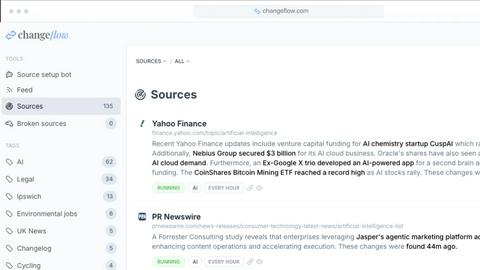
Visual Comparison
Changeflow
Klipzy

Feature Comparison
Changeflow
AI-Powered Intelligence
Changeflow leverages advanced AI technology to filter out irrelevant changes and deliver only the updates that matter to you. This means no more time wasted on false positives or unnecessary alerts, allowing teams to focus on what truly impacts their business.
Natural Language Setup
The platform allows users to describe the specific URLs and types of updates they want to monitor in plain English. This straightforward process eliminates the need for complex technical setups or manual configurations, making it accessible to users of all skill levels.
Customized Summaries
Instead of sifting through entire web pages, Changeflow provides AI-generated summaries that highlight exactly what has changed and why it matters. This feature saves users valuable time and ensures that they are always informed about relevant updates.
Smart Link Following
Changeflow can intelligently follow links on monitored pages, checking for updates on the target pages as well. This means that as new links are introduced, the platform continues to provide a comprehensive feed of relevant changes, ensuring that no important information is missed.
Klipzy
AI-Powered Video Effects
Klipzy offers over 20 AI-driven cinematic effects that allow users to add motion and depth to their static images. From zoom in and out to parallax and motion blur, these effects transform ordinary photos into visually stunning videos, elevating your content to a professional level without requiring any editing expertise.
Multiple Aspect Ratios
To accommodate various social media platforms and video requirements, Klipzy provides five different aspect ratios. This feature ensures that your videos are optimized for Instagram Reels, TikTok, and other platforms, making it easy to reach your audience wherever they are.
User-Friendly Workflow
Creating videos with Klipzy is a straightforward process that requires just three simple steps: upload your photo, choose an effect, and download your finished video. This intuitive workflow allows users of all skill levels to create high-quality video content quickly and efficiently.
No Watermark & Cloud Storage
Klipzy ensures a professional finish by providing users with videos that do not contain any watermarks. Additionally, users benefit from secure cloud storage, allowing them to access and manage their projects easily without the fear of losing their work.
Use Cases
Changeflow
Competitor Pricing Tracking
Business teams can leverage Changeflow to monitor competitor pricing in real-time, enabling them to make strategic decisions based on the most current market data. This is crucial for staying competitive and adjusting strategies as needed.
Regulatory Change Monitoring
Compliance teams can use Changeflow to keep an eye on regulatory updates, ensuring they are always aware of changes that could impact their operations. This proactive approach helps mitigate risks and maintain compliance with evolving regulations.
Legal Citation Tracking
Legal librarians at Am Law 200 firms benefit from Changeflow by monitoring court dockets and legal citations. This allows them to stay ahead of critical updates in the legal landscape, ensuring that their teams have access to the most pertinent information.
Market Movement Monitoring
Changeflow is also perfect for businesses that want to follow news mentions and market movements. By tracking key updates across various sources, teams can respond swiftly to changes that may affect their business environment or strategy.
Klipzy
Social Media Content Creation
Klipzy is perfect for social media managers and influencers looking to create eye-catching Reels, TikToks, and Shorts. By transforming photos into engaging videos, users can enhance their profiles and attract more followers with minimal effort.
Real Estate Showcasing
Real estate agents can utilize Klipzy to create cinematic video tours of properties. By adding motion effects to photos of listings, agents can present homes in a visually appealing manner that captures potential buyers' attention.
E-commerce Product Promotion
E-commerce businesses can use Klipzy to animate product images, making items more attractive to shoppers. By turning static product photos into dynamic videos, brands can increase engagement and drive sales.
Travel Memory Preservation
Travel enthusiasts can immortalize their adventures by converting travel photos into vibrant video clips. Klipzy allows users to share their experiences in a more engaging way, transforming memories into cinematic stories that can be easily shared with friends and family.
Overview
About Changeflow
Changeflow is an innovative web monitoring tool designed to help businesses keep track of important changes across various web pages. By utilizing advanced AI technology, Changeflow not only identifies when a change occurs but also provides insightful summaries of what has changed and its relevance to your specific interests. This powerful tool is ideal for business teams that require real-time intelligence, such as tracking competitor pricing, monitoring regulatory updates, and following industry news. Legal professionals and compliance teams particularly benefit from Changeflow's ability to monitor court dockets, legal citations, and critical filings with remarkable accuracy. With a user-friendly setup process requiring only simple, plain English descriptions of what to monitor, Changeflow is both accessible and efficient. Its sophisticated capabilities ensure that users receive timely notifications, enabling them to make informed decisions quickly and effectively.
About Klipzy
Klipzy is an innovative AI-powered video creation tool designed specifically for content creators, marketers, and social media enthusiasts who wish to elevate their visual storytelling. By transforming static images into dynamic video content with just a few clicks, Klipzy democratizes access to professional-quality video effects, eliminating the need for complex software or extensive video editing skills. The platform allows users to harness the power of cinematic effects, including pan, zoom, and the renowned Ken Burns effect, to create engaging videos effortlessly. With support for various image formats and a user-friendly interface, Klipzy is tailored for anyone looking to make their visual content more captivating. Whether you want to enhance your social media presence, showcase products, or preserve travel memories, Klipzy provides the tools necessary to breathe life into your images.
Frequently Asked Questions
Changeflow FAQ
How does Changeflow ensure the accuracy of the changes it reports?
Changeflow uses advanced AI algorithms to analyze web pages and determine the relevance of changes. This ensures that users receive accurate updates tailored to their specific monitoring needs.
Can I track pages behind login walls?
Yes, Changeflow is equipped with sophisticated anti-blocking technology that allows it to navigate pages behind login walls and JavaScript, achieving a 99.9% success rate in accessing content that other tools may struggle with.
Is the setup process complicated?
Not at all. Changeflow offers a natural language setup, allowing users to simply describe what they want to track. There is no need for technical expertise or manual configurations, making it user-friendly for all.
How does Changeflow support team collaboration?
Changeflow provides shared workspaces where teams can collaborate effectively. Additionally, it offers API access, allowing users to integrate monitoring capabilities into their existing workflows seamlessly.
Klipzy FAQ
What image formats are supported?
Klipzy supports various image formats, including JPG, PNG, and WebP. Users can upload images up to 50MB in size, making it versatile for different photo types.
How long can the videos be?
Videos created with Klipzy can have a maximum duration of 15 seconds. This length is ideal for social media platforms that favor short, impactful content.
What aspect ratios are available?
Klipzy offers five different aspect ratios, allowing users to tailor their videos to fit the requirements of various social media platforms, ensuring optimal viewing experiences.
Is there a free option?
Yes, Klipzy provides a free option that allows users to create one video clip per day. For those who wish to create unlimited videos, a subscription can be unlocked for just $10.
Alternatives
Changeflow Alternatives
Changeflow is an AI-driven platform that specializes in providing market and competitor insights by monitoring web pages for significant changes. It falls under the Productivity & Management category, designed to help business teams, legal professionals, and compliance departments efficiently track relevant updates in their respective fields. Users often seek alternatives to Changeflow for various reasons, including pricing, specific feature sets, or compatibility with their existing platforms and workflows. When exploring alternatives, it is crucial to evaluate the core functionalities that meet your tracking needs, reliability in capturing changes, ease of use, and the ability to integrate into your current systems. Additionally, consider customer support and the overall reputation of the tool, as these factors can significantly impact your experience in leveraging market insights.
Klipzy Alternatives
Klipzy is an advanced AI-powered video creation tool that caters to content creators, marketers, and social media enthusiasts by transforming still images into dynamic videos with cinematic effects. Positioned within the productivity and management category, Klipzy simplifies video production, making it accessible to users with varying levels of editing experience. Users may seek alternatives to Klipzy for a variety of reasons including pricing, specific feature sets, or the need for compatibility with various platforms. When exploring alternatives, it is crucial to consider aspects such as ease of use, the range of effects available, support for different image formats, and the ability to optimize content for specific social media platforms.