
Image to Image AI vs Proofapp
Side-by-side comparison to help you choose the right product.

Image to Image AI
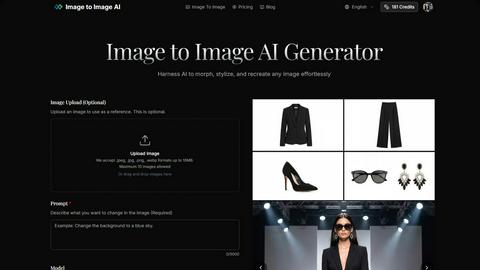
Transform images effortlessly with Image to Image AI, turning text prompts or references into stunning visuals.
Last updated: February 25, 2026

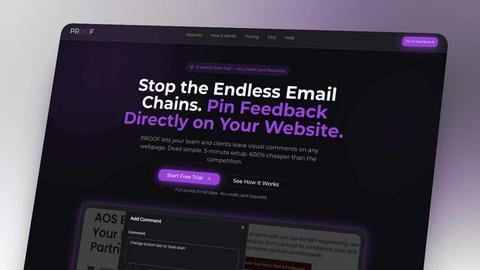
Proofapp enables teams to leave visual feedback directly on website screenshots, streamlining design reviews.
Last updated: March 3, 2026
Visual Comparison
Image to Image AI
Proofapp
Feature Comparison
Image to Image AI
Image Upload and Transformation
Users can upload up to eight reference images to serve as the basis for their transformations. This feature allows for style transfer and the creation of composite images, giving users the flexibility to combine multiple elements into a single cohesive design.
Multiple AI Models
Image to Image AI offers a selection of over nine distinct AI models, including Nano Banana, Nano Banana Pro, and GPT-4o Image. Users can choose models based on their quality and cost preferences, ensuring they find the perfect fit for their specific project requirements.
Aspect Ratios and Resolutions
The platform supports a variety of aspect ratios, including 1:1, 16:9, and 21:9, among others, allowing users to tailor their images for different applications. Additionally, it provides output options in multiple resolutions, including 1K, 2K, and 4K, ensuring high-quality results suitable for any context.
Customization Options
With options to adjust transformation parameters such as aspect ratio, output count, and transformation strength, users have extensive control over the final results. This level of customization ensures that images can be transformed in a way that closely matches the user's vision.
Proofapp
Visual Commenting
Proofapp allows users to click anywhere on a screenshot to leave contextual feedback, eliminating ambiguities often found in traditional communication methods. This feature ensures that comments are placed exactly where they belong, making it easier for teams to address specific issues without confusion.
Multi-Breakpoint Testing
With automated capture of screenshots at both desktop and mobile breakpoints, Proofapp enables teams to review how their designs appear across different devices. This feature is essential for ensuring that websites are responsive and visually appealing on all screens.
Real-time Collaboration
Proofapp's real-time collaboration feature allows team members to see comments and updates from colleagues instantaneously. This functionality fosters effective teamwork, enabling users to reply, resolve comments, and track progress collectively without the need for constant refreshes.
Secure Share Links
Users can generate secure, expirable links to share projects with clients, allowing them to view and comment on designs seamlessly. This feature enhances security and ensures that only authorized users have access to sensitive project information.
Use Cases
Image to Image AI
Marketing Campaign Development
Marketers can utilize Image to Image AI to generate multiple variations of campaign assets quickly. By transforming existing images into new styles or designs, they can effectively test and optimize their visual content for different audiences.
Concept Visualization for Designers
Designers can take advantage of the platform to visualize concepts by uploading initial drafts and describing desired changes. This allows them to explore various creative directions and refine their ideas before finalizing projects.
Creative Experimentation
Artists and creative enthusiasts can use Image to Image AI to experiment with different artistic styles. Whether they want to create surreal landscapes or modern abstract pieces, the tool provides an easy way to transform their images and explore new aesthetics.
Social Media Content Creation
Content creators can leverage Image to Image AI for producing eye-catching visuals for social media. By transforming their images into striking graphics, they can enhance engagement and attract more followers with professional-quality content.
Proofapp
Freelancers
Freelancers can utilize Proofapp to present their designs professionally and gather client feedback efficiently. By eliminating lengthy email threads, they can save time and focus on delivering high-quality work.
Marketing Teams
Marketing teams can leverage Proofapp to review landing pages and campaign materials visually. This collaborative approach ensures that all team members provide input on designs, leading to better marketing outcomes.
Small Development Teams
Development teams can streamline client approvals using Proofapp without the complexity and cost associated with enterprise-level tools. The platform's straightforward interface allows for quick feedback loops, enhancing productivity.
Design Agencies
Design agencies managing multiple projects can benefit from Proofapp's organized feedback system. By keeping all comments visual and in one dashboard, agencies can reduce the time spent on revisions and improve client satisfaction.
Overview
About Image to Image AI
Image to Image AI is an advanced online photo editing tool that leverages artificial intelligence to transform, stylize, and recreate images effortlessly. This innovative platform is designed for a wide range of users, including designers, marketers, and creative enthusiasts who wish to enhance their visual content with minimal effort. By allowing users to upload reference images or provide descriptive prompts, Image to Image AI generates high-quality images that maintain the original's structure while applying creative modifications. With the ability to choose from over nine AI models and various output formats and resolutions, users can achieve professional-grade results tailored to their specific needs. Whether you are looking to visualize concepts, create marketing assets, or experiment with artistic styles, Image to Image AI stands out as a powerful solution that simplifies the creative process.
About Proofapp
Proofapp is a revolutionary visual feedback and website review platform designed to enhance collaboration between designers, developers, and their clients. By allowing users to upload any website URL, Proofapp automatically captures screenshots for both desktop and mobile views, facilitating seamless visual communication. The platform empowers reviewers to pin comments directly onto the design, initiate threaded discussions, attach relevant files, and resolve feedback — all without requiring an account. This ease of use significantly reduces the chaos of email chains and vague revision notes. With features like real-time notifications, Slack integration, multi-page support, and customizable accent colors, Proofapp is ideal for freelancers, agencies, and teams looking to streamline their design process. Whether collecting client feedback or managing multiple projects, Proofapp transforms feedback into a visual, organized, and actionable format, drastically improving productivity and clarity in design revisions.
Frequently Asked Questions
Image to Image AI FAQ
How does Image to Image differ from Text to Image generation?
Image to Image AI focuses on transforming existing images based on user-uploaded references or descriptive prompts, while Text to Image generation creates images from scratch based solely on textual descriptions.
What types of images work best with the transformation?
Images with clear details and good lighting yield the best results. The platform is designed to preserve the original structure while applying artistic transformations, making high-quality source images ideal for effective transformations.
How much control do I have over the transformation process?
Users have significant control over the transformation process, as they can customize various parameters such as aspect ratio, output count, and transformation strength, allowing for tailored results that align with their vision.
How long does the transformation process take?
The transformation process is typically quick, allowing users to generate multiple image variations in seconds. This efficiency enables users to explore different creative directions without lengthy waiting times.
Proofapp FAQ
How does Proofapp improve feedback communication?
Proofapp transforms feedback into visual comments pinned directly on screenshots, allowing for precise communication and reducing misunderstandings associated with traditional email feedback.
Is there a limit on the number of projects I can manage with Proofapp?
No, Proofapp allows users to manage multiple projects simultaneously, making it easy for teams and freelancers to organize their workflow efficiently without any project limits.
Can clients leave feedback without creating an account?
Yes, clients can leave feedback without needing an account. This feature greatly simplifies the review process, making it accessible for all stakeholders involved.
What kind of security measures does Proofapp employ?
Proofapp implements enterprise-level security features, including role-based permissions and audit logs, to ensure that user data is handled securely and that access is controlled effectively.
Alternatives
Image to Image AI Alternatives
Image to Image AI is an innovative online photo editing tool that utilizes advanced artificial intelligence to transform and stylize images based on user-defined prompts or reference images. This platform falls under the category of AI-assisted creative tools, catering to designers, marketers, and creative individuals looking to enhance their visual content efficiently. Users often seek alternatives to Image to Image AI due to various factors, including pricing, specific feature sets, and compatibility with their individual creative workflows. When evaluating alternatives, it is essential to consider aspects such as the range of AI models offered, customization options, output quality, and the ease of use of the platform to ensure it aligns with the user's project requirements and goals.
Proofapp Alternatives
Proofapp is a visual feedback and website review platform designed to enhance collaboration among designers, developers, and their clients. By allowing users to leave contextual comments directly on website screenshots, Proofapp streamlines the design review and approval process, making it easier for teams to gather and act on feedback. As part of the productivity and management category, it serves as a vital tool for efficient project management. Users often seek alternatives to Proofapp for various reasons, including pricing structures, feature sets, and specific platform requirements. When choosing an alternative, it is essential to consider the tool's usability, integration capabilities, collaboration features, and overall value for money. A good alternative should not only replicate the core functionalities of Proofapp but also offer enhancements that cater to the unique needs of users in different contexts.