
Glossa vs Hush Touch | Voice-to-Text for MacOS
Side-by-side comparison to help you choose the right product.

Glossa offers fast, accurate AI translation of sermons in 100+ languages, breaking language barriers for your church.
Last updated: February 25, 2026

Hush Touch | Voice-to-Text for MacOS
Hush Touch is an offline voice-to-text app for macOS that learns your vocabulary and formats dictation intelligently.
Last updated: February 25, 2026
Visual Comparison
Glossa
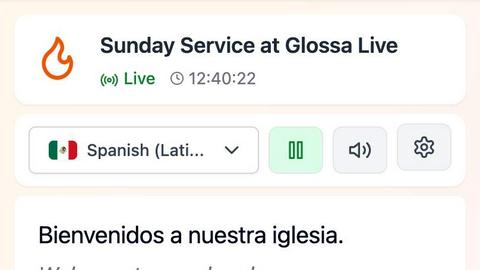
Hush Touch | Voice-to-Text for MacOS
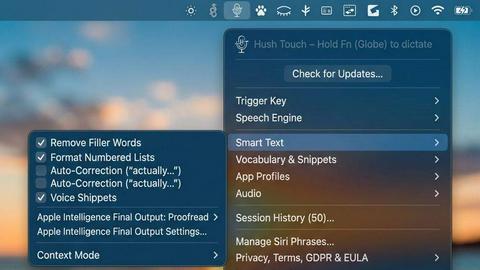
Feature Comparison
Glossa
Real-Time Translation
Glossa utilizes cutting-edge AI technology to deliver real-time translations with ultra-low latency. This ensures that translations are synchronized with the speaker, allowing attendees to fully engage without missing a moment of the service.
Multi-Language Support
With support for over 100 languages, Glossa enables churches to reach diverse audiences. Congregation members can select their preferred language, ensuring everyone can understand and participate in the worship experience.
User-Friendly Setup
Getting started with Glossa is quick and easy. Churches only need a laptop and a stable internet connection to connect their audio system. There is no need for specialized hardware, allowing for a hassle-free setup that can be completed in under 10 seconds.
Voice Cloning Technology
Glossa offers an advanced voice cloning feature that allows users to utilize the speaker's own voice in translations. This enhances the authenticity of the experience, making it feel more personal for the congregation.
Hush Touch | Voice-to-Text for MacOS
Dual Engine Recognition
Hush Touch combines the capabilities of two Apple dictation engines: DictationTranscriber and SFSpeechRecognizer. This dual-engine approach optimizes natural flow and punctuation while enhancing custom vocabulary recognition, resulting in superior accuracy and responsiveness during dictation.
Custom Vocabulary
The app supports up to 500 custom vocabulary terms and features an auto-learn functionality that recognizes corrections made by the user. This ensures that industry-specific jargon, brand names, and other unique phrases are accurately transcribed, providing a personalized dictation experience.
Smart Text Processing
Hush Touch employs advanced text processing features that automatically remove filler words, correct common mistakes, and format lists. This real-time processing occurs entirely on the user's device, resulting in cleaner, more coherent text output without the need for manual editing.
Context Modes & Hands-Free Functionality
Users can switch between different context modes—General, Email, Code, and Notes—to optimize dictation for specific tasks. The hands-free feature allows users to initiate dictation using Siri and utilizes auto-insertion after a brief pause, making it easier to dictate without interruption.
Use Cases
Glossa
Multilingual Worship Services
Glossa is ideal for churches that host multilingual worship services. With real-time translations, congregations can hear the sermon in their preferred language, ensuring inclusivity and engagement among attendees.
Community Outreach Events
Churches can leverage Glossa during community outreach events to effectively communicate with diverse groups. By providing translations, churches can share their message and engage with attendees from various linguistic backgrounds.
Bible Study Groups
For multilingual bible study groups, Glossa enables participants to study scripture together while understanding the material in their own languages. This fosters deeper discussions and connections among members.
International Missions
Churches involved in international missions can utilize Glossa to communicate effectively with local populations. By breaking down language barriers, Glossa allows for meaningful interactions and the sharing of faith across cultures.
Hush Touch | Voice-to-Text for MacOS
Professional Email Drafting
Hush Touch is ideal for professionals who need to draft emails quickly and efficiently. With voice activation and hands-free capabilities, users can compose responses and messages without being tethered to their keyboards, streamlining communication.
Academic Note-Taking
Students can leverage Hush Touch for taking lecture notes or preparing study materials. The app's ability to learn specialized vocabulary makes it particularly useful for subjects with technical terms, aiding in accurate note-taking during classes.
Creative Writing
Writers can use Hush Touch to brainstorm ideas and draft content effortlessly. The app's seamless integration into creative workflows allows authors to focus on their thoughts without the distraction of typing, enhancing productivity and creativity.
Medical Documentation
Healthcare professionals can dictate patient notes and medical records using Hush Touch. The app's custom vocabulary learning feature ensures that it accurately captures complex medical terminology, making it a valuable tool for physicians and medical staff.
Overview
About Glossa
Glossa is an innovative real-time AI translation service designed specifically for churches with multilingual congregations. In an increasingly diverse world, it is essential for faith communities to break down language barriers, and Glossa excels in facilitating this need. As the pastor speaks, Glossa captures the audio, transcribes it, and translates it into over 100 languages simultaneously, ensuring that everyone in the congregation can participate fully in worship. Attendees can effortlessly connect with their smartphones and listen through earbuds in their preferred language, eliminating the need for expensive interpretation equipment or volunteer translators. With Glossa, every member of the congregation can receive the Word in their heart language, fostering inclusivity and engagement. Whether you are a small immigrant church or a large international ministry, Glossa provides a seamless experience that enriches spiritual gatherings and enhances communication among diverse congregations.
About Hush Touch | Voice-to-Text for MacOS
Hush Touch is an innovative voice-to-text application specifically designed for macOS users who seek a fast, natural, and private dictation experience. Unlike many dictation tools that rely on cloud processing, Hush Touch operates entirely on-device, ensuring that all voice data remains private and secure. By leveraging two powerful Apple transcription engines and an advanced Apple Intelligence final pass, the app delivers high accuracy and cleaner text output. With its lightweight footprint of just 5.5 MB, Hush Touch integrates seamlessly into everyday writing workflows, allowing users to dictate emails, messages, notes, and documents effortlessly. The app is tailored for professionals, students, and anyone who requires hands-free dictation without the hassle of complex setups or ongoing subscriptions. For a one-time fee of $20, users gain lifetime access to a tool that not only improves dictation efficiency but also learns and adapts to their unique vocabulary over time.
Frequently Asked Questions
Glossa FAQ
What equipment do we need to stream the translation?
You only need a stable internet connection and a way to connect your audio system or microphone to Glossa. Most churches can use their existing audio setup to get started.
How does Glossa's real-time translation work?
Glossa captures the speaker’s audio in real-time, transcribing and translating it almost instantaneously into selected languages. This process allows attendees to receive translations via their smartphones without delay.
How many languages can we translate to simultaneously?
Glossa can translate into over 100 languages simultaneously, allowing congregations to cater to diverse linguistic needs during their services.
Is there a limit to the number of listeners?
No, Glossa does not impose a limit on the number of listeners. As long as attendees connect via their smartphones, they can listen to the translations in their preferred language without any restrictions.
Hush Touch | Voice-to-Text for MacOS FAQ
How does Hush Touch ensure privacy?
Hush Touch processes all voice data entirely on-device, meaning no information is sent to the cloud. This guarantees privacy and security for users who are concerned about data collection.
Can I customize the vocabulary in Hush Touch?
Yes, Hush Touch allows users to add up to 500 custom vocabulary terms. The app also learns from your corrections, ensuring it adapts to your specific language and jargon over time.
Is there a free trial available for Hush Touch?
Yes, Hush Touch offers a 7-day free trial with no credit card required. This allows users to experience the app's features and capabilities before committing to a purchase.
What platforms does Hush Touch support?
Hush Touch is specifically designed for macOS, ensuring optimal performance and integration with Apple's ecosystem. The app is lightweight and can run smoothly on most Mac devices.
Alternatives
Glossa Alternatives
Glossa is an advanced AI translation service designed specifically for churches with multilingual congregations, enabling real-time translation of sermons in over 100 languages. As faith communities become increasingly diverse, users often seek alternatives to Glossa for various reasons, including pricing, feature sets, or the specific platform needs of their church. A comprehensive understanding of the features, ease of use, and language support is essential when choosing an alternative to ensure that it meets the unique needs of your congregation. When exploring alternatives, it is crucial to assess factors such as the quality of translation, the speed of service, and the ability to handle multiple languages simultaneously. Additionally, consider the user experience, including setup requirements and accessibility for congregation members. A solution that seamlessly integrates with existing audio systems and minimizes the need for additional equipment can greatly enhance the worship experience for diverse attendees.
Hush Touch | Voice-to-Text for MacOS Alternatives
Hush Touch | Voice-to-Text for MacOS is an advanced offline dictation application designed specifically for macOS users, falling under the productivity and management category. It offers a unique, private dictation experience by processing voice data entirely on-device, ensuring user confidentiality while providing high accuracy through dual engine recognition. Users often seek alternatives to Hush Touch for various reasons, including pricing concerns, feature requirements, or compatibility with different platforms. When selecting an alternative, it is essential to consider factors such as voice recognition accuracy, customization options, user interface, and whether the solution operates offline or relies on cloud services. Evaluating these aspects can help ensure that the chosen application meets individual dictation needs effectively.