
FilexHost vs Hush Touch | Voice-to-Text for MacOS
Side-by-side comparison to help you choose the right product.

FilexHost
Effortlessly host and share any file with FilexHost, generating a live link in seconds through simple drag and drop.
Last updated: February 25, 2026

Hush Touch | Voice-to-Text for MacOS
Hush Touch is an offline voice-to-text app for macOS that learns your vocabulary and formats dictation intelligently.
Last updated: February 25, 2026
Visual Comparison
FilexHost

Hush Touch | Voice-to-Text for MacOS
Feature Comparison
FilexHost
Instant Subdomains
FileXHost automatically generates a unique subdomain (your-file.filex.host) for every uploaded file, allowing users to share links instantly with zero setup. This feature eliminates the need for complex configuration, making file sharing quick and efficient.
Free SSL Encryption
All links generated through FileXHost come with free SSL encryption, ensuring that the files are securely transmitted. This not only protects user data but also provides peace of mind to recipients, knowing their downloads are safe from prying eyes.
Smart View Modes
FileXHost offers smart view modes that allow users to choose between direct rendering or a download page. This flexibility ensures that files are presented optimally based on their type, enhancing the viewing experience for the recipient.
Optional Password Protection
For users who require additional security, FileXHost provides optional password protection and expiry settings. This feature allows users to set parameters on shared links, including the ability to restrict access or define how long a file remains available.
Hush Touch | Voice-to-Text for MacOS
Dual Engine Recognition
Hush Touch combines the capabilities of two Apple dictation engines: DictationTranscriber and SFSpeechRecognizer. This dual-engine approach optimizes natural flow and punctuation while enhancing custom vocabulary recognition, resulting in superior accuracy and responsiveness during dictation.
Custom Vocabulary
The app supports up to 500 custom vocabulary terms and features an auto-learn functionality that recognizes corrections made by the user. This ensures that industry-specific jargon, brand names, and other unique phrases are accurately transcribed, providing a personalized dictation experience.
Smart Text Processing
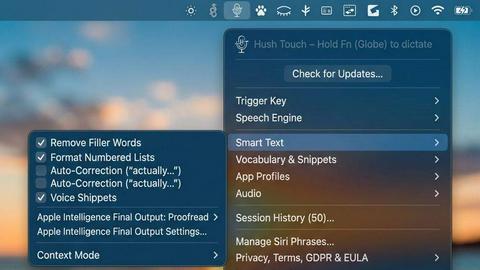
Hush Touch employs advanced text processing features that automatically remove filler words, correct common mistakes, and format lists. This real-time processing occurs entirely on the user's device, resulting in cleaner, more coherent text output without the need for manual editing.
Context Modes & Hands-Free Functionality
Users can switch between different context modes—General, Email, Code, and Notes—to optimize dictation for specific tasks. The hands-free feature allows users to initiate dictation using Siri and utilizes auto-insertion after a brief pause, making it easier to dictate without interruption.
Use Cases
FilexHost
Professional Reports
Professionals can use FileXHost to share client reports and presentations without the hassle of email attachments. The instant sharing capability means reports can reach clients quickly, facilitating timely feedback.
Developer Resources
Developers can host landing pages, mock APIs, or entire websites effortlessly with FileXHost. The platform’s ability to render HTML files as live websites allows developers to showcase their work instantly.
Digital Product Distribution
Creators can distribute digital products such as eBooks, music, or software files using FileXHost. With no limits on file types and a maximum file size of 1GB, creators can share their products seamlessly.
Educational Materials
Educators can share lecture notes, research papers, and supplementary materials with students. FileXHost’s quick sharing capabilities support efficient communication and resource distribution in educational settings.
Hush Touch | Voice-to-Text for MacOS
Professional Email Drafting
Hush Touch is ideal for professionals who need to draft emails quickly and efficiently. With voice activation and hands-free capabilities, users can compose responses and messages without being tethered to their keyboards, streamlining communication.
Academic Note-Taking
Students can leverage Hush Touch for taking lecture notes or preparing study materials. The app's ability to learn specialized vocabulary makes it particularly useful for subjects with technical terms, aiding in accurate note-taking during classes.
Creative Writing
Writers can use Hush Touch to brainstorm ideas and draft content effortlessly. The app's seamless integration into creative workflows allows authors to focus on their thoughts without the distraction of typing, enhancing productivity and creativity.
Medical Documentation
Healthcare professionals can dictate patient notes and medical records using Hush Touch. The app's custom vocabulary learning feature ensures that it accurately captures complex medical terminology, making it a valuable tool for physicians and medical staff.
Overview
About FilexHost
FileXHost is an innovative file hosting and sharing platform designed to simplify the process of storing and distributing files of any type. Whether you need to share documents, media files, spreadsheets, or even entire websites, FileXHost delivers a seamless solution with its intuitive "Drop & Share" functionality. Users can effortlessly drag and drop their files, receive an instant secure URL, and share it without any necessary configurations such as server setups or DNS management. This makes it ideal for professionals, developers, and creators who require quick and efficient file delivery without the hassle of traditional sharing methods. FileXHost also prioritizes user experience, ensuring that recipients view files exactly as intended, enhancing engagement without the need for additional downloads or plugins.
About Hush Touch | Voice-to-Text for MacOS
Hush Touch is an innovative voice-to-text application specifically designed for macOS users who seek a fast, natural, and private dictation experience. Unlike many dictation tools that rely on cloud processing, Hush Touch operates entirely on-device, ensuring that all voice data remains private and secure. By leveraging two powerful Apple transcription engines and an advanced Apple Intelligence final pass, the app delivers high accuracy and cleaner text output. With its lightweight footprint of just 5.5 MB, Hush Touch integrates seamlessly into everyday writing workflows, allowing users to dictate emails, messages, notes, and documents effortlessly. The app is tailored for professionals, students, and anyone who requires hands-free dictation without the hassle of complex setups or ongoing subscriptions. For a one-time fee of $20, users gain lifetime access to a tool that not only improves dictation efficiency but also learns and adapts to their unique vocabulary over time.
Frequently Asked Questions
FilexHost FAQ
What is FileXHost?
FileXHost is a file hosting and sharing platform that allows users to upload and share files of various types easily. It provides instant links for sharing without complex setups.
Is it really free?
Yes, FileXHost offers a free plan that allows users to host up to 1,000 files with a maximum size of 25MB each. However, the free version is ad-supported and includes certain limitations.
What file types are supported?
FileXHost supports a wide range of file types, including documents (PDF, TXT), spreadsheets (XLSX, CSV), media files (MP4, MP3), images (JPG, PNG), and even HTML projects.
How do I update my site?
To update your site, simply upload a new version of the file or website ZIP through the FileXHost interface. The platform will generate a new link automatically for easy sharing.
Hush Touch | Voice-to-Text for MacOS FAQ
How does Hush Touch ensure privacy?
Hush Touch processes all voice data entirely on-device, meaning no information is sent to the cloud. This guarantees privacy and security for users who are concerned about data collection.
Can I customize the vocabulary in Hush Touch?
Yes, Hush Touch allows users to add up to 500 custom vocabulary terms. The app also learns from your corrections, ensuring it adapts to your specific language and jargon over time.
Is there a free trial available for Hush Touch?
Yes, Hush Touch offers a 7-day free trial with no credit card required. This allows users to experience the app's features and capabilities before committing to a purchase.
What platforms does Hush Touch support?
Hush Touch is specifically designed for macOS, ensuring optimal performance and integration with Apple's ecosystem. The app is lightweight and can run smoothly on most Mac devices.
Alternatives
FilexHost Alternatives
FilexHost is a cutting-edge file hosting and sharing platform that falls under the category of productivity and management tools. It simplifies the process of storing and distributing a wide range of files, allowing users to effortlessly generate live links through a straightforward drag-and-drop interface. This innovative solution appeals to professionals, developers, and content creators who prioritize efficiency and ease of use in their file-sharing needs. Users often seek alternatives to FilexHost for various reasons, including pricing considerations, specific feature requirements, or compatibility with different platforms. When exploring alternatives, it is essential to evaluate factors like security measures, user experience, storage capacity, and the ability to customize sharing options. A comprehensive assessment will ensure that users find a solution that aligns with their unique needs and enhances their file-sharing capabilities.
Hush Touch | Voice-to-Text for MacOS Alternatives
Hush Touch | Voice-to-Text for MacOS is an advanced offline dictation application designed specifically for macOS users, falling under the productivity and management category. It offers a unique, private dictation experience by processing voice data entirely on-device, ensuring user confidentiality while providing high accuracy through dual engine recognition. Users often seek alternatives to Hush Touch for various reasons, including pricing concerns, feature requirements, or compatibility with different platforms. When selecting an alternative, it is essential to consider factors such as voice recognition accuracy, customization options, user interface, and whether the solution operates offline or relies on cloud services. Evaluating these aspects can help ensure that the chosen application meets individual dictation needs effectively.