
Gomotion vs Image to Image AI
Side-by-side comparison to help you choose the right product.

Gomotion
Gomotion harnesses AI to effortlessly create stunning motion graphics for creators and marketers alike.
Last updated: February 25, 2026

Image to Image AI
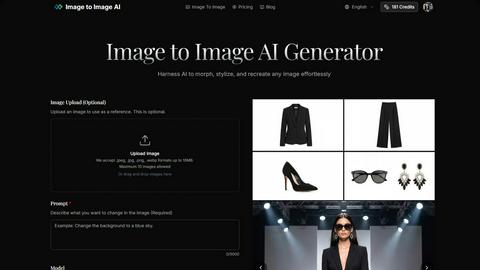
Transform images effortlessly with Image to Image AI, turning text prompts or references into stunning visuals.
Last updated: February 25, 2026
Visual Comparison
Gomotion
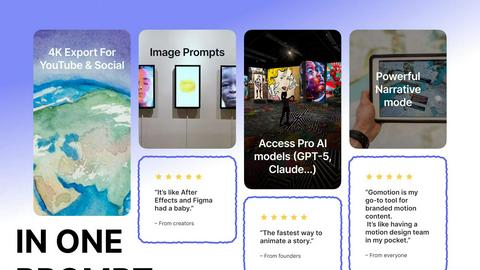
Image to Image AI
Feature Comparison
Gomotion
Instant Cinematic Animation
Gomotion's standout feature is its ability to convert text or image prompts into cinematic animations instantly. This reduces the time typically associated with motion design, empowering users to create dynamic content quickly and efficiently.
No Keyframes Required
Unlike traditional animation software, Gomotion eliminates the need for complex keyframing. Users can simply describe their animation needs in natural language, allowing for a more accessible and streamlined design experience.
One-Click Brand Import
This feature allows users to import their brand assets with a single click, ensuring consistency and professionalism in all projects. It simplifies the process of integrating logos, colors, and fonts, saving valuable time for creators and marketers.
Multi-Screen Design Capability
Gomotion is built to support design for any screen, whether it’s for social media, websites, or presentations. This versatility ensures that animated content looks great on all platforms, enhancing viewer engagement and reach.
Image to Image AI
Image Upload and Transformation
Users can upload up to eight reference images to serve as the basis for their transformations. This feature allows for style transfer and the creation of composite images, giving users the flexibility to combine multiple elements into a single cohesive design.
Multiple AI Models
Image to Image AI offers a selection of over nine distinct AI models, including Nano Banana, Nano Banana Pro, and GPT-4o Image. Users can choose models based on their quality and cost preferences, ensuring they find the perfect fit for their specific project requirements.
Aspect Ratios and Resolutions
The platform supports a variety of aspect ratios, including 1:1, 16:9, and 21:9, among others, allowing users to tailor their images for different applications. Additionally, it provides output options in multiple resolutions, including 1K, 2K, and 4K, ensuring high-quality results suitable for any context.
Customization Options
With options to adjust transformation parameters such as aspect ratio, output count, and transformation strength, users have extensive control over the final results. This level of customization ensures that images can be transformed in a way that closely matches the user's vision.
Use Cases
Gomotion
Social Media Content Creation
Gomotion is ideal for social media marketers looking to create eye-catching animated posts and stories. With its rapid output capabilities, users can produce engaging content that captures attention and drives interaction.
Promotional Videos
Businesses can leverage Gomotion to produce promotional videos that effectively showcase their products or services. The platform's speed and ease of use make it possible to create compelling narratives that resonate with audiences quickly.
Educational Presentations
Educators and trainers can use Gomotion to develop animated presentations that enhance learning experiences. The platform allows for the integration of animated diagrams and visuals, making complex concepts easier to understand.
Brand Advertising
With its one-click brand import feature, Gomotion enables marketers to create branded ads that maintain visual consistency. The ability to produce high-quality animations in minutes helps brands stay relevant in fast-paced advertising environments.
Image to Image AI
Marketing Campaign Development
Marketers can utilize Image to Image AI to generate multiple variations of campaign assets quickly. By transforming existing images into new styles or designs, they can effectively test and optimize their visual content for different audiences.
Concept Visualization for Designers
Designers can take advantage of the platform to visualize concepts by uploading initial drafts and describing desired changes. This allows them to explore various creative directions and refine their ideas before finalizing projects.
Creative Experimentation
Artists and creative enthusiasts can use Image to Image AI to experiment with different artistic styles. Whether they want to create surreal landscapes or modern abstract pieces, the tool provides an easy way to transform their images and explore new aesthetics.
Social Media Content Creation
Content creators can leverage Image to Image AI for producing eye-catching visuals for social media. By transforming their images into striking graphics, they can enhance engagement and attract more followers with professional-quality content.
Overview
About Gomotion
Gomotion is the world's most advanced AI-powered motion design platform, seamlessly combining the capabilities of traditional tools like After Effects with innovative AI technology. Designed for creators and marketers alike, Gomotion transforms simple text or image prompts into stunning cinematic animations within moments. Users can easily describe how they want their text to move and generate a variety of creative outputs, including titles, captions, logos, charts, and even complete narrative videos—without the need for intricate keyframe techniques. This intuitive platform allows for one-click brand importation, making it simple to maintain brand consistency across all projects. Whether you're crafting content for social media, presentations, or promotional materials, Gomotion stands out by enabling users to produce captivating, ready-to-publish ads, demos, and stories in just minutes. This efficiency not only accelerates the creative process but also enhances storytelling, allowing for beautifully animated content tailored for any screen.
About Image to Image AI
Image to Image AI is an advanced online photo editing tool that leverages artificial intelligence to transform, stylize, and recreate images effortlessly. This innovative platform is designed for a wide range of users, including designers, marketers, and creative enthusiasts who wish to enhance their visual content with minimal effort. By allowing users to upload reference images or provide descriptive prompts, Image to Image AI generates high-quality images that maintain the original's structure while applying creative modifications. With the ability to choose from over nine AI models and various output formats and resolutions, users can achieve professional-grade results tailored to their specific needs. Whether you are looking to visualize concepts, create marketing assets, or experiment with artistic styles, Image to Image AI stands out as a powerful solution that simplifies the creative process.
Frequently Asked Questions
Gomotion FAQ
What types of animations can I create with Gomotion?
Gomotion allows users to create a wide variety of animations, including titles, logos, charts, and full narrative videos. The platform's AI technology makes it easy to turn simple prompts into dynamic visuals.
Is Gomotion suitable for beginners?
Yes, Gomotion is designed for all skill levels. Its intuitive interface and natural language input make it accessible to beginners while still offering advanced features for experienced motion designers.
Can I use my own assets in Gomotion?
Absolutely. Gomotion includes a one-click brand import feature, allowing users to easily integrate their own logos, fonts, and color schemes, ensuring brand consistency across all projects.
What platforms can I use Gomotion on?
Gomotion is a versatile platform that supports design for any screen. Whether you're creating content for social media, websites, or presentations, Gomotion ensures your animations look great everywhere.
Image to Image AI FAQ
How does Image to Image differ from Text to Image generation?
Image to Image AI focuses on transforming existing images based on user-uploaded references or descriptive prompts, while Text to Image generation creates images from scratch based solely on textual descriptions.
What types of images work best with the transformation?
Images with clear details and good lighting yield the best results. The platform is designed to preserve the original structure while applying artistic transformations, making high-quality source images ideal for effective transformations.
How much control do I have over the transformation process?
Users have significant control over the transformation process, as they can customize various parameters such as aspect ratio, output count, and transformation strength, allowing for tailored results that align with their vision.
How long does the transformation process take?
The transformation process is typically quick, allowing users to generate multiple image variations in seconds. This efficiency enables users to explore different creative directions without lengthy waiting times.
Alternatives
Gomotion Alternatives
Gomotion is an advanced AI-powered motion design platform that revolutionizes the way creators and marketers produce stunning motion graphics. By effortlessly transforming text and image prompts into cinematic animations, it caters to a wide range of users looking to enhance their visual storytelling. As with any tool, users often seek alternatives due to various factors such as pricing, feature sets, and specific platform needs that may better suit their workflow or project requirements. When considering an alternative to Gomotion, it is essential to evaluate the capabilities offered by other platforms, including ease of use, customization options, and the quality of output. Additionally, factors like integration with existing tools, support for brand consistency, and the ability to create content for multiple screen formats should also guide your decision-making process. By identifying these key aspects, users can find a solution that aligns with their creative goals and operational needs.
Image to Image AI Alternatives
Image to Image AI is an innovative online photo editing tool that utilizes advanced artificial intelligence to transform and stylize images based on user-defined prompts or reference images. This platform falls under the category of AI-assisted creative tools, catering to designers, marketers, and creative individuals looking to enhance their visual content efficiently. Users often seek alternatives to Image to Image AI due to various factors, including pricing, specific feature sets, and compatibility with their individual creative workflows. When evaluating alternatives, it is essential to consider aspects such as the range of AI models offered, customization options, output quality, and the ease of use of the platform to ensure it aligns with the user's project requirements and goals.