
Fusedash vs qtrl.ai
Side-by-side comparison to help you choose the right product.

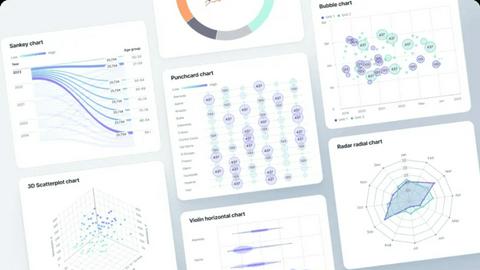
Fusedash is an AI data visualization platform that transforms raw data into actionable dashboards and reports.
Last updated: March 3, 2026

qtrl.ai
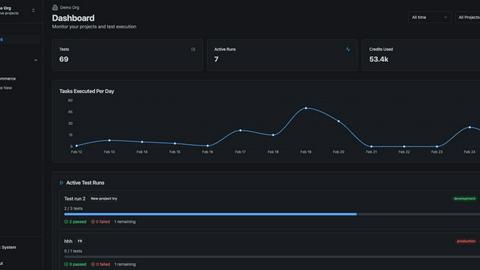
qtrl.ai is an all-in-one QA platform that combines test management and AI-driven automation for scalable quality.
Last updated: February 27, 2026
Visual Comparison
Fusedash
qtrl.ai
Feature Comparison
Fusedash
Unified AI Visualization Workspace
Fusedash consolidates every stage of the data workflow into a single, cohesive platform. Users can connect data from CSVs, APIs, or databases and immediately leverage it to create dashboards, charts, maps, and narrative storytelling reports. This eliminates the friction of switching between multiple specialized tools. The integrated AI assists throughout, from suggesting optimal chart types to generating quick summaries, ensuring that data presentation is both efficient and impactful, all within one environment.
AI Chart Generator
This feature allows users to rapidly create publication-ready visualizations from their datasets. By simply uploading a CSV or connecting an API, the AI analyzes the data and recommends the most effective chart types to communicate the story. Users can then instantly apply comparisons, filters, and clear labels. These charts can be used as standalone assets for presentations or seamlessly embedded into larger dashboard views, dramatically speeding up the report creation process.
Consistent KPI & Metric Definitions
A foundational feature for maintaining data integrity, Fusedash enables teams to define key performance indicators, dimensions, and calculations once. These standardized definitions are then reused across every dashboard, chart, and report. This ensures that when leadership reviews a KPI dashboard and the marketing team examines a performance chart, they are both looking at numbers calculated the same way, fostering trust and eliminating debates over data accuracy.
Smart AI Chat for Data Exploration
Fusedash includes an intelligent chat interface that allows users to interact with their data using natural language. Team members can ask questions like "What were sales in Q4 by region?" or "Show me a breakdown of website traffic sources." The AI interprets these queries, provides answers, suggests relevant metrics, and can even transform the insights into new, shareable dashboard views. This makes deep data exploration accessible to non-technical stakeholders.
qtrl.ai
Autonomous QA Agents
qtrl.ai features autonomous QA agents that execute testing instructions on demand or continuously. These agents can run tests across multiple environments at scale while operating within user-defined rules. This capability ensures real browser execution instead of simulations, enhancing the reliability of test results.
Enterprise-Grade Test Management
The platform provides centralized management of test cases, plans, and executions, ensuring full traceability and audit trails. With support for both manual and automated workflows, qtrl.ai is designed for compliance and auditability, making it ideal for enterprises that require rigorous quality assurance processes.
Progressive Automation
qtrl.ai enables teams to start with human-written testing instructions and gradually transition to AI-generated tests. The platform intelligently suggests new tests based on coverage gaps, allowing teams to review, approve, and refine tests at every step of the process, thus maintaining control over their testing strategy.
Adaptive Memory
qtrl.ai incorporates adaptive memory, which builds a living knowledge base of the application being tested. This feature learns from exploration, test execution, and issues, powering smarter, context-aware test generation that becomes more effective with each interaction.
Use Cases
Fusedash
Executive KPI Review Dashboards
Leadership teams require a high-level, real-time view of organizational health. Fusedash is used to build centralized executive dashboards that aggregate key metrics from across departments—such as revenue, customer acquisition costs, and operational efficiency. The consistent KPI definitions ensure reliability, while storytelling sections can add crucial context to explain fluctuations, enabling faster, more informed strategic decisions.
Marketing and Revenue Performance Tracking
Marketing and sales teams use Fusedash to track campaign performance, funnel conversion rates, and ROI. They can connect data from ad platforms, CRMs, and web analytics to create unified views. The ability to filter by segment, channel, or time period, and drill down into specific data points, helps teams identify what's working, optimize spend, and accurately report on performance to stakeholders.
Operations and Real-Time Monitoring
For teams managing logistics, infrastructure, or customer support, minutes matter. Fusedash's real-time interfaces support monitoring fast-moving metrics like system uptime, transaction volumes, or support ticket backlogs. Live dashboards provide instant visibility into operations, allowing teams to detect and respond to issues proactively before they escalate, ensuring smooth business continuity.
Geographic Analysis with Map Visualizations
Organizations with physical locations, distribution networks, or regional sales teams leverage Fusedash's built-in mapping capabilities. By visualizing data such as sales density, customer demographics, or asset locations on an interactive map, teams can uncover geographic trends, optimize territory management, and make data-driven decisions about where to allocate resources for maximum impact.
qtrl.ai
Scalable QA for Growing Teams
As organizations expand, QA teams often struggle with the volume of testing required. qtrl.ai provides a scalable solution that allows teams to manage test cases efficiently while integrating AI-driven automation to keep pace with development demands.
Legacy Workflow Modernization
Companies looking to modernize their legacy QA workflows can leverage qtrl.ai's capabilities to transition from brittle, traditional automation methods to a more adaptive and intelligent testing framework that enhances agility without losing control.
Continuous Integration and Delivery
For teams implementing CI/CD pipelines, qtrl.ai seamlessly integrates into existing workflows, providing continuous quality feedback loops that ensure high-quality software releases. The platform supports rapid test execution across various environments, which is crucial in a fast-paced development landscape.
Enhanced Compliance and Governance
Enterprises requiring stringent governance and traceability in their QA processes can benefit from qtrl.ai's enterprise-grade features. The platform's comprehensive audit trails and permissioned autonomy levels enable organizations to maintain oversight while optimizing their testing efforts.
Overview
About Fusedash
Fusedash is an AI-powered data visualization and business intelligence platform designed to transform complex, connected data into clear, actionable insights. It serves as a unified workspace where teams can build decision-ready dashboards, interactive charts, detailed maps, and narrative reports without the need to rebuild logic across disparate tools. The platform's core value proposition lies in its ability to centralize data definitions and workflows, enabling organizations to maintain a single source of truth. By allowing users to define KPIs and metrics once and reuse them consistently across all visualizations and reports, Fusedash eliminates conflicting data stories and ensures every stakeholder is aligned. It is built for modern teams across functions—from leadership and marketing to operations and sales—who need to monitor performance, explain changes, and act on insights quickly. With integrated AI capabilities for natural language querying, visualization generation, and summarization, Fusedash significantly reduces the time from data to decision, empowering teams to focus on strategic action rather than manual report-building.
About qtrl.ai
qtrl.ai is an advanced test management platform designed to meet the demands of modern software development teams. It offers a comprehensive suite of tools that enable organizations to effectively manage, execute, and analyze their testing processes. With qtrl.ai, teams can organize their test cases, plan and execute test runs, trace requirements to coverage, and monitor quality metrics through intuitive real-time dashboards. This platform is particularly beneficial for engineering leads and QA managers who need clear visibility into testing outcomes, including what has been tested, what is passing, and potential risks.
What sets qtrl.ai apart from traditional test management solutions is its innovative AI layer. The platform includes autonomous agents capable of generating user interface tests from natural language descriptions, maintaining them as applications evolve, and executing these tests across various environments and browsers. With a progressive automation model, qtrl.ai allows teams to start with manual testing and gradually integrate AI-driven automation, making it suitable for organizations at any stage of QA maturity. Ultimately, qtrl.ai empowers teams to scale quality assurance efforts without sacrificing oversight, trust, or governance.
Frequently Asked Questions
Fusedash FAQ
What types of data sources can I connect to Fusedash?
Fusedash offers flexible data integration options to suit various needs. You can start quickly by uploading CSV or Excel files directly into the platform. For live, updated data, you can connect to a wide range of APIs from business applications like Salesforce, Google Analytics, and ad platforms. This allows you to combine multiple datasets into a single, comprehensive view for analysis and reporting.
How does the AI in Fusedash assist with data visualization?
The AI in Fusedash acts as an intelligent assistant throughout the visualization process. It can generate appropriate charts from your raw data with a single click, suggest optimal chart types and metrics based on your questions in Smart Chat, and help refine visuals by recommending better labels or comparisons. It essentially accelerates the design process and helps ensure your visualizations clearly communicate the intended story.
Can I create different views for different teams from the same data?
Absolutely. This is a core strength of Fusedash. You can build a single, centralized dataset with consistent KPIs and then create multiple tailored views from it. For example, you can craft a high-level dashboard for executives, a detailed chart report for the marketing team, and a real-time monitoring view for operations—all sourcing the same underlying data, ensuring consistency while meeting each audience's specific needs.
What is "Storytelling" within Fusedash reports?
Storytelling is a feature that moves beyond static charts and numbers. It allows you to add narrative context, annotations, and explanatory text directly alongside your visualizations in a report. This helps answer the critical questions of why a metric changed and what should be done next, providing crucial context for stakeholders and turning a simple dashboard into a compelling, actionable business narrative.
qtrl.ai FAQ
What makes qtrl.ai different from traditional testing tools?
qtrl.ai stands out due to its integrated AI layer that enables autonomous test generation and execution. This differentiates it from traditional tools that often rely solely on manual testing or rigid automation frameworks, providing a more adaptable and scalable solution.
Can qtrl.ai be used by teams at any stage of QA maturity?
Yes, qtrl.ai is designed with a progressive automation model that allows teams to start with manual test management and gradually introduce AI-assisted automations. This flexibility makes it suitable for organizations at any stage of their QA journey.
How does qtrl.ai ensure the security of test data?
qtrl.ai incorporates enterprise-ready security by ensuring that sensitive data, like per-environment variables and encrypted secrets, are never exposed to AI agents. This design maintains the integrity and confidentiality of test data across all environments.
Is it possible to monitor test execution in real-time with qtrl.ai?
Absolutely. qtrl.ai provides real-time dashboards that track quality metrics, offering clear visibility into test runs, pass rates, and risk areas. This feature enables teams to make informed decisions quickly and effectively.
Alternatives
Fusedash Alternatives
Fusedash is an AI-powered data visualization platform in the analytics and data category. It enables teams to build interactive dashboards, charts, and maps from a single dataset, using AI to generate summaries and answer natural language queries. Users may explore alternatives for various reasons, including budget constraints, specific feature requirements like advanced modeling, or the need for deeper integration with an existing enterprise software stack. The search often stems from a need for a different balance between ease-of-use, customization, and analytical depth. When evaluating alternatives, key considerations include the platform's core data visualization capabilities, the sophistication of its AI and natural language processing, real-time data handling, and the overall cost-to-value ratio for your team's specific use cases. The ideal solution should align with both your technical requirements and strategic business intelligence goals.
qtrl.ai Alternatives
qtrl.ai is a comprehensive QA platform that specializes in structured test management and incorporates AI-driven test automation tailored for engineering and product teams. This dual focus allows organizations to streamline their quality assurance processes, making it easier to manage test cases, execute test runs, and analyze quality metrics through real-time dashboards. Users frequently seek alternatives to qtrl.ai due to various factors, including pricing concerns, specific feature requirements, or the need for compatibility with existing platforms. When exploring alternatives, it is essential to consider the scope of features offered, the ease of integration with current workflows, and the level of support provided. Evaluating these criteria can help ensure that the chosen solution aligns with the organization's QA maturity level and long-term goals.