
FlashSlides vs SchoolGPT
Side-by-side comparison to help you choose the right product.

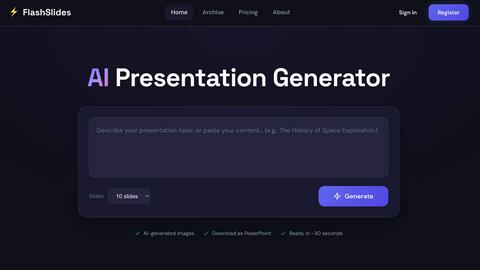
FlashSlides effortlessly creates stunning presentations in minutes, combining AI-generated content and images for max...
Last updated: February 25, 2026

SchoolGPT
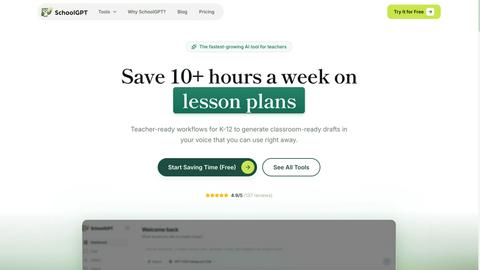
SchoolGPT is an AI teaching assistant that saves K-12 educators over 10 hours weekly on lesson planning and grading.
Last updated: February 26, 2026
Visual Comparison
FlashSlides
SchoolGPT
Feature Comparison
FlashSlides
AI-Powered Content Generation
FlashSlides employs cutting-edge AI technology to produce tailored presentation content based on user-defined topics. This ensures a consistent and coherent narrative throughout all slides, significantly reducing the time traditionally spent on research and manual content assembly, thereby streamlining the entire presentation development process.
Customized Visuals
Each slide generated by FlashSlides is enhanced with unique, AI-generated images that complement the textual content. This feature not only elevates the visual appeal of the presentations but also captivates the audience’s attention, ensuring that the slides are both informative and engaging.
Quick Export Options
Users can effortlessly download their completed presentations in the widely-used PowerPoint format (.pptx), making it easy to integrate into existing workflows. Furthermore, the ability to share presentations via a unique URL enhances collaboration and distribution, facilitating better communication among team members and stakeholders.
Flexible Presentation Creation
FlashSlides provides users with the flexibility to create presentations of varying lengths, accommodating different contexts and requirements. Whether users need a brief overview with as few as 5 slides or a comprehensive analysis with up to 30 slides, FlashSlides can adapt to any situation, ensuring optimal presentation delivery.
SchoolGPT
Instant AI Model Access
SchoolGPT provides educators with immediate access to multiple AI models, allowing for quick generation of various educational materials. This feature eliminates the need for time-consuming searches for resources, streamlining the lesson planning process and enhancing teaching effectiveness.
Ready-to-Use Templates
With more than 60 templates designed specifically for K-12 educators, SchoolGPT enables teachers to create customized lesson plans, quizzes, and feedback mechanisms in seconds. These templates are aligned with state standards, ensuring compliance and relevance in educational content.
Built-in Differentiation
SchoolGPT incorporates built-in differentiation features, allowing educators to tailor materials to fit diverse student needs and learning styles. This ensures that all students receive appropriate support, contributing to a more inclusive classroom environment.
Professional Communication Tools
The platform includes tools for generating professional emails and parent communications, making it easier for educators to maintain open lines of communication with families. This feature fosters positive relationships with parents and guardians, enhancing student support.
Use Cases
FlashSlides
Academic Presentations
Students can utilize FlashSlides to quickly craft impressive presentations for class assignments and project reports. This allows them to dedicate more time to in-depth research and idea refinement, rather than getting sidetracked by the complexities of slide design.
Business Proposals
Business professionals can take advantage of FlashSlides to rapidly assemble polished meeting decks and quarterly reports. This efficiency not only helps in conveying ideas and data effectively but also contributes to improved decision-making and communication within teams and with external stakeholders.
Educational Content Development
Teachers and educators can leverage FlashSlides to generate captivating lesson plans and educational materials that engage students. The incorporation of AI-generated visuals and structured content simplifies complex topics, enhancing the overall learning experience for students.
Investor Pitch Decks
Startups and founders can rely on FlashSlides to create compelling pitch decks that resonate with potential investors. By presenting their business ideas in a professional manner, entrepreneurs can significantly enhance their chances of securing funding and support, making FlashSlides an invaluable tool in the startup landscape.
SchoolGPT
Streamlining Lesson Planning
Teachers can quickly generate comprehensive lesson plans based on specific standards or objectives, saving invaluable time and ensuring alignment with curriculum requirements. This allows educators to focus more on teaching and less on administrative tasks.
Providing Writing Feedback
SchoolGPT's writing feedback tool enables educators to give personalized, constructive feedback on student writing. Teachers can input custom criteria or rubrics, ensuring that their feedback is relevant and supportive of student growth.
Creating Assessments
Educators can effortlessly create multiple-choice quizzes and assessments tailored to any topic or standard. This feature streamlines the assessment process, enabling teachers to focus more on instruction rather than test creation.
Generating Report Card Comments
SchoolGPT simplifies the often tedious task of writing report card comments by providing tailored suggestions based on each student's strengths and areas for improvement. This ensures that feedback is both meaningful and reflective of student progress.
Overview
About FlashSlides
FlashSlides is an advanced AI-powered presentation generator designed to simplify and expedite the creation of professional presentations for users across various sectors. Whether you're a student preparing for a project, an educator aiming to engage students, a business professional crafting a persuasive proposal, or a startup founder seeking to pitch ideas to investors, FlashSlides caters to all these needs effectively. By entering a topic, users can leverage the platform’s sophisticated AI capabilities to generate coherent and visually appealing slide content, complete with relevant text and custom images. This process not only saves valuable time but also fosters creativity, allowing users to concentrate on delivering impactful messages rather than getting bogged down by design intricacies. With an intuitive interface and a multitude of features, FlashSlides stands poised to transform the presentation-building experience, making it an essential tool for effective communication in any setting.
About SchoolGPT
SchoolGPT is a revolutionary AI teaching assistant tailored specifically for K-12 educators. Designed with the unique challenges of the classroom in mind, this all-in-one platform provides teachers with instant access to a variety of advanced AI models, including ChatGPT, Claude, Gemini, and more. With over 60 ready-to-use templates crafted by educators, SchoolGPT empowers teachers to effortlessly generate lesson plans, writing feedback, multiple-choice quizzes, rubrics, report card comments, individualized education programs (IEPs), parent emails, worksheets, study guides, and much more in just seconds. Each output is aligned with state standards, ensuring that educators can deliver quality education while effectively addressing diverse student needs through built-in differentiation. Unlike generic AI tools that demand extensive prompt engineering, SchoolGPT offers classroom-ready drafts in a teacher's own voice, allowing for immediate implementation. Join over 10,000 teachers who have successfully reclaimed their evenings and weekends, enhancing their work-life balance while improving educational outcomes.
Frequently Asked Questions
FlashSlides FAQ
How does FlashSlides work?
FlashSlides operates through a straightforward three-step process: users input their chosen topic, the AI swiftly generates a complete presentation with slides, and users can then download the presentation or share it via a unique link. This efficient process takes less than a minute, making it highly effective for users.
Is FlashSlides really free?
Yes! Every user can create one free presentation per day without the need for a credit card. For those who require additional presentations, extra credits can be purchased at competitive rates, allowing for flexible usage tailored to individual needs.
What formats can I download my presentations in?
Users can download their presentations as PowerPoint (.pptx) files, ensuring compatibility with Microsoft PowerPoint, Google Slides, and other similar software. Additionally, users can easily share their presentations through a unique URL for convenient access.
Are my presentations private?
By default, presentations created on FlashSlides are public and may be visible in the platform's archive. However, users have the option to make any presentation private from their dashboard, providing them with control over confidentiality and content management.
SchoolGPT FAQ
Is SchoolGPT really free to start?
Yes, SchoolGPT offers a free tier that allows educators to explore its features. Users can generate up to 20 AI responses monthly without needing a credit card, making it an accessible option for all teachers.
Why not just use ChatGPT?
While ChatGPT is a powerful tool, it requires extensive prompt engineering to yield classroom-ready outputs. SchoolGPT is designed specifically for educators, providing pre-built templates and instant, relevant results tailored for K-12 education.
Is my data and student information safe?
Absolutely. SchoolGPT is FERPA and COPPA compliant, ensuring that all data, including student information, is handled with the utmost security and privacy in mind.
How much time will I actually save?
Teachers using SchoolGPT report saving over 10 hours each week on lesson planning, grading, and administrative tasks. This substantial time savings allows educators to focus more on teaching and less on paperwork.
Alternatives
FlashSlides Alternatives
FlashSlides is an advanced AI-powered presentation generator that simplifies the process of creating professional presentations across various sectors, including education and business. Users value the platform for its ability to produce visually appealing content quickly, but many seek alternatives due to factors like pricing, specific feature sets, or platform compatibility. When considering an alternative, it's essential to evaluate key aspects such as AI capabilities, ease of use, customization options, and export functionalities to ensure the new solution meets your presentation needs effectively.
SchoolGPT Alternatives
SchoolGPT is an innovative AI teaching assistant designed specifically for K-12 educators, aimed at simplifying lesson planning and grading. As an educational technology tool, it offers a suite of features tailored to meet the unique demands of classroom environments, including instant access to various AI models and over 60 ready-to-use templates. Users often seek alternatives to SchoolGPT due to factors such as pricing, specific feature requirements, or the need for compatibility with their existing platforms. When searching for an alternative, it is essential to consider the range of features offered, the ease of use, and how well the tool aligns with educational standards. Additionally, look for platforms that provide sufficient customization options to meet diverse student needs and support effective communication between educators, students, and parents. Understanding your specific requirements will guide you in selecting the best option for your teaching context.