
FilexHost vs TemplateFox
Side-by-side comparison to help you choose the right product.

FilexHost
Effortlessly host and share any file with FilexHost, generating a live link in seconds through simple drag and drop.
Last updated: February 25, 2026

TemplateFox
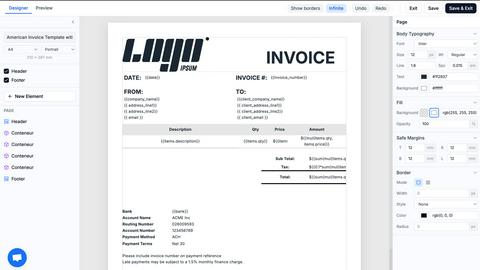
Effortlessly design and automate PDF generation for invoices, reports, and more with TemplateFox's intuitive platform.
Last updated: February 26, 2026
Visual Comparison
FilexHost

TemplateFox
Feature Comparison
FilexHost
Instant Subdomains
FileXHost automatically generates a unique subdomain (your-file.filex.host) for every uploaded file, allowing users to share links instantly with zero setup. This feature eliminates the need for complex configuration, making file sharing quick and efficient.
Free SSL Encryption
All links generated through FileXHost come with free SSL encryption, ensuring that the files are securely transmitted. This not only protects user data but also provides peace of mind to recipients, knowing their downloads are safe from prying eyes.
Smart View Modes
FileXHost offers smart view modes that allow users to choose between direct rendering or a download page. This flexibility ensures that files are presented optimally based on their type, enhancing the viewing experience for the recipient.
Optional Password Protection
For users who require additional security, FileXHost provides optional password protection and expiry settings. This feature allows users to set parameters on shared links, including the ability to restrict access or define how long a file remains available.
TemplateFox
Dynamic Template Design
TemplateFox provides a highly intuitive drag-and-drop editor that allows users to design templates visually. This feature eliminates the need for any coding skills, making it accessible for everyone from professionals to beginners.
Automated Document Generation
Users can generate a vast array of documents—from invoices to reports—through a straightforward API call or Zapier automation. This automation simplifies workflows and saves significant time in document preparation.
Dynamic Data Binding
With TemplateFox, users can inject dynamic data into their templates seamlessly. This means that names, addresses, prices, and other data points can be updated automatically, ensuring that each document is personalized and accurate.
Scalable PDF Generation
TemplateFox is built to handle varying data loads efficiently. Tables within documents can automatically grow to accommodate any amount of data, spanning multiple pages if necessary, which is particularly useful for detailed reports or invoices.
Use Cases
FilexHost
Professional Reports
Professionals can use FileXHost to share client reports and presentations without the hassle of email attachments. The instant sharing capability means reports can reach clients quickly, facilitating timely feedback.
Developer Resources
Developers can host landing pages, mock APIs, or entire websites effortlessly with FileXHost. The platform’s ability to render HTML files as live websites allows developers to showcase their work instantly.
Digital Product Distribution
Creators can distribute digital products such as eBooks, music, or software files using FileXHost. With no limits on file types and a maximum file size of 1GB, creators can share their products seamlessly.
Educational Materials
Educators can share lecture notes, research papers, and supplementary materials with students. FileXHost’s quick sharing capabilities support efficient communication and resource distribution in educational settings.
TemplateFox
Invoicing
Businesses can automate their invoicing process by generating professional invoices quickly and efficiently. This not only saves time but also enhances the accuracy of financial documents.
Reporting
TemplateFox allows organizations to create comprehensive reports that can be updated with real-time data. This feature is ideal for businesses needing to present data-driven insights regularly.
Certifications
Educational institutions and training organizations can use TemplateFox to issue certificates in bulk. The ability to personalize each certificate with dynamic data ensures that every recipient receives a unique document.
Shipping Documents
E-commerce businesses can generate packing slips, shipping labels, and delivery notes seamlessly. The automation of these documents ensures that logistics run smoothly and efficiently.
Pricing Comparison
FilexHost
FileXHost offers two main pricing plans to cater to different user needs. The Free Plan includes hosting for 1,000 files, with a maximum file size of 25MB and a 7-day expiry, but is ad-supported. The Pro Plan, priced at $10 per month, provides permanent hosting for up to 10,000 files with a maximum size of 1GB each, alongside additional features like analytics and an ad-free experience.
TemplateFox
TemplateFox offers a free plan that allows users to generate 100 PDFs per month. For those requiring more extensive usage, affordable paid plans are available, providing scalability and additional features tailored to various business needs. For detailed pricing tiers and features, users are encouraged to visit the TemplateFox website.
Overview
About FilexHost
FileXHost is an innovative file hosting and sharing platform designed to simplify the process of storing and distributing files of any type. Whether you need to share documents, media files, spreadsheets, or even entire websites, FileXHost delivers a seamless solution with its intuitive "Drop & Share" functionality. Users can effortlessly drag and drop their files, receive an instant secure URL, and share it without any necessary configurations such as server setups or DNS management. This makes it ideal for professionals, developers, and creators who require quick and efficient file delivery without the hassle of traditional sharing methods. FileXHost also prioritizes user experience, ensuring that recipients view files exactly as intended, enhancing engagement without the need for additional downloads or plugins.
About TemplateFox
TemplateFox is a powerful Software as a Service (SaaS) solution designed to streamline the generation of professional PDFs from visually crafted templates. With its user-friendly drag-and-drop editor, users can create and customize templates without any prior knowledge of HTML or CSS. This makes TemplateFox an ideal choice for indie hackers, developers, and businesses looking to automate their document workflows efficiently. The platform allows users to generate thousands of documents—including invoices, certificates, reports, and more—through a simple API call or integration with Zapier. Users can expect rapid results, with PDF generation occurring in just 1-3 seconds. Starting with a free tier that offers 100 PDFs per month, TemplateFox scales effortlessly with affordable paid plans, ensuring that users have access to a robust solution tailored to their needs.
Frequently Asked Questions
FilexHost FAQ
What is FileXHost?
FileXHost is a file hosting and sharing platform that allows users to upload and share files of various types easily. It provides instant links for sharing without complex setups.
Is it really free?
Yes, FileXHost offers a free plan that allows users to host up to 1,000 files with a maximum size of 25MB each. However, the free version is ad-supported and includes certain limitations.
What file types are supported?
FileXHost supports a wide range of file types, including documents (PDF, TXT), spreadsheets (XLSX, CSV), media files (MP4, MP3), images (JPG, PNG), and even HTML projects.
How do I update my site?
To update your site, simply upload a new version of the file or website ZIP through the FileXHost interface. The platform will generate a new link automatically for easy sharing.
TemplateFox FAQ
How does TemplateFox handle document security?
TemplateFox provides signed URLs for document access, ensuring that sensitive information is securely transmitted and only accessible to authorized individuals.
Can I integrate TemplateFox with other tools?
Yes, TemplateFox offers no-code integrations with popular platforms such as Zapier, Airtable, and others, allowing users to automate their workflows easily.
What types of documents can I create with TemplateFox?
You can create a wide variety of documents, including invoices, reports, certificates, packing slips, and any other professional PDFs tailored to your needs.
Is there a free trial available for TemplateFox?
Yes, TemplateFox offers a free plan that allows users to generate up to 100 PDFs per month, enabling potential customers to test the platform's capabilities before committing to a paid plan.
Alternatives
FilexHost Alternatives
FilexHost is a cutting-edge file hosting and sharing platform that falls under the category of productivity and management tools. It simplifies the process of storing and distributing a wide range of files, allowing users to effortlessly generate live links through a straightforward drag-and-drop interface. This innovative solution appeals to professionals, developers, and content creators who prioritize efficiency and ease of use in their file-sharing needs. Users often seek alternatives to FilexHost for various reasons, including pricing considerations, specific feature requirements, or compatibility with different platforms. When exploring alternatives, it is essential to evaluate factors like security measures, user experience, storage capacity, and the ability to customize sharing options. A comprehensive assessment will ensure that users find a solution that aligns with their unique needs and enhances their file-sharing capabilities.
TemplateFox Alternatives
TemplateFox is a powerful Software as a Service (SaaS) platform that specializes in the streamlined generation of professional PDFs using visually crafted templates. It falls within the productivity and management category, catering to a diverse range of users including indie hackers, developers, and businesses seeking to automate their document workflows. Users often explore alternatives to TemplateFox due to various reasons such as pricing structures, feature sets, or specific platform needs that may not align perfectly with their requirements. When searching for an alternative, it is essential to consider factors such as the ease of use, scalability, and the ability to customize templates without requiring technical expertise. Additionally, examining the automation capabilities and integration options with existing tools is crucial, as these elements significantly impact the efficiency of document generation workflows. Ultimately, identifying a solution that meets your unique needs while offering robust support can lead to enhanced productivity.