
Facejam vs Nani
Side-by-side comparison to help you choose the right product.

Facejam
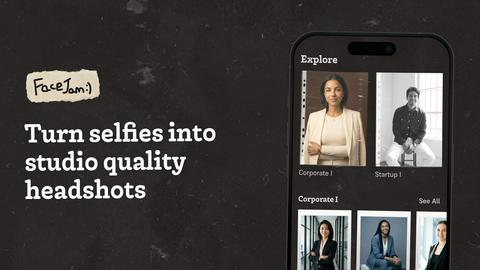
Transform your selfies into professional headshots in minutes, perfect for LinkedIn and business profiles, with FaceJam.
Last updated: February 25, 2026

Nani
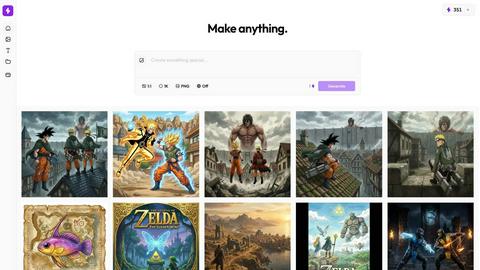
Nani streamlines AI image generation by saving prompts and images, ensuring an organized, efficient creative workflow.
Last updated: February 25, 2026
Visual Comparison
Facejam
Nani
Feature Comparison
Facejam
Professional Headshots
FaceJam provides a seamless way to create professional headshots for various contexts, including LinkedIn profiles, resumes, and corporate directories. Users can bypass costly photography sessions and receive polished images in just minutes, making it a valuable resource for job seekers and professionals alike.
Industry-Specific Styles
With over 100 styles available, FaceJam caters to the unique aesthetic needs of different industries. From real estate agents to legal professionals, users can select tailored looks that align with their profession, ensuring they present the right image to their audience.
High-Resolution Results
FaceJam guarantees high-resolution headshots that maintain a realistic appearance, ensuring users receive images that look as though they were taken in a professional studio. This quality is crucial for maintaining a polished and trustworthy online presence.
Privacy and Ownership
FaceJam prioritizes user privacy, ensuring that uploaded photos remain secure and are never used to improve the AI model or shared with third parties. Users retain full ownership and commercial rights to the images generated, providing peace of mind and control over their professional representations.
Nani
Image Sets
Nani allows users to upload reference images once and reuse them across multiple generations. This feature eliminates the need to repeatedly search for and upload the same images, making the creative process much more efficient.
Prompt Sets
With Nani's Prompt Sets, users can save style directions, character descriptions, and brand guidelines as reusable building blocks. This functionality ensures consistency across your projects and speeds up the workflow by reducing the need to rewrite prompts from scratch.
Composable Prompts
The Composable Prompts feature enables users to combine their saved sets naturally, creating a cohesive workflow. Instead of starting anew each time, you can easily assemble prompts and references, significantly reducing the time spent on each generation.
Visual Iteration
Nani offers a unique Visual Iteration tool that allows users to drag previous results back in as references without the hassle of downloading and re-uploading images. This feature enhances the iterative process, enabling users to refine their creations more effectively.
Use Cases
Facejam
LinkedIn Headshots
Professionals seeking to enhance their LinkedIn profiles can use FaceJam to generate eye-catching headshots that resonate with recruiters and potential employers. With industry-specific styles, users can align their image with their career aspirations.
Corporate Teams
FaceJam is ideal for businesses looking to create cohesive images for team pages and corporate directories. By utilizing the same platform, companies can ensure that all team members have consistent, high-quality headshots that reflect the organization’s professionalism.
Personal Branding
For entrepreneurs and creatives, maintaining a consistent online presence is crucial. FaceJam enables users to create professional images suitable for their personal websites, social media platforms, and portfolios, enhancing their overall branding strategy.
Quick Revisions for Events
When needing quick headshots for unexpected networking events or conferences, FaceJam can deliver professional images in minutes. Users can upload new selfies and generate fresh headshots, ensuring they are always prepared to make a great first impression.
Nani
Digital Art Creation
Artists can leverage Nani to streamline their workflow by organizing their reference images and prompts. This allows for a more focused approach to creating digital art, enhancing creativity and productivity.
Marketing Campaigns
Marketers can utilize Nani's features to maintain consistent branding across various campaigns. By saving brand-specific prompts and images, they can generate targeted visuals that align with their marketing objectives.
Content Development
Content creators can benefit from Nani by efficiently producing graphics for blogs, social media, and other platforms. The ability to reuse prompts and images saves time, allowing creators to focus on ideation and content strategy.
Collaborative Projects
Nani is perfect for teams working on collaborative projects. By using shared folders and public links, team members can quickly access, edit, and recreate each other's work, fostering a collaborative and efficient creative environment.
Overview
About Facejam
FaceJam is a revolutionary AI-powered tool that transforms your selfies into professional-grade headshots in just minutes. Designed for individuals across various fields, including realtors, consultants, creatives, and corporate professionals, FaceJam streamlines the process of obtaining high-quality images without the need for expensive photographers or time-consuming sessions. By simply uploading a few photos of yourself and selecting from over 50 customizable styles, users can generate stunning headshots tailored to their specific industry and personal branding needs. The primary value proposition of FaceJam lies in its ability to deliver realistic, studio-quality results quickly and cost-effectively, allowing users to enhance their professional presence without the hassle of traditional photography. Whether you are updating your LinkedIn profile, creating a personal brand, or needing headshots for corporate use, FaceJam offers an innovative solution to meet your requirements efficiently and securely.
About Nani
Nani is a cutting-edge workflow tool designed to streamline the process of AI image generation, built on the robust framework of Google's Nano Banana Pro (Gemini). Unlike traditional AI image tools that are often limited to one-time uses, Nani is tailored for users who require a more organized and efficient method for repetitive image creation. Whether you are a digital artist, a marketer, or a content creator, Nani offers a comprehensive suite of features that enhance productivity and creativity. By allowing users to save and reuse reference images and prompts, Nani minimizes the tedious nature of prompt rewriting and image searching. The platform's fast user interface ensures a seamless and engaging user experience, enabling creators to focus on bringing their ideas to life without the frustration of disorganization. With Nani, you can unlock the full potential of AI image generation while maintaining a structured workflow.
Frequently Asked Questions
Facejam FAQ
How does your AI headshot generator work?
FaceJam operates through a simple two-step process. Users upload their selfies and choose a preferred template. The AI then generates high-quality headshots based on the uploaded images, making it an efficient solution for professional photography needs.
What do you do with my uploaded photos?
The uploaded photos are used solely to train the AI on the user's appearance, allowing for the creation of realistic headshots. FaceJam ensures that user images are not utilized to improve the model or shared with others, maintaining strict privacy standards.
How many good photos can I expect?
FaceJam guarantees at least one high-quality image in every pack. The number of successful photos users receive largely depends on the quality of the selfies uploaded. Following the provided guidelines can yield 5-10 or more impressive headshots.
Who owns my AI photos?
Users retain full ownership of their generated AI photos. FaceJam grants a commercial license, allowing users to utilize their images freely for professional purposes without any restrictions imposed by the service.
Nani FAQ
How does Nani improve my AI image generation workflow?
Nani enhances your workflow by providing a structured way to organize images and prompts, allowing for quick reuse and efficient collaboration, minimizing repetitive tasks.
What are the costs associated with using Nani?
Nani operates on a credit-based billing system, costing approximately 30 cents per image generation for 1K or 2K resolution, with no subscriptions or commitments required.
Is there a learning curve for using Nani?
Nani is designed with a simple and intuitive interface that eliminates any significant learning curve. Users can start creating stunning images immediately without prior experience.
Can I share my creations with others?
Yes, Nani allows users to share their creations through public links, enabling others to view and recreate your work in their own accounts, fostering collaboration and inspiration.
Alternatives
Facejam Alternatives
FaceJam is an innovative AI-powered tool that belongs to the image generation category, specifically designed to transform selfies into professional headshots. Users across various industries use FaceJam to create high-quality images quickly, making it a popular solution for enhancing online professional presence. However, users may seek alternatives due to various reasons such as pricing concerns, the availability of specific features, or compatibility with different platforms. When considering an alternative to FaceJam, it's essential to evaluate factors like the range of customizable styles, image quality, user privacy policies, and the overall ease of use. Ensuring that the alternative meets your specific professional needs and provides a seamless experience will lead to better outcomes for your online representation.
Nani Alternatives
Nani is a sophisticated workflow tool designed specifically for AI image generation, enabling users to streamline their creative processes. It falls within the image generation category and provides unique features that help artists, marketers, and content creators organize their prompts and images for more efficient and productive workflows. Users often seek alternatives to Nani due to factors such as pricing, specific feature sets, or compatibility with their preferred platforms. When choosing an alternative, it is essential to consider aspects like user interface, ease of use, the flexibility of features, and how well the tool can accommodate your unique creative needs. Finding a solution that enhances productivity while delivering the right functionalities can significantly impact your creative output.