
ExpenseManager vs ProcessBankStatement
Side-by-side comparison to help you choose the right product.

ExpenseManager
ExpenseManager simplifies expense tracking, bill splitting, and cash flow forecasting for individuals and groups.
Last updated: February 25, 2026

ProcessBankStatement
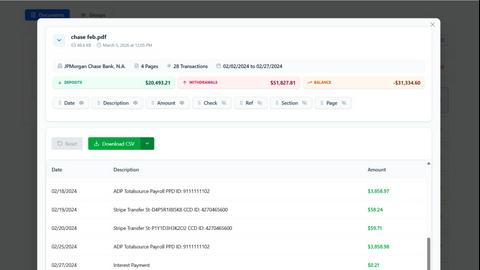
ProcessBankStatement instantly converts PDF bank statements into clean, structured CSV files for financial analysis.
Last updated: March 11, 2026
Visual Comparison
ExpenseManager

ProcessBankStatement
Feature Comparison
ExpenseManager
AI-Powered Receipt Scanning
ExpenseManager utilizes advanced OCR technology, allowing users to take a photo of their receipts and automatically extract essential details such as the amount, category, and merchant name. This feature eliminates the tedious task of manually entering expenses and enhances accuracy in tracking spending.
Budget Alerts
Users can set personalized budgets within the app and receive timely alerts at 50%, 75%, and 90% of their budget limit. This proactive feature helps prevent overspending and encourages users to stay within their financial goals, promoting healthier spending habits.
Expense Splitting Made Easy
ExpenseManager offers versatile options for splitting costs among users, whether it's for couples, roommates, or travel groups. Users can choose equal, percentage-based, or custom splits, making it simple to manage shared expenses without confusion or conflict.
Comprehensive Currency Support
The app supports over 30 currencies, making it an essential tool for international travelers. Users can efficiently manage expenses in different currencies, ensuring seamless tracking and accurate conversions, regardless of where they are in the world.
ProcessBankStatement
Intelligent PDF Parser
The core engine of ProcessBankStatement is its advanced parser, which intelligently identifies and extracts key data points from any bank statement PDF. It accurately captures transaction dates, descriptions, deposits, withdrawals, and running balances, even from complex or multi-column layouts. The technology handles both digital text-based PDFs and scanned image documents, ensuring clean, structured output ready for analysis without manual cleanup.
Bank-Grade Security & Privacy
Security is paramount. All file uploads and data transfers are protected with robust encryption protocols. Users maintain complete control over their data, with the ability to view and permanently delete uploaded statements and generated files from the system at any time. This commitment to privacy ensures that sensitive financial information is handled with the utmost care and confidentiality.
Seamless Software Integration
The tool is built for practical workflow integration. The generated CSV files are meticulously formatted for direct import into popular accounting platforms like QuickBooks and spreadsheet applications like Microsoft Excel or Google Sheets. This eliminates the need for reformatting or data manipulation, allowing for instant reconciliation, reporting, and financial analysis.
High-Volume Batch Processing
For professionals handling multiple client accounts or monthly statements, the batch upload capability is a significant time-saver. Users can upload several PDF statements at once, and the system will process them sequentially, providing individual CSV outputs for each file. This feature scales the efficiency gains, making it ideal for accounting firms and bookkeepers during peak periods.
Use Cases
ExpenseManager
Couples Managing Household Expenses
Couples can leverage ExpenseManager to track shared household costs effortlessly. By using the app, they can avoid misunderstandings about who paid what and ensure that financial contributions are transparent, leading to fewer arguments and a healthier relationship.
Individuals Tracking Personal Expenses
For individuals, ExpenseManager serves as a personal finance tool that helps track spending, categorize expenses, and set budgets. This functionality empowers users to understand their financial habits and identify areas for potential savings.
Group Travel Expense Management
Travelers can benefit from ExpenseManager's ability to split trip expenses, whether for lodging, meals, or activities. By using the app, groups can ensure everyone knows what they owe, making it easier to settle debts and enjoy their travels without financial stress.
Roommates Sharing Bills
Roommates can utilize ExpenseManager to manage shared bills and rent payments efficiently. The app provides clarity on who owes what, ensuring that everyone remains accountable for their financial responsibilities, thereby fostering a harmonious living environment.
ProcessBankStatement
Streamlining Bookkeeping & Client Accounting
Accountants and bookkeepers can drastically reduce the time spent on client onboarding and monthly reconciliations. Instead of manually keying in data from various client-provided PDF statements, they upload the documents and receive standardized CSVs. This allows them to focus on higher-value advisory services, analysis, and ensuring financial accuracy rather than data entry.
Accelerating Loan & Mortgage Processing
Loan processors and underwriters often need to analyze months of bank statements for applicants. Manually reviewing PDFs is slow. With ProcessBankStatement, they can instantly convert statements into CSV format, enabling quick filtering, summation of deposits, and identification of transaction patterns using spreadsheet tools, significantly speeding up the verification and decision-making process.
Empowering Small Business Financial Management
Small business owners can take control of their finances without dedicated bookkeeping staff. By converting their monthly bank statements to CSV, they can easily import transactions into their accounting software, track expenses, prepare for tax season, and generate cash flow reports—all with minimal effort and technical expertise.
Enhancing Financial Analysis & Reporting
Financial analysts and consultants who need to examine transaction histories for budgeting, auditing, or forensic accounting benefit from structured data. The clean CSV output allows for advanced pivot tables, trend analysis, and custom reporting in Excel, turning unstructured PDFs into a powerful dataset for informed business insights.
Overview
About ExpenseManager
ExpenseManager is an innovative application designed to simplify personal budgeting and expense management for individuals, couples, and groups. By integrating features such as receipt scanning, budget tracking, and expense splitting, ExpenseManager addresses the multifaceted challenges of financial management. Users can effortlessly snap a photo of their receipts, allowing the app's AI-powered Optical Character Recognition (OCR) technology to extract critical information like amount, category, and merchant details in an instant. This streamlining enables users to set budgets and receive alerts when they approach spending limits. ExpenseManager is ideal for couples sharing household expenses, roommates splitting rent and bills, travelers managing multi-currency expenses, and anyone who seeks clarity and control over their financial habits. With a user-friendly interface and robust features, ExpenseManager empowers users to take charge of their finances effectively.
About ProcessBankStatement
ProcessBankStatement is a sophisticated, AI-powered tool designed to eliminate the tedious and error-prone manual data entry associated with bank statements. It serves as a critical bridge between raw financial documents and actionable data. By simply uploading a PDF bank statement, users receive a clean, structured, and downloadable CSV file within seconds. The platform's intelligent parsing engine accurately extracts transaction details, dates, amounts, and descriptions, formatting the data for immediate use in accounting software like QuickBooks, spreadsheets like Excel, or custom financial analysis. It is specifically engineered for finance professionals, accountants, bookkeepers, small business owners, and loan processors who require efficiency and accuracy. Its core value proposition lies in transforming hours of manual work into a secure, automated process that is both fast and reliable, ensuring data integrity while giving users full control over their sensitive financial information.
Frequently Asked Questions
ExpenseManager FAQ
What is the Founding Member offer?
The Founding Member offer allows the first 100 users to access all premium features of ExpenseManager free for life. This limited-time promotion encourages early adopters to take advantage of the app’s full capabilities without any financial commitment.
What happens if I don't stay active?
If users do not remain active, their account may be deactivated, and they may lose access to the premium features offered during the Founding Member promotion. Regular usage is encouraged to maintain account status and ensure continued access to all functionalities.
Is my financial data secure?
ExpenseManager employs bank-grade AES-256 encryption to ensure the security of users' financial data. The app prioritizes user privacy and data protection, providing peace of mind while managing sensitive financial information.
What platforms are supported?
ExpenseManager is designed to be compatible with both iOS and Android devices, allowing users to access their financial information and manage expenses on the go. The app can be easily downloaded from the respective app stores for seamless integration into daily life.
ProcessBankStatement FAQ
What types of bank statement files are supported?
ProcessBankStatement currently supports PDF files exclusively. This includes both modern, text-based PDFs directly downloaded from your online banking portal, as well as scanned PDFs or images of physical statements that have been saved as a PDF. The intelligent parser is designed to handle both formats accurately.
Is there a free plan or trial available?
Yes, there is a free tier available. Unregistered guest users can process up to 3 pages per day. By registering for a free account, users receive enhanced limits of 5 pages per day at no cost, allowing you to thoroughly test the service's capabilities and accuracy with your own statements before committing to a paid plan.
How secure is my financial data when using this tool?
Your data security is our top priority. All files are encrypted during upload and download (in transit). We adhere to strict data handling protocols, and you retain full ownership and control. You can permanently delete your uploaded statements and generated CSV files from our servers at any time through your account dashboard.
Which banks are supported by the parser?
The tool is trusted to work reliably with statements from all major U.S. banks and credit unions, including Chase, Bank of America, Wells Fargo, Citibank, and many others. The system is continuously updated to support new statement formats. Currently, international bank statements are not supported, but more formats are being added over time.
Alternatives
ExpenseManager Alternatives
ExpenseManager is a cutting-edge application tailored for individuals, couples, and groups aiming to streamline their personal budgeting and expense management. Falling under the Business & Finance category, it offers a suite of features including receipt scanning, budget tracking, and expense splitting to help users manage their financial habits effectively. Users often seek alternatives to ExpenseManager for various reasons, including pricing structures, specific feature sets, or platform compatibility. When searching for an alternative, it's essential to consider factors such as user interface, integration capabilities, and the breadth of features offered, ensuring the chosen solution aligns with personal or group financial management needs.
ProcessBankStatement Alternatives
ProcessBankStatement is a specialized tool in the business and finance software category, designed to automate the conversion of PDF bank statements into structured CSV files. This process, traditionally manual and error-prone, is critical for bookkeeping, reconciliation, and financial analysis. Users may seek alternatives for various reasons, including budget constraints, the need for different output formats, or integration with specific accounting platforms. Some may require batch processing capabilities, support for international banks, or a different pricing model that better suits their transaction volume. When evaluating alternatives, key considerations should include the accuracy and reliability of the data extraction, the range of supported financial institutions, data security protocols, and the overall ease of use. The ideal solution should seamlessly fit into your existing financial workflow, saving time while ensuring data integrity.