
ConvertBankToExcel vs ExpenseManager
Side-by-side comparison to help you choose the right product.

ConvertBankToExcel
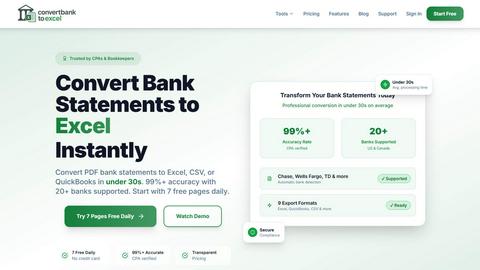
ConvertBankToExcel swiftly transforms PDF bank statements into Excel, CSV, and more with 99% accuracy in under 30.
Last updated: February 25, 2026

ExpenseManager
ExpenseManager simplifies expense tracking, bill splitting, and cash flow forecasting for individuals and groups.
Last updated: February 25, 2026
Visual Comparison
ConvertBankToExcel
ExpenseManager

Feature Comparison
ConvertBankToExcel
99%+ Accuracy Rate
The platform boasts a CPA-verified accuracy rate of over 99%, ensuring that transaction data is extracted correctly. This high level of precision minimizes errors that can occur during manual data entry, providing peace of mind to accounting professionals.
Fast Processing Time
ConvertBankToExcel processes bank statements in less than 30 seconds, allowing users to quickly convert their financial data without delays. This speed is crucial for professionals who need to maintain productivity and meet tight deadlines.
Extensive Bank Support
With support for over 20 major US and Canadian banks, including Chase, Wells Fargo, and Bank of America, ConvertBankToExcel ensures comprehensive compatibility. This extensive bank support simplifies the process for users by providing solutions tailored to multiple banking institutions.
Multiple Export Formats
The platform offers nine different export formats, including QuickBooks (QBO/QFX/OFX/IIF), Excel, and CSV. This flexibility allows users to choose the format that best meets their accounting needs, ensuring seamless integration with their preferred financial software.
ExpenseManager
AI-Powered Receipt Scanning
ExpenseManager utilizes advanced OCR technology, allowing users to take a photo of their receipts and automatically extract essential details such as the amount, category, and merchant name. This feature eliminates the tedious task of manually entering expenses and enhances accuracy in tracking spending.
Budget Alerts
Users can set personalized budgets within the app and receive timely alerts at 50%, 75%, and 90% of their budget limit. This proactive feature helps prevent overspending and encourages users to stay within their financial goals, promoting healthier spending habits.
Expense Splitting Made Easy
ExpenseManager offers versatile options for splitting costs among users, whether it's for couples, roommates, or travel groups. Users can choose equal, percentage-based, or custom splits, making it simple to manage shared expenses without confusion or conflict.
Comprehensive Currency Support
The app supports over 30 currencies, making it an essential tool for international travelers. Users can efficiently manage expenses in different currencies, ensuring seamless tracking and accurate conversions, regardless of where they are in the world.
Use Cases
ConvertBankToExcel
Streamlining Accounting Processes
Accounting firms can utilize ConvertBankToExcel to automate the conversion of bank statements, significantly reducing the time spent on manual data entry. This allows professionals to allocate resources to more strategic tasks, enhancing overall efficiency.
Simplifying Tax Preparation
Tax professionals can benefit from the fast and accurate conversion of bank statements, making it easier to compile financial records for clients. This feature is particularly useful during tax season when timely access to financial data is critical for accurate filings.
Facilitating Loan Applications
Mortgage brokers can leverage ConvertBankToExcel to prepare organized bank statements quickly, ensuring that all necessary documentation is readily available for clients seeking loans. This expedites the application process and improves client satisfaction.
Enhancing Financial Reporting
Businesses can use ConvertBankToExcel to convert their bank statements into formats suitable for financial analysis and reporting. This capability enables organizations to generate insights from their financial data, supporting better decision-making.
ExpenseManager
Couples Managing Household Expenses
Couples can leverage ExpenseManager to track shared household costs effortlessly. By using the app, they can avoid misunderstandings about who paid what and ensure that financial contributions are transparent, leading to fewer arguments and a healthier relationship.
Individuals Tracking Personal Expenses
For individuals, ExpenseManager serves as a personal finance tool that helps track spending, categorize expenses, and set budgets. This functionality empowers users to understand their financial habits and identify areas for potential savings.
Group Travel Expense Management
Travelers can benefit from ExpenseManager's ability to split trip expenses, whether for lodging, meals, or activities. By using the app, groups can ensure everyone knows what they owe, making it easier to settle debts and enjoy their travels without financial stress.
Roommates Sharing Bills
Roommates can utilize ExpenseManager to manage shared bills and rent payments efficiently. The app provides clarity on who owes what, ensuring that everyone remains accountable for their financial responsibilities, thereby fostering a harmonious living environment.
Overview
About ConvertBankToExcel
ConvertBankToExcel is an advanced AI-powered platform specifically designed for accounting professionals seeking to streamline the tedious process of bank statement data entry. By automating the extraction of transaction data from PDF bank statements, this innovative tool transforms them into easily usable Excel, CSV, and QuickBooks formats. Its intelligent technology not only significantly reduces the chances of human error but also enhances productivity, allowing accountants to focus on more valuable tasks. Trusted by over 50,000 CPAs, bookkeepers, and accounting professionals, ConvertBankToExcel eliminates the need for manual data entry, making it an indispensable solution for firms looking to optimize their workflow. With features such as automatic bank detection and batch processing, users can convert their bank statements in under 30 seconds with a remarkable accuracy rate of over 99%, making it an invaluable asset for efficient financial management.
About ExpenseManager
ExpenseManager is an innovative application designed to simplify personal budgeting and expense management for individuals, couples, and groups. By integrating features such as receipt scanning, budget tracking, and expense splitting, ExpenseManager addresses the multifaceted challenges of financial management. Users can effortlessly snap a photo of their receipts, allowing the app's AI-powered Optical Character Recognition (OCR) technology to extract critical information like amount, category, and merchant details in an instant. This streamlining enables users to set budgets and receive alerts when they approach spending limits. ExpenseManager is ideal for couples sharing household expenses, roommates splitting rent and bills, travelers managing multi-currency expenses, and anyone who seeks clarity and control over their financial habits. With a user-friendly interface and robust features, ExpenseManager empowers users to take charge of their finances effectively.
Frequently Asked Questions
ConvertBankToExcel FAQ
How does ConvertBankToExcel ensure data security?
ConvertBankToExcel employs bank-grade encryption to protect user data during the conversion process. Additionally, files are automatically deleted after 24 hours, enhancing data privacy and security.
Can I convert scanned bank statements?
Yes, ConvertBankToExcel's advanced AI-powered OCR technology can handle both digital and scanned PDFs, making it versatile for various types of bank statements.
What is the average processing time for converting bank statements?
Most bank statements are processed in under 30 seconds, allowing users to quickly obtain their converted files without unnecessary delays.
Is there a free trial available?
ConvertBankToExcel offers a free tier that allows users to convert up to 7 pages daily at no cost and without requiring a credit card, providing an accessible way for potential customers to try the service.
ExpenseManager FAQ
What is the Founding Member offer?
The Founding Member offer allows the first 100 users to access all premium features of ExpenseManager free for life. This limited-time promotion encourages early adopters to take advantage of the app’s full capabilities without any financial commitment.
What happens if I don't stay active?
If users do not remain active, their account may be deactivated, and they may lose access to the premium features offered during the Founding Member promotion. Regular usage is encouraged to maintain account status and ensure continued access to all functionalities.
Is my financial data secure?
ExpenseManager employs bank-grade AES-256 encryption to ensure the security of users' financial data. The app prioritizes user privacy and data protection, providing peace of mind while managing sensitive financial information.
What platforms are supported?
ExpenseManager is designed to be compatible with both iOS and Android devices, allowing users to access their financial information and manage expenses on the go. The app can be easily downloaded from the respective app stores for seamless integration into daily life.
Alternatives
ConvertBankToExcel Alternatives
ConvertBankToExcel is a cutting-edge AI-powered platform that specializes in transforming PDF bank statements into easily manageable formats like Excel and CSV. It falls within the Productivity & Management category, specifically aimed at accounting professionals who strive to streamline their data entry processes. Users often seek alternatives to ConvertBankToExcel due to various reasons, such as pricing considerations, specific feature requirements, or compatibility with different platforms. When looking for an alternative, it is essential to evaluate factors such as accuracy rates, processing speed, the range of supported banks, and the variety of export formats available. Additionally, the user experience, interface design, and customer support can significantly influence the overall effectiveness of the chosen solution.
ExpenseManager Alternatives
ExpenseManager is a cutting-edge application tailored for individuals, couples, and groups aiming to streamline their personal budgeting and expense management. Falling under the Business & Finance category, it offers a suite of features including receipt scanning, budget tracking, and expense splitting to help users manage their financial habits effectively. Users often seek alternatives to ExpenseManager for various reasons, including pricing structures, specific feature sets, or platform compatibility. When searching for an alternative, it's essential to consider factors such as user interface, integration capabilities, and the breadth of features offered, ensuring the chosen solution aligns with personal or group financial management needs.