
BudgetSheet vs Redbark
Side-by-side comparison to help you choose the right product.

BudgetSheet
BudgetSheet effortlessly imports live bank transactions into Google Sheets for seamless financial tracking and.
Last updated: February 25, 2026

Redbark automatically syncs your Australian bank and brokerage data to tools like Google Sheets and YNAB.
Last updated: February 28, 2026
Visual Comparison
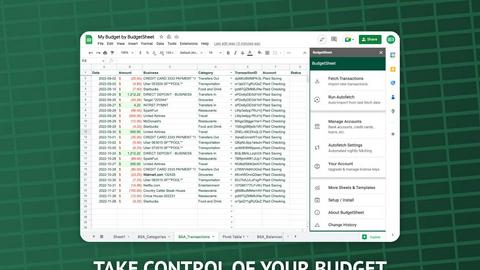
BudgetSheet
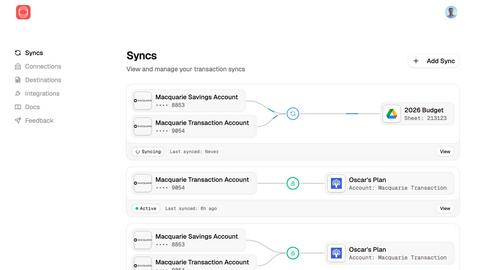
Redbark
Feature Comparison
BudgetSheet
Live Bank Connections
BudgetSheet enables users to link their bank accounts directly to Google Sheets, allowing for real-time access to transaction data. This feature eliminates manual updates and ensures that your financial information is always current.
Automated Transaction Fetching
With the Autofetch feature, BudgetSheet can be configured to automatically retrieve new bank transactions nightly. This means users no longer have to remember to update their sheets, making financial tracking effortless and efficient.
Customizable Budgeting
Users can design their own budgeting frameworks directly within Google Sheets. Unlike other tools that impose rigid structures, BudgetSheet offers the flexibility to create unique charts, tables, and reports tailored to individual financial goals.
Secure Data Handling
BudgetSheet prioritizes user security by utilizing Plaid for bank connections. It does not store any bank login credentials and only keeps a read-only access token, which is encrypted to ensure your financial data is protected.
Redbark
Secure CDR & Open Banking Integration
Redbark prioritizes security and regulatory compliance by connecting to Australian banks exclusively through the Consumer Data Right (CDR) framework via an ACCC-accredited intermediary. This provides a government-regulated, bank-approved method for data access, ensuring transparent user consent and the right to withdraw access at any time. It is a fundamentally more secure and reliable approach than outdated and fragile screen-scraping techniques, offering users peace of mind that their financial data access is legitimate and protected.
Pass-Through Data Architecture
A cornerstone of Redbark's privacy-first design is its pass-through data architecture. Your sensitive financial information, including transactions, balances, and account details, flows directly from your bank or brokerage to your connected destination tool. Redbark acts as a secure conduit, never storing or retaining your financial data on its servers. This significantly reduces data breach risk and ensures your information remains under your control, only residing where you intend it to be.
Multi-Destination & Multi-Account Sync
Redbark offers unparalleled flexibility by allowing you to sync data from a single financial account to multiple destinations simultaneously. You can send transactions to Google Sheets for custom analysis, to YNAB for budgeting, and to Actual Budget for local-first finance management all at once. Furthermore, it supports connections to over 100 Australian banks, credit unions, New Zealand banks via Akahu, and global brokerages and crypto exchanges via SnapTrade, consolidating all your financial data into one automated workflow.
Intelligent Deduplication & Automated Syncing
The platform employs smart, ID-based deduplication logic with overlap buffers to intelligently catch and prevent duplicate transactions, such as those that post late. This ensures your spreadsheets and budgets remain clean and accurate. Syncing is fully automated via webhooks; when your bank pushes new transaction data, Redbark triggers an immediate background sync, updating your connected tools in near real-time without any manual intervention required.
Use Cases
BudgetSheet
Personal Finance Management
Individuals can utilize BudgetSheet to manage their personal finances, track spending, and create tailored budgets that reflect their income and expenses. This empowers users to make informed financial decisions.
Small Business Accounting
BudgetSheet is beneficial for small business owners who need to track income and expenses across multiple accounts. The integration with Google Sheets allows for straightforward reporting and analysis.
Investment Tracking
Investors can use BudgetSheet to monitor their investment accounts and transactions. By pulling data directly into Google Sheets, they can analyze performance and adjust their strategies as needed.
Expense Reporting
BudgetSheet simplifies the process of generating expense reports, making it easier for freelancers and contractors to keep track of their business-related expenses for tax purposes or client billing.
Redbark
Automated Business Expense Tracking
Freelancers and small business owners can connect their business transaction accounts to automatically sync all income and expenses directly into a Google Sheets ledger. This eliminates manual receipt entry and bank statement downloads, saving hours each month and providing an always-up-to-date view of cash flow for simplified accounting, tax preparation, and financial reporting.
Live Investment Portfolio Dashboard
Investors managing holdings across multiple platforms like CommSec, Stake, and other global brokerages can use Redbark to sync live portfolio balances, profit/loss figures, and full trade histories into a centralized spreadsheet. This enables the creation of a real-time dashboard that aggregates all investments, providing a comprehensive view of asset allocation and performance without logging into each brokerage individually.
Streamlined Personal Budget Management
Individuals seeking to automate their personal finance can connect their everyday spending, savings, and loan accounts to budgeting apps like YNAB or Actual Budget. Redbark automatically feeds new transactions into these categories, ensuring budgets are always current. This removes the friction of manual entry, encouraging consistent budget adherence and providing immediate insight into spending habits.
Consolidated Financial Reporting
Financial analysts, bookkeepers, or individuals managing complex finances can use Redbark to pull data from numerous bank accounts, credit cards, and offset accounts into a single master Google Sheet or Airtable base. This creates a unified source of truth for generating custom reports, cash flow forecasts, and net worth statements, all updated automatically with the latest data from every connected institution.
Overview
About BudgetSheet
BudgetSheet is an innovative Google Sheets add-on designed to streamline the process of managing your financial data. With BudgetSheet, users can effortlessly import live bank transactions from over 10,000 financial institutions into their Google Sheets without the hassle of manual exports or tedious copying and pasting from CSV files. This tool is ideal for individuals who want full control over their budgeting process, allowing them to create customized budgets tailored to their specific needs. By leveraging the secure connection provided by Plaid, BudgetSheet ensures that your financial data remains safe while offering real-time updates. Whether you are a personal finance enthusiast, a small business owner, or simply someone looking to track expenses more effectively, BudgetSheet provides a user-friendly solution that integrates seamlessly into your existing workflow.
About Redbark
Redbark is a sophisticated financial data automation platform designed to seamlessly connect your Australian bank accounts and global investment portfolios directly to the productivity and budgeting tools you already use. It eliminates the tedious, error-prone process of manual data entry and CSV file management by automating the flow of your financial data. Built on a foundation of security and compliance, Redbark leverages Australia's Consumer Data Right (CDR) framework for bank-approved, secure data access, moving beyond unreliable legacy screen-scraping methods. Its core value proposition is a unique pass-through architecture: your transaction, balance, and holdings data flows in real-time from your financial institution to your chosen destination like Google Sheets, Notion, or Airtable, without ever being stored on Redbark's servers. This makes it an indispensable tool for freelancers, investors, small business owners, and any individual who demands accurate, automated, and private financial tracking without requiring any technical expertise.
Frequently Asked Questions
BudgetSheet FAQ
How does BudgetSheet connect to my bank accounts?
BudgetSheet uses Plaid to securely connect to your financial institutions. This ensures that your bank credentials are never stored, providing you with peace of mind regarding your financial security.
Can I customize the way my data is displayed in Google Sheets?
Yes, BudgetSheet allows you to create personalized charts, tables, and reports tailored to your unique financial goals, giving you full control over your budgeting process.
Is there a free trial available for BudgetSheet?
Absolutely! You can try BudgetSheet free for 15 days, allowing you to explore its features and determine if it meets your financial management needs without any upfront commitment.
What types of accounts can I link with BudgetSheet?
BudgetSheet supports a wide range of accounts, including checking accounts, savings accounts, credit cards, investment accounts, and loans. Check the list of supported banks to ensure your institution is included.
Redbark FAQ
How is Redbark different from screen-scraping tools?
Redbark is fundamentally different and superior to legacy screen-scraping tools. It uses Australia's official Consumer Data Right (CDR) framework, a regulated, bank-approved system for data access. Screen-scraping requires you to share your online banking credentials, violates most bank terms of service, and is prone to breaking. CDR is secure, reliable, and provides you with legal rights over your data, including transparent consent and easy access revocation.
Is my financial data stored on Redbark's servers?
No. Redbark employs a unique pass-through data architecture. Your raw financial data, including transactions and balances, is never stored on Redbark's systems. It flows securely and directly from your bank or brokerage to your chosen destination tool like Google Sheets. Redbark only processes the data momentarily to facilitate the transfer, ensuring maximum privacy and security.
Which banks and brokerages does Redbark support?
Redbark supports over 100 financial institutions. This includes all major Australian banks and credit unions via the CDR system, New Zealand banks via the Akahu platform, and a wide array of global brokerages and crypto exchanges through its partnership with SnapTrade. This covers most major providers like CommBank, Westpac, NAB, ANZ, Macquarie, ING, CommSec, and Stake.
What happens if a transaction posts to my bank late?
Redbark's intelligent deduplication feature is designed specifically for this scenario. It uses a combination of unique transaction IDs and overlap buffers when syncing data. This smart logic identifies transactions that have already been synced, even if they appear later in a new data feed, and prevents them from creating duplicate entries in your spreadsheet or budgeting app.
Alternatives
BudgetSheet Alternatives
BudgetSheet is an innovative tool in the personal finance category that allows users to import live bank transactions directly into Google Sheets for seamless financial tracking. This add-on is designed to simplify budgeting by providing real-time updates from over 10,000 financial institutions, enabling users to maintain accurate and current financial data with ease. Despite its advantages, users often seek alternatives to BudgetSheet for various reasons, including pricing, feature sets, and specific platform requirements. When searching for an alternative, it is essential to consider factors such as the level of automation, customization options, user security, and integration capabilities with existing systems. Finding a solution that aligns with individual financial management needs is crucial for effective budgeting.
Redbark Alternatives
Redbark is a financial data automation service that securely syncs Australian bank transactions and global brokerage data directly into productivity platforms like Google Sheets, Notion, and Airtable. It operates within the fintech category, specifically focusing on open banking and personal financial management tools. Users often explore alternatives for various reasons, including budget constraints, the need for different destination apps, or a requirement for broader international bank support beyond Australia and New Zealand. Some may seek more advanced analytics or a different user interface than what a sync-focused tool provides. When evaluating alternatives, key considerations should include the security model and data access method, the range of supported financial institutions and destination apps, the pricing structure and transparency, and the overall reliability and automation of the sync process. The ideal solution should align with your specific financial tracking workflow.