
BudgetSheet vs Manage Bankroll
Side-by-side comparison to help you choose the right product.

BudgetSheet
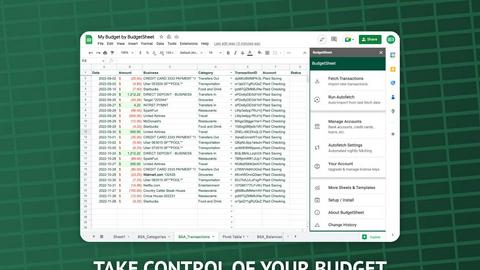
BudgetSheet effortlessly imports live bank transactions into Google Sheets for seamless financial tracking and.
Last updated: February 25, 2026

Manage Bankroll
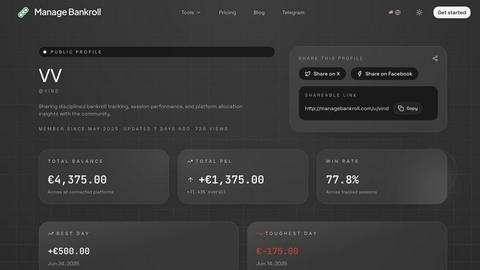
Manage Bankroll is a privacy-first finance tracker that helps you manage your bets and trades with simple manual.
Last updated: February 25, 2026
Visual Comparison
BudgetSheet
Manage Bankroll
Feature Comparison
BudgetSheet
Live Bank Connections
BudgetSheet enables users to link their bank accounts directly to Google Sheets, allowing for real-time access to transaction data. This feature eliminates manual updates and ensures that your financial information is always current.
Automated Transaction Fetching
With the Autofetch feature, BudgetSheet can be configured to automatically retrieve new bank transactions nightly. This means users no longer have to remember to update their sheets, making financial tracking effortless and efficient.
Customizable Budgeting
Users can design their own budgeting frameworks directly within Google Sheets. Unlike other tools that impose rigid structures, BudgetSheet offers the flexibility to create unique charts, tables, and reports tailored to individual financial goals.
Secure Data Handling
BudgetSheet prioritizes user security by utilizing Plaid for bank connections. It does not store any bank login credentials and only keeps a read-only access token, which is encrypted to ensure your financial data is protected.
Manage Bankroll
AI-Powered Natural Language Parsing
Manage Bankroll utilizes AI technology that allows users to input transactions using natural language. For instance, typing "won $150 poker tournament" automatically structures the data, simplifying the entry process and reducing the time spent on manual logging.
Multi-Currency Support
The app supports multiple currencies, making it an ideal choice for global users. This feature ensures that traders and bettors from different regions can easily track their financial activities without worrying about conversion issues.
Privacy-First Design
In an era where data privacy is paramount, Manage Bankroll stands out with its privacy-first design. The application does not link to any bank APIs or require OAuth tokens, ensuring that users' financial data remains on their devices, providing peace of mind regarding their sensitive information.
Built-in Calculators and Trackers
Manage Bankroll comes equipped with a suite of professional tools, including poker odds calculators, betting trackers, and tax calculators. These built-in features eliminate the need for users to switch between different apps, enhancing efficiency and convenience.
Use Cases
BudgetSheet
Personal Finance Management
Individuals can utilize BudgetSheet to manage their personal finances, track spending, and create tailored budgets that reflect their income and expenses. This empowers users to make informed financial decisions.
Small Business Accounting
BudgetSheet is beneficial for small business owners who need to track income and expenses across multiple accounts. The integration with Google Sheets allows for straightforward reporting and analysis.
Investment Tracking
Investors can use BudgetSheet to monitor their investment accounts and transactions. By pulling data directly into Google Sheets, they can analyze performance and adjust their strategies as needed.
Expense Reporting
BudgetSheet simplifies the process of generating expense reports, making it easier for freelancers and contractors to keep track of their business-related expenses for tax purposes or client billing.
Manage Bankroll
Sports Betting Management
Sports bettors can leverage Manage Bankroll to meticulously track their wagers, wins, and losses. The app allows users to categorize their betting activities, enabling them to analyze performance and identify successful strategies over time.
Poker Game Tracking
Poker players benefit from the app's ability to record session details, including wins, losses, and specific game notes. This structured tracking helps players refine their strategies and improve their overall game performance.
Trading Performance Analysis
Day traders can utilize Manage Bankroll to log their trades, monitor profit and loss, and assess their trading strategies. The app’s analytics features assist traders in recognizing patterns and making informed decisions to enhance profitability.
Crypto Investment Oversight
Crypto investors can manage their transactions and track the performance of various cryptocurrencies within the app. By manually logging trades and investments, users gain a clearer understanding of their digital asset performance, leading to better investment strategies.
Overview
About BudgetSheet
BudgetSheet is an innovative Google Sheets add-on designed to streamline the process of managing your financial data. With BudgetSheet, users can effortlessly import live bank transactions from over 10,000 financial institutions into their Google Sheets without the hassle of manual exports or tedious copying and pasting from CSV files. This tool is ideal for individuals who want full control over their budgeting process, allowing them to create customized budgets tailored to their specific needs. By leveraging the secure connection provided by Plaid, BudgetSheet ensures that your financial data remains safe while offering real-time updates. Whether you are a personal finance enthusiast, a small business owner, or simply someone looking to track expenses more effectively, BudgetSheet provides a user-friendly solution that integrates seamlessly into your existing workflow.
About Manage Bankroll
Manage Bankroll is a comprehensive finance tracking app tailored for traders, poker players, sports bettors, and crypto investors who aim to maintain a keen awareness of their financial decisions. Unlike conventional finance applications that automate tracking processes, Manage Bankroll emphasizes manual entry, fostering a deeper connection with one's financial activities. This approach is backed by research indicating that actively documenting transactions enhances awareness and reflection, thereby empowering users to make more informed choices in high-risk financial endeavors. The app is designed with privacy in mind, ensuring that users’ data remains secure and solely on their devices. By combining the psychological benefits of manual tracking with advanced AI-driven data entry, Manage Bankroll provides a unique solution for individuals seeking to improve their bankroll management and decision-making processes.
Frequently Asked Questions
BudgetSheet FAQ
How does BudgetSheet connect to my bank accounts?
BudgetSheet uses Plaid to securely connect to your financial institutions. This ensures that your bank credentials are never stored, providing you with peace of mind regarding your financial security.
Can I customize the way my data is displayed in Google Sheets?
Yes, BudgetSheet allows you to create personalized charts, tables, and reports tailored to your unique financial goals, giving you full control over your budgeting process.
Is there a free trial available for BudgetSheet?
Absolutely! You can try BudgetSheet free for 15 days, allowing you to explore its features and determine if it meets your financial management needs without any upfront commitment.
What types of accounts can I link with BudgetSheet?
BudgetSheet supports a wide range of accounts, including checking accounts, savings accounts, credit cards, investment accounts, and loans. Check the list of supported banks to ensure your institution is included.
Manage Bankroll FAQ
Is Manage Bankroll suitable for beginners?
Yes, Manage Bankroll is designed for users of all experience levels. Its intuitive interface and straightforward manual entry process make it accessible for beginners while still offering advanced features for seasoned traders and players.
How does the AI-powered natural language feature work?
The AI-powered natural language parsing feature allows users to input transaction details in conversational terms. The app then automatically interprets and organizes the data, streamlining the entry process and saving time.
Can I use Manage Bankroll for multiple platforms?
Absolutely. Manage Bankroll allows users to add various sportsbooks, poker sites, trading accounts, and crypto exchanges, enabling comprehensive tracking of all financial activities in one place.
What measures does Manage Bankroll take to ensure data privacy?
Manage Bankroll prioritizes user privacy by not linking with any bank APIs or external platforms. All data is stored locally on the user's device, ensuring complete control and security over personal financial information.
Alternatives
BudgetSheet Alternatives
BudgetSheet is an innovative tool in the personal finance category that allows users to import live bank transactions directly into Google Sheets for seamless financial tracking. This add-on is designed to simplify budgeting by providing real-time updates from over 10,000 financial institutions, enabling users to maintain accurate and current financial data with ease. Despite its advantages, users often seek alternatives to BudgetSheet for various reasons, including pricing, feature sets, and specific platform requirements. When searching for an alternative, it is essential to consider factors such as the level of automation, customization options, user security, and integration capabilities with existing systems. Finding a solution that aligns with individual financial management needs is crucial for effective budgeting.
Manage Bankroll Alternatives
Manage Bankroll is a privacy-first finance tracker designed for individuals involved in trading, poker, sports betting, and crypto investing. By emphasizing manual entry, the app encourages users to engage more deeply with their financial activities, thus fostering better decision-making in high-risk situations. However, users often seek alternatives due to various factors such as pricing, specific feature sets, or compatibility with different platforms and devices. When exploring alternatives to Manage Bankroll, it is essential to consider the application's core functionalities and how they align with personal financial goals. Look for options that prioritize user privacy, provide intuitive data entry methods, and offer robust tools for tracking and analyzing financial performance. Additionally, make sure the alternative can cater to the specific needs of your trading or betting activities, including support for multiple currencies if necessary.